





 See Compatible Printers
 Read more about our ink!
Epson
Compatible Epson 78 Set of 6 All Colors Ink Cartridge
- Shipping:
- Calculated at Checkout

Amazon Price:

- Shipping:
- Calculated at Checkout
- Compatible Printers
- Specifications
- SKU:
- CS-EP-078-SET6
- Condition:
- New Compatible
- OEM Part #:
- T078120 / T078220 / T078320 / T078420 / T078520 / T078620
- Color:
- Black + Cyan + Magenta + Yellow + Light Cyan + Light Magenta
- Ink Type:
- Dye
- Chip:
- Yes — new compatible chip (Intellidge-type level chip); "cannot recognize" riski orta, çip kalitesi kritik
- Warranty:
- Lifetime Warranty
- Returns:
- 1-Year Free Returns
- Description
- Reviews
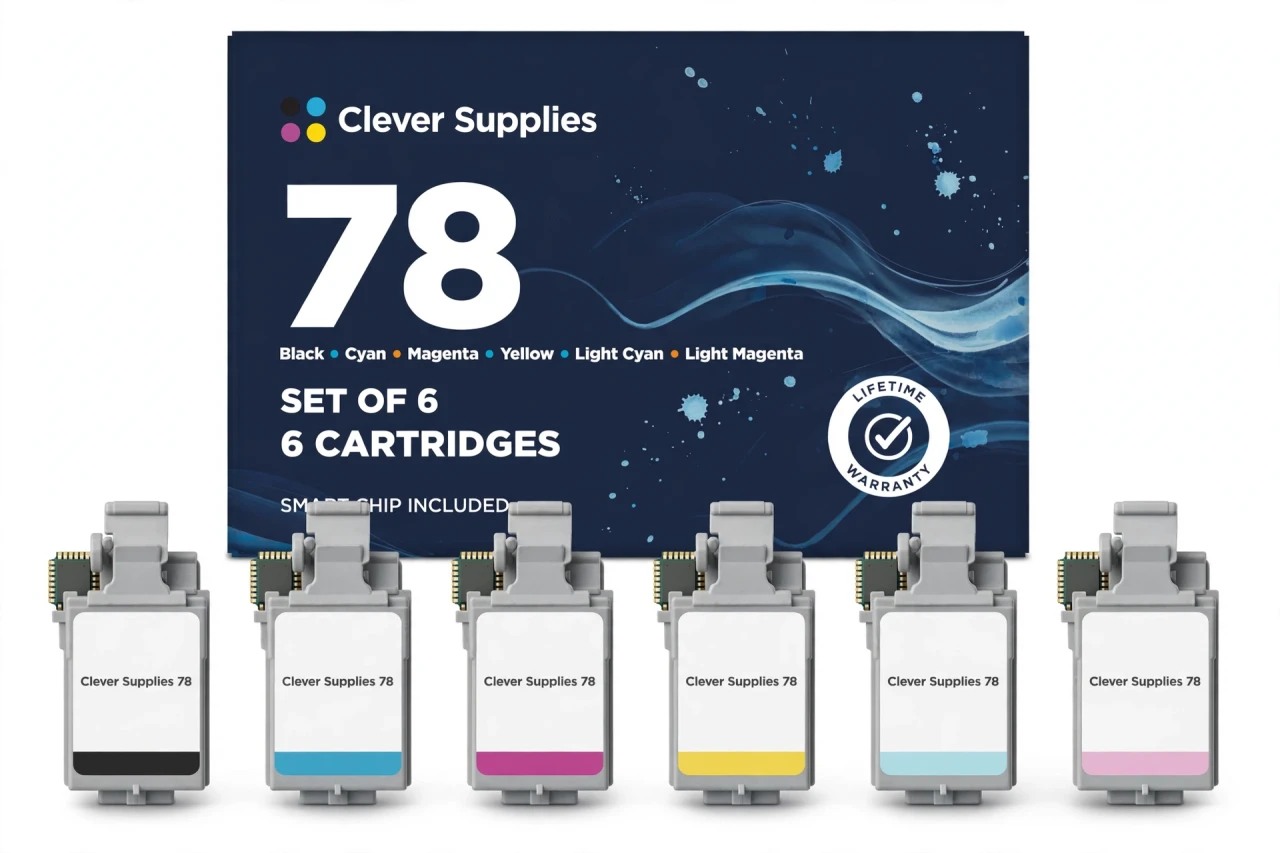
The complete Claria shelf in one box: all six standard-tier cartridges — T078120 black, T078220 cyan, T078320 magenta, T078420 yellow, T078520 light cyan and T078620 light magenta — each filled with Claria Hi-Definition dye ink.


A full set is the right buy when several positions are ageing together, which is how these printers usually decline: one color stops the machine (Epson's design requires every slot filled and unexpended), you replace it, and the next oldest follows a month later. The set resets the whole system at once. Yields, stated honestly: Epson publishes no official per-cartridge yield table for this family, so no page figures are printed for this set — seller numbers elsewhere are not Epson ratings.
The set fits all seven verified models — Artisan 50, Stylus Photo R260, Stylus Photo R280, Stylus Photo R380, Stylus Photo RX580, Stylus Photo RX595, Stylus Photo RX680. The high-capacity 77 tier (T077120–T077620) works in the same printers and can be mixed by position, but it is a different tier and is not what this box contains. Every cartridge carries a new compatible chip; see the recognition note below. Lifetime warranty, free returns for the first year.
Shop the Epson 78 family: T078120 Black Ink Cartridge · T078220 Cyan Ink Cartridge · T078320 Magenta Ink Cartridge · T078420 Yellow Ink Cartridge · T078520 Light Cyan Ink Cartridge · T078620 Light Magenta Ink Cartridge · Set of 13 3 Black 2 Each Color Ink Cartridge
Browse by series: Artisan · Stylus Photo
Frequently Asked Questions
What exactly is in the box?
Six cartridges, one of each color in the Claria system: T078120 Black, T078220 Cyan, T078320 Magenta, T078420 Yellow, T078520 Light Cyan and T078620 Light Magenta. The contents table is printed on the box front.
Do I have to install all six at once?
No. Install the positions that are expended and keep the rest sealed as spares. Most owners refresh the whole set when colors start failing in sequence - it ends the one-at-a-time stoppages.
Is this the high-capacity 77 set?
No - this is the 78 standard-capacity set. The 77 tier (T077120-T077620, and Epson's T077920 color pack) is the high-capacity sibling family for the same printers. The tiers can be mixed by position, but this box is entirely 78 cartridges.
Which printers does it fit?
Every model in the family: seven officially verified printers - the Artisan 50, the Stylus Photo R260, R280 and R380, and the Stylus Photo RX580, RX595 and RX680. The list was compiled from Epson America's own Claria 78/77 fact sheet (CPD-32251) and Epson's support documentation.
How many pages will I get from it?
Longevity has no official rating. Epson does not publish an official per-cartridge yield table for the 78/77 family - its fact sheet gives no yield figures - so we do not print a page number for these cartridges, here or in the specifications. Photo yield depends heavily on image coverage in any case. Third-party listings quote figures for these codes, but they are seller claims, not Epson ratings, and we will not present them as specifications.
Will these cartridges be recognized by my printer?
If the screen objects to one of the six, start by reseating it. Each cartridge carries a new compatible chip, and 'cannot recognize' errors are a known failure mode in this cartridge class: press the cartridge in firmly until it clicks and restart the printer before assuming a fault. These printers have been out of production for years, so new firmware locks are unlikely; the realistic risk is chip quality. A cartridge that will not recognize is covered by our lifetime warranty, and we do not claim recognition is guaranteed in every case.
Can the printer run with one color empty?
No - the printer treats the six positions as a set. Per Epson's support answers, it will not operate if any cartridge is expended or removed; a single empty position stops the machine, which is exactly why the colors are also sold as singles.
What ink is inside?
All six positions run on one ink family - Claria Hi-Definition dye, the six-color photographic dye system of this Epson generation. Expect the smooth gradations these Stylus Photo and Artisan printers are known for; the formula is a photo dye, not a pigment document ink.
Does changing ink affect CD/DVD printing?
It does. The same six cartridges that print your photos also print ink-jet printable discs on the R260, R280, R380 and RX all-in-ones - no separate disc ink is involved. Give printed discs time to dry before handling, and use ink-jet printable media.
How do I install it?
Work one position at a time, with the replacement ready before the spent cartridge comes out so no slot sits empty. Peel off only the yellow tape, keep off the green chip, press the cartridge into its color holder until it clicks, close the cover, and let the printer charge the ink.
Is this a genuine Epson cartridge?
No. The set is ours - Clever Supplies compatibles built to the genuine cartridges' specification and codes, labeled compatible on the box and on this page, and not manufactured by Epson.
What warranty and returns cover this cartridge?
The set is covered by a lifetime warranty: a cartridge that fails to perform is replaced, and free returns run for the first year. (Returns note: the 1-year returns period is our standing compatible-product policy, applied to inkjet as an assumption pending Emrah's inkjet-specific confirmation.)
Related Items

Epson
Compatible Epson 277XL Set of 6 All Colors Ink Cartridge
One box, the whole six-color set reset: T277XL120-S black, T277XL220-S cyan, T277XL320-S magenta, T277XL420-S yellow, T277XL520-S light cyan and T277XL620-S light magenta — every cartridge...


Epson
Compatible Epson 79 Set of 6 All Colors Ink Cartridge
The whole Claria shelf in one box: all six high-capacity 79 cartridges — T079120-S black, T079220-S cyan, T079320-S magenta, T079420-S yellow, T079520-S light cyan and T079620-S light magenta — each...

Epson
Compatible Epson 273XL Set of 5 All Colors Ink Cartridge
One box, the whole printer reset — all five positions, all XL: T273XL020-S pigment black, T273XL120-S Photo Black, T273XL220-S cyan, T273XL320-S magenta and T273XL420-S yellow. Unlike Epson's own...
Epson
Compatible Epson 78 T078420 Yellow Ink Cartridge
Yellow fails quietly: prints don't stop looking colourful, they start looking cold — blues harden, warm light goes missing. This is the cartridge the printer will eventually name: our compatible...