





 See Compatible Printers
 Read more about our ink!
Dell
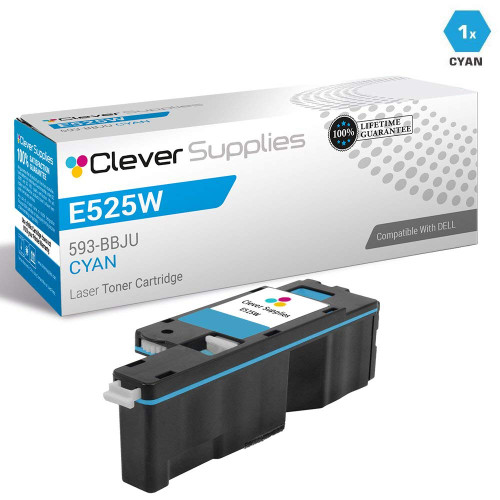
Compatible Dell 593-BBJU Laser Toner Cartridge Cyan
- Page Yield:
- 1,400 Pages
- Availability:
- In Stock
- Shipping:
- Calculated at Checkout

Amazon Price:

- Page Yield:
- 1,400 Pages
- Availability:
- In Stock
- Shipping:
- Calculated at Checkout
- Compatible Printers
- Multi-Function E525wi>
- Color Laser E525W
- Multifunction E525W
- Specifications
- SKU:
- Dell-593-BBJU
- Printer Brand:
- Dell
- OEM Number:
- 593-BBJU
- Ink Color:
- Cyan
- Page Yield:
- 1,400 Pages
- Printer Type:
- Laser Cartridge
- Condition:
- New Compatible
- Description
- Yields up to 1400 pages
- Trust compatible Dell 593-BBJU Toner Cartridges to provide outstanding print quality for all your important documents
- Unlike bargain brand toners Dell 593-BBJU Toner Cartridge is specifically engineered to work in Dell printers for optimum quality and performance
- Compatible with: Dell Color Laser E525W printer
- Ink/Toner Color: Cyan
- Ink/Toner Pack Size: 1/Pack
- Supply Type: Toner
- Cartridge Yield Type: Standard
- Ink/Toner Cartridge Type: Compatible
- Reviews

/> 

Compatible Dell 593-BBJU Laser Toner Cartridge Cyan delivers excellent print quality sharp images and text
Compatible Dell Cyan Toner Cartridge consistently produces high-resolution printouts with enhanced graphics and sharp text and yields approximately 1400 pages.
Features:
Frequently Asked Questions
What does one printed page actually cost with the 593-BBJU?
At $28.85 for a rated 1,400 pages, this cyan cartridge works out to roughly 2.06 cents per page. We will be straight with you: that is not bargain-bin cost per page. The 593-BBJU is a compact cartridge for a compact printer, and small cartridges almost always cost more per page than the big workgroup tanks. What you are paying for here is a modest upfront price and a cartridge sized to a light-duty machine, not rock-bottom running costs.
How many pages will 1,400 pages of cyan realistically cover?
That rating assumes about 5% page coverage, which is a page of ordinary text with a small color element. Cyan drains faster than the headline number suggests if you print full-color flyers, charts with blue backgrounds, or photos. A home office printing a few color pages a week may stretch one 593-BBJU across many months; a small business printing color handouts daily will see the low-toner warning much sooner.
Why does cyan seem to run out before the other colors?
Cyan does quiet background work in most color documents: skies, water, corporate blues, and the blue component of greens and grays all pull from this cartridge. Many printers also run color calibration cycles that sip a little of every toner. If your E525W reports cyan low while magenta and yellow still look healthy, that is a normal consumption pattern, not a defect.
What happens when I install this cartridge in my E525W?
Remove the old cyan unit, gently rock the 593-BBJU side to side a few times to distribute the toner, pull the sealing tape if present, and slide it into the cyan slot until it seats. The printer should recognize it as a full cartridge and clear the cyan warning. If the first pages look pale, print a few test pages; output normally evens out quickly.
Is this a genuine Dell cartridge?
No. This is a compatible cartridge built to the 593-BBJU specification and sold under our own label, which is a big part of why it costs less than the Dell-branded version. It carries our 1-year warranty, and if it does not perform, our shipping and returns policy gives you a full year of free returns as well.
Where does my order ship from, and how do I reach you?
We ship from four warehouses in Illinois, Pennsylvania, Georgia, and California, so most orders travel a short distance. Support is available Monday through Friday, 9 AM to 5 PM Central. You can browse the rest of the range on our Dell toner page.
Why did the cyan level drop during a week when we hardly printed?
Small drops between jobs are normal on the E525W. Printers run periodic calibration cycles that sip a little of every toner to keep colors aligned, and many apparently black documents quietly use cyan in their grays and shadows. On a compact 1,400-page cartridge like the 593-BBJU, those sips are visible on the gauge in a way they would not be on a large workgroup tank. A slow fall while idle is housekeeping, not a leak or a fault.
For a lightly used E525W, should we stock a spare cyan or order when the warning appears?
Ordering on the warning is a defensible choice here. A home or micro office printing a few color pages a week can stretch one 593-BBJU across many months, so the low-toner warning arrives with plenty of time to act, and cash is not sitting on a shelf in cartridge form. Stocking a spare makes more sense when the printer supports daily business and a dry cyan slot would hold up work — the lighter the use, the weaker the case for the spare.
Can paper and room conditions make the cyan look worse than it is?
Yes. Damp paper is the common culprit: sheets that have sat in a humid room absorb moisture and take toner unevenly, so colors look flat and washed even with a healthy cartridge. Very dusty or steamy rooms do output no favors either. Before blaming the 593-BBJU for dull color, run a few pages from a fresh, dry ream and compare — if the color recovers on good paper, the cartridge was never the problem.
How do we check which color the E525W actually needs?
Read the supply screen rather than guessing from one washed-out page. The screen reports each slot separately, so it will name the low color directly — and the code beside it tells you what to order, 593-BBJU for the cyan position. Color symptoms overlap more than owners expect: a page that looks wrong can implicate two or three slots at a glance, while the screen settles it in seconds. Check first, order once, order right.
About This 593-BBJU Cyan Cartridge
The 593-BBJU is the cyan cartridge for the Dell E525W color laser printer, rated at 1,400 pages and priced at $28.85 — about 2.06 cents a page. That yield is genuinely modest, and we would rather say so up front: this cartridge suits the E525W's role as a small-footprint home and micro-office printer, where color jobs are occasional and a low purchase price matters more than the lowest possible cost per page. Every unit is backed by a 1-year warranty and 1-year free returns, and orders leave from our warehouses in IL, PA, GA, or CA.
Related Items
Dell
Compatible Dell E525W Toner Cartridge Cyan (593-BBJU)
/>


Dell
Compatible Dell Laser Toner Cartridges 3 Color Set (593-BBJU/ 593-BBJV/ 593-BBJW)
/>

Dell
Compatible Dell Laser Toner Cartridges 4 Color Set (593-BBJX/ 593-BBJU/ 593-BBJV/ 593-BBJW)
/>

Dell
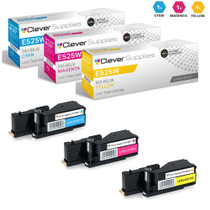
Compatible Dell E525W Toner Cartridges 3 Color Set (593-BBJU, 593-BBJV, 593-BBJW)
/>