







 See Compatible Printers
 Read more about our ink!
Canon
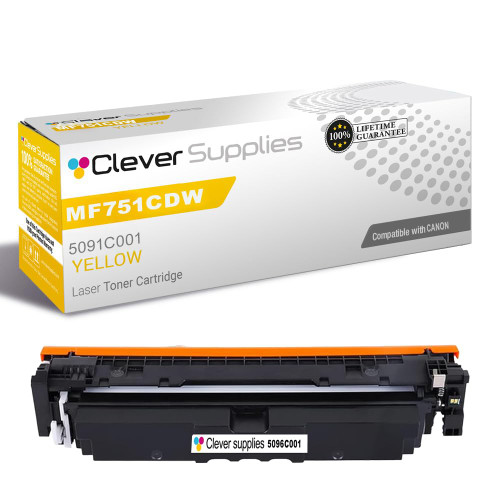
Compatible Canon MF751CDW (5091C001) Toner Cartridge Yellow
- Page Yield:
- Color: 1900
- Availability:
- In Stock
- Shipping:
- Calculated at Checkout

Amazon Price:

- Page Yield:
- Color: 1900
- Availability:
- In Stock
- Shipping:
- Calculated at Checkout
- Compatible Printers
- Specifications
- SKU:
- CS-Canon-069-MF751CDW-Y
- Printer Brand:
- Canon
- OEM Number:
- 5091C001
- Ink Color:
- Yellow
- Page Yield:
- Color: 1900
- Printer Type:
- Laser Cartridge
- Condition:
- New Compatible
- Description
- Reviews

/> 

Enhance your printing performance with the Canon 069 toner cartridge series, specifically designed for optimal results in compatible Canon laser printers. This high-quality toner set includes Canon 0695094C001 Black, 5093C001 Cyan, 5092C001 Magenta, and 5091C001 Yellow cartridges, providing vibrant and sharp output for all your printing needs. Perfect for both home and office use, the Canon 069 toner cartridge delivers consistent and professional-grade prints. Whether you're producing color documents or black-and-white reports, these cartridges maintain excellent clarity and durability across every page. Compatible with Canon LBP-674CDW, MF751CDW, and MF753CDW printer models, the Canon 069 cartridge series ensures seamless integration and hassle-free installation. Enjoy high page yields and reduced downtime with these reliable toner cartridges, making them ideal for high-volume printing environments. Rely on compatible Canon technology to keep your prints looking their best. Each Canon 069 toner cartridge is engineered for peak performance, ensuring crisp text and vivid images with every use.
Frequently Asked Questions
Black-and-white output is perfect, but color pages come out cold and bluish — what explains that?
A missing warm ingredient: yellow. Black text never touches the color cartridges, so it stays perfect while color quietly fails. The Canon 069 yellow cartridge (5091C001) feeds the greens and warm tones, and when it empties, color pages lose their warmth and lean cold and blue — greens first, then skin tones and anything golden. On an MF751CDW showing exactly that split personality, the yellow cartridge is the first thing to check.
Why did nobody spot it going?
Yellow fades without drama. A page rarely contains much pure yellow, so there is no moment where a big yellow area prints white and gives the game away. Instead the symptoms arrive second-hand, written in other colors: greens going blue, oranges going red, photos looking like they were taken in winter. By the time the pattern is obvious, the cartridge has usually been empty for a while — a very normal story for 5091C001.
How far does a cartridge go in an MF751CDW?
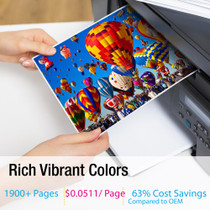
Up to 1,900 pages, for $52.83 — about 2.78¢ per page. Remember that on a multifunction machine like the MF751CDW, color copies spend toner exactly as prints do, so a copying-heavy office draws this cartridge down faster than its print count suggests. Even so, yellow is usually the slowest-spent color in mixed office use; one cartridge commonly serves many months.
Is this the right yellow for my machine?
If your MF751CDW's outgoing yellow cartridge is labeled 5091C001, yes — this is the yellow member of the Canon 069 family it runs on. The rest of the set is black (5094C001), cyan (5093C001) and magenta (5092C001), each replaced independently. For sustained heavy color work there is a high-yield alternative, the 069H yellow (5095C001), which fits the same slot; the standard Canon 069 is the everyday size.
Can we change just the yellow and leave the others in?
That is the correct approach. The cartridges empty at their own rates and the machine only needs the finished one replaced. Swapping a healthy cyan or magenta "while you're in there" throws away pages you have already paid for. Change the 5091C001, print a green-bearing test page to confirm the warmth is back, and let the others run their course.
What cover comes with it?
A 1-year warranty and 1-year free returns, standard on everything we sell. Full terms are on our shipping and returns page. Orders are routed from whichever of our IL, PA, GA and CA warehouses is closest, and the support team answers Monday to Friday, 9 AM to 5 PM CST.
How can we catch yellow running out before it spoils a color job?
Make one small habit: once a month, print a test page that carries a solid block of green. Green is built from cyan plus yellow, so it is the first place a tiring 5091C001 shows itself — greens drifting toward blue mean yellow is nearly done, weeks before the loss becomes obvious in everyday documents. A ten-second monthly check converts yellow from the cartridge nobody notices into the cartridge you replace on your own schedule.
Yellow gave out in the middle of a document — can we finish the run?
Often, yes. Take the cartridge out and rock it gently from side to side; the toner still inside redistributes and can lay down evenly for a modest number of extra pages — usually enough to finish the job on the glass. It is a bridge, not a repair: order the replacement 5091C001 the same day, because a shaken cartridge is living on its last reserves and will fade again without much warning.
We duplex most color work — how should we read the 1,900-page rating?
As 1,900 printed sides. Each two-sided sheet spends two pages of the rating, so expect roughly 950 duplexed sheets from a cartridge. On the MF751CDW the same accounting covers copies, which also print a side at a time. Offices that duplex heavily sometimes feel a cartridge finished early; measured in sides rather than sheets, the cartridge has almost always delivered close to what was promised.
Yellow is the slowest-spent color here — does a spare still make sense?
It does, precisely because it is slow. A single sealed spare can cover the machine for a very long stretch, and toner stored sealed and flat does not deteriorate while it waits. The alternative — noticing the greens have gone blue during a deadline job and waiting days for a delivery — costs far more than the shelf space one box occupies. Buy the spare when the current 5091C001 is fitted, and forget about yellow until the test page says otherwise.
About This Canon MF751CDW Yellow Toner Cartridge
This compatible Canon 069 yellow cartridge (5091C001) serves the Canon imageCLASS MF751CDW's printing and copying alike, rated at up to 1,900 pages for $52.83 — around 2.78¢ a page. It is the cartridge that keeps greens green and color pages warm, and the easiest one in the set to overlook until it's gone; replacing it takes about a minute. The full family is listed on our Canon toner page.
Every one of these takes it: the LBP-674CDW, ImageClass MF751CDW and ImageClass MF753CDW. Rounding out the range are the Canon 069 magenta cartridge, the Canon 069 black cartridge and the Canon 069 cyan cartridge. the Canon 069 color set of four is the all-in-one alternative, with the high-yield Canon 069H yellow cartridge as the other-yield version of this cartridge.
Related Items

Canon
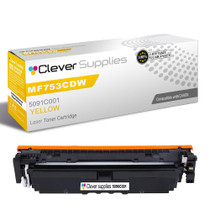
Compatible Canon MF753CDW (5091C001) Toner Cartridge Yellow
/>


Canon
Compatible Canon 069 (5091C001) Toner Cartridge Yellow
/>

Canon
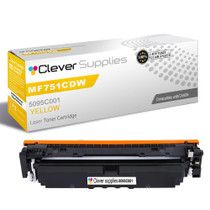
Compatible Canon MF751CDW (5095C001) Toner Cartridge Yellow
/>

Canon
Compatible Canon LBP-674CDW (5091C001) Toner Cartridge Yellow
/>