





 See Compatible Printers
 Read more about our ink!
Canon
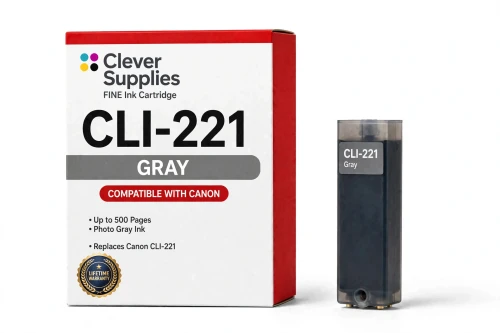
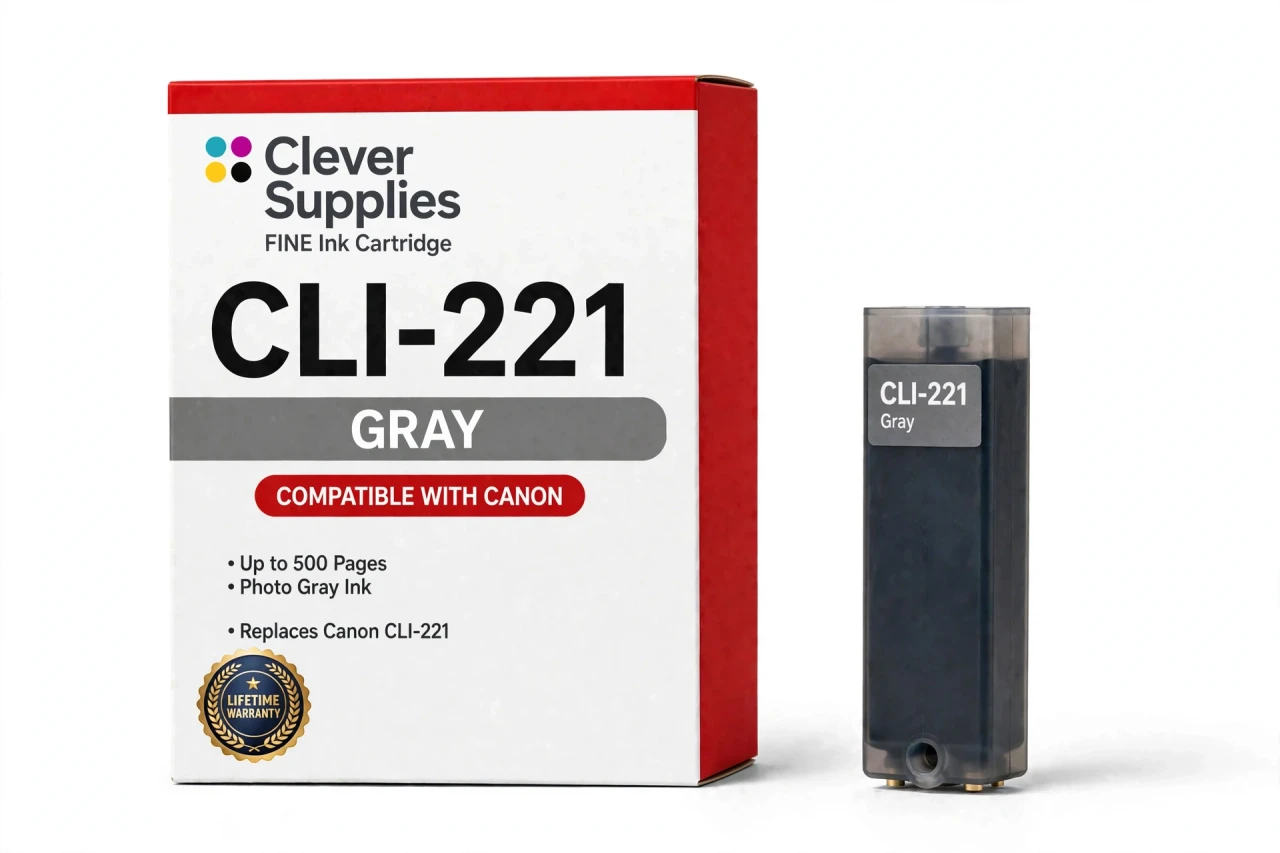
Compatible Canon CLI-221GY Gray Ink Cartridge
- Page Yield:
- Up to 500 pages
- Shipping:
- Calculated at Checkout

Amazon Price:

- Page Yield:
- Up to 500 pages
- Shipping:
- Calculated at Checkout
- Compatible Printers
- Specifications
- SKU:
- CS-CN-221-GY
- Condition:
- New Compatible
- OEM Part #:
- CLI-221GY
- Color:
- Gray
- Ink Type:
- Dye
- Page Yield:
- Up to 500 pages
- Chip:
- New compatible chip
- Warranty:
- Lifetime Warranty
- Returns:
- 1-Year Free Returns
- Description
My printer belongs to the PGI-220 / CLI-221 family — will it take this gray cartridge?
Only two models in the family will. The sixth slot, the one reserved for gray, exists solely on the Canon PIXMA MP980 and the Canon PIXMA MP990. Every other PGI-220 / CLI-221 printer carries five tanks and has no gray position, so there is nowhere for this cartridge to go in those machines.
So which printers does the CLI-221GY actually fit?
Just the Canon PIXMA MP980 and the Canon PIXMA MP990. The complete verified list is set out in the Compatible Printers section on this page — check your model against it before ordering.
Why would a printer need a dedicated gray ink at all?
Gray is there for monochrome photography. It lays down the smooth mid-tones that black-and-white prints depend on; try to build those same shades from black alone and the result tends to come out coarse and grainy.
How many pages does the gray tank deliver?
The supplier rates it at up to 500 pages. Canon published no official yield table for this family, so the figure is the cartridge maker's own, measured on standard test pages at around 5% coverage. What you actually get depends on what you print — dense photos draw far more ink than text.
Is there a chip on this cartridge?
Yes, a new compatible one. It reports ink levels back to the printer, which keeps the low-ink warnings working as normal. The cartridge is not a refilled original shell running on a reset chip.
May I combine it with original Canon cartridges?
You may. The printer reads each slot independently, so our compatible gray runs happily alongside genuine Canon tanks, or the other way round, and individual colors can be changed one at a time as they empty.
A message popped up after installation — how should I respond?
Acknowledge the message on screen, take the tank out and press it back until it clicks, then restart the printer. Should the message persist, clean the gold chip contacts with a dry lint-free cloth and reinstall the cartridge.
Is this a genuine Canon CLI-221GY?
No — it is a Clever Supplies compatible cartridge produced to the CLI-221GY specification and covered by our lifetime warranty. Canon did not manufacture it; the Canon name serves only to identify the printers it fits.
What if it leaks, is not recognized, or prints poorly?
Stop and contact us instead of printing on with a faulty cartridge. The lifetime warranty covers recognition failures, leaks and print-quality defects: we replace the cartridge or refund you, and returns are free for the first year.
I print mostly color photos — why is my gray cartridge still nearly full?
Because gray has a specialist's job. The CLI-221GY exists for monochrome photography: it lays down the smooth mid-tones that black-and-white prints depend on, tones that would come out coarse and grainy if the printer had to build them from black alone. A household printing in color draws on cyan, magenta, yellow and the blacks constantly, while the gray tank is only called on when you print in black and white — so it can sit nearly full for months while its neighbors cycle. That is normal behavior for the sixth slot on the MP980 and MP990, not a fault: judge this tank by your monochrome output, and expect it to be the last one in the set you ever replace.
- Reviews
The Clever Supplies compatible Canon CLI-221GY Gray ink cartridge replaces the Canon CLI-221GY and fits 2 verified printers — Canon PIXMA MP980, Canon PIXMA MP990 are in the full list under Compatible Printers below. It is rated at up to 500 pages (the cartridge supplier's rating — Canon published no official yield table for this family) and carries a new compatible chip that reports ink levels to the printer.
This cartridge belongs to the PGI-220 / CLI-221 family — a five-tank system — pigment PGI-220 black for documents beside dye CLI-221 black, cyan, magenta and yellow — with a sixth Gray tank on the MP980 and MP990 for black-and-white photo printing. Canon never published an official page-yield table for this family, so the ratings printed here are the cartridge supplier's figures, quoted exactly as supplied. Covered by our lifetime warranty with free returns for the first year.


Shop the Canon PGI-220 / CLI-221 family: PGI-220PGBK Pigment Black Ink Cartridge — $8.24 · CLI-221BK Black Ink Cartridge — $8.24 · CLI-221C Cyan Ink Cartridge — $8.24 · CLI-221GY Gray Ink Cartridge — $8.24 · CLI-221M Magenta Ink Cartridge — $8.24 · CLI-221Y Yellow Ink Cartridge — $8.24 · PGI-220 / CLI-221 Set of 12 BCMY Ink Cartridges — $62.82 · PGI-220 / CLI-221 Set of 14 BCMY + Gray Ink Cartridges — $73.29 · PGI-220 / CLI-221 Set of 5 BCMY Ink Cartridges — $26.18 · PGI-220 / CLI-221 Set of 6 BCMY + Gray Ink Cartridges — $31.41
Frequently Asked Questions
Related Items
Canon
Compatible Canon CLI-231GY Gray Ink Cartridge
The Clever Supplies compatible Canon CLI-231GY Gray ink cartridge replaces the Canon CLI-231GY and fits 1 verified printer — Canon PIXMA TS8820 are in the full list under Compatible Printers below...


Canon
Compatible Canon CLI-42 Gray Ink Cartridge
The Clever Supplies compatible Canon CLI-42 Gray ink cartridge replaces the Canon CLI-42 and fits the PIXMA PRO-100 — the only printer in this family. It is rated at about 492 pages; our cartridge is...
Canon
Compatible Canon CLI-271XL Gray Ink Cartridge
The Clever Supplies compatible Canon CLI-271XL Gray ink cartridge replaces the Canon CLI-271XL and fits 3 verified printers — Canon PIXMA MG7720,
Canon
Compatible Canon CLI-251XL Gray Ink Cartridge
The Clever Supplies compatible Canon CLI-251XL Gray ink cartridge replaces the Canon CLI-251XL and fits 4 verified printers — Canon PIXMA iP8720,