





 See Compatible Printers
 Read more about our ink!
Brother
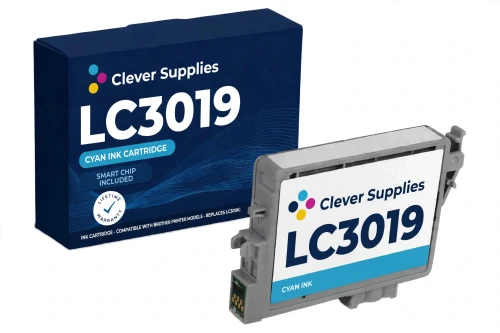
Compatible Brother LC3019 LC3019C Cyan Ink Cartridge
- Page Yield:
- Up to 1,500 pages (ISO/IEC 24711)
- Shipping:
- Calculated at Checkout

Amazon Price:

- Page Yield:
- Up to 1,500 pages (ISO/IEC 24711)
- Shipping:
- Calculated at Checkout
- Compatible Printers
- Specifications
- SKU:
- CS-BR-3019-C
- Condition:
- New Compatible
- OEM Part #:
- LC3019C
- Color:
- Cyan
- Page Yield:
- Up to 1,500 pages (ISO/IEC 24711)
- Chip:
- New compatible chip
- Warranty:
- Lifetime Warranty
- Returns:
- 1-Year Free Returns
- Description
- Reviews
This is the Super High Yield cyan cartridge for the 3 printers in its platform — MFC-J5330DW, MFC-J6530DW, MFC-J6930DW. The cartridge is our compatible LC3019C, rated up to 1,500 pages to ISO/IEC 24711. It does NOT fit the INKvestment Tank printers (MFC-J5830DW, MFC-J5830DW XL, MFC-J5930DW, MFC-J6535DW, MFC-J6535DW XL, MFC-J6935DW), which take LC3029 instead. Do not order this cartridge for a Tank printer, however similar the yield numbers look.



A single cyan cartridge is the right buy when one color is low and the rest are healthy — sets are for resets, not for forcing a bundle. This Super High Yield cartridge, LC3019C, is rated up to 1,500 pages (ISO/IEC 24711) and serves MFC-J5330DW, MFC-J6530DW, MFC-J6930DW. Its tier siblings are LC3019BK, LC3019C, LC3019M and LC3019Y.
The cartridge carries a new compatible chip, with the small green chip on top that Brother's own support pages ask about when a cartridge is not detected. Brother's support text for this family is explicit that a genuine cartridge's microchip lets the machine detect ink volume and proper installation — so with a compatible cartridge the level display may not read. That is a display behavior, not a print failure, and we state it before you buy. Covered by our lifetime warranty, with free returns for the first year.
Shop the Brother LC3019 family: LC3019BK Black Ink Cartridge · LC3019M Magenta Ink Cartridge · LC3019Y Yellow Ink Cartridge · Set of 4 BCMY Ink Cartridge · Set of 9 BCMY Ink Cartridge
Browse by series: MFC MULTIFUNCTION SERIES
Frequently Asked Questions
My printer needs cyan only—must I purchase a complete box?
No, the LC3019C can be ordered alone. Sets contain these same cartridges in a single box; using the printer does not oblige you to buy that format.
Which yield tier suits a printer that consumes ink quickly?
For a fast-running machine where avoiding changes matters more than the price of each cartridge, choose the Super High Yield tier: 3,000 pages for black and 1,500 for a color such as LC3019C. The High Yield alternative is rated at 550 pages and fits a steady office workload when the lowest per-cartridge cost is the priority.
Which machines are actually listed for the LC3019C?
Only the MFC-J5330DW, MFC-J6530DW and MFC-J6930DW appear on Brother’s official list for this cyan cartridge. For the whole family side by side — all six LC3019 offers priced per page, and the step down to the LC3017 tier below it worked out in cents — see our Best Brother LC3019 Ink Cartridges guide.
Why is an LC3029 cyan not an acceptable substitute with the same color rating?
Both families publish the same headline figures—3,000 pages black and 1,500 pages per color—but LC3029 is made for INKvestment Tank printers. LC3019 is the standard-cassette version, and the two physical forms are not interchangeable.
What happens if this cyan is ordered for a Tank printer?
It will not fit. The MFC-J5830DW, MFC-J5830DW XL, MFC-J5930DW, MFC-J6535DW, MFC-J6535DW XL and MFC-J6935DW all use LC3029 instead. Matching yield numbers do not change that exclusion.
Can LC3017 and LC3019 cartridges share the same standard-cassette printer?
Yes. Brother lists both tiers for the same three machines, and each cartridge position operates separately. The contrary statement made by one compatible seller could not be verified from Brother material and is not repeated as a restriction.
After a firmware update, what is the practical response to a recognition warning?
This cyan uses a new compatible chip. If recognition becomes unreliable after firmware changes, remove and firmly reseat it, inspect the small green contact for cleanliness, avoid touching that contact with fingers and restart the machine. Brother’s general March 2025 position is that firmware updates do not block third-party ink.
How does Brother explain the “Cannot Detect Ink Volume” wording?
Its support information says a genuine Brother cartridge’s microchip lets the machine detect ink volume and correct installation, whereas a non-genuine cartridge may not register in the same way. The printer still prints; the level gauge may not read.
Should LC3019C be classified as an INKvestment Tank cartridge?
No.
What storage routine applies to a spare cyan cartridge?
Handle the unit by the housing and keep fingers away from the small green chip on top. An opened cartridge should go into the printer promptly. Sealed stock belongs upright, away from heat and direct sunlight, and should remain closed until its position is ready.
Is the LC3019C presented as a Brother-manufactured product?
No. Clever Supplies makes this compatible version to the LC3019C specification, with a new compatible chip. The box and product page identify it as compatible; it is not manufactured by Brother.
What protection applies if the cyan cartridge does not perform?
It carries a lifetime warranty, under which a cartridge that fails to perform is replaced. Free returns are available within the first year.
Related Items

Brother
Compatible Brother LC3019 LC3019BK Black Ink Cartridge
This is the Super High Yield black cartridge for the 3 printers in its platform — MFC-J5330DW, MFC-J6530DW,


Brother
Compatible Brother LC3019 LC3019M Magenta Ink Cartridge
This is the Super High Yield magenta cartridge for the 3 printers in its platform — MFC-J5330DW, MFC-J6530DW,

Brother
Compatible Brother LC3019 LC3019Y Yellow Ink Cartridge
This is the Super High Yield yellow cartridge for the 3 printers in its platform — MFC-J5330DW, MFC-J6530DW,

Brother
Compatible Brother LC3019 Set of 9 BCMY Ink Cartridge
This is the Super High Yield set for the 3 printers in its platform — MFC-J5330DW, MFC-J6530DW,