




LBP664Cdw
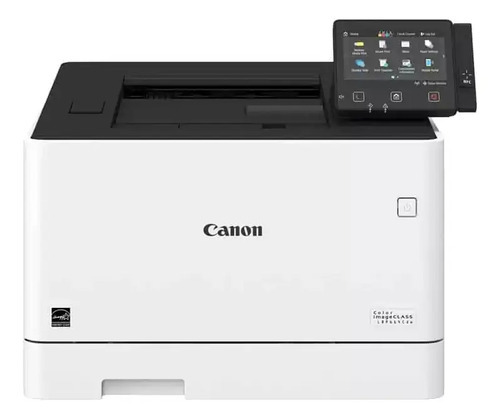
As the successor to the LBP654Cdw, the imageCLASS LBP664Cdw carries the 28-ppm color print-only role forward with a 5-inch touchscreen and up to 850 sheets of paper capacity. Duplex, Ethernet and Wi-Fi remain standard. It uses the Canon 055 cartridge set (black 3016C001 at 2,300 pages, with cyan, magenta and yellow at 2,100 pages each).
Toner Cartridges for Canon Lbp664Cdw
| Cartridge | Color | Page Yield | OEM # |
|---|---|---|---|
| Canon 055 Black (Compatible) | Black | 2,300 pages | 3016C001 |
| Canon 055 Cyan (Compatible) | Cyan | 2,100 pages | 3015C001 |
| Canon 055 Magenta (Compatible) | Magenta | 2,100 pages | 3014C001 |
| Canon 055 Yellow (Compatible) | Yellow | 2,100 pages | 3013C001 |
Frequently Asked Questions
What toner does the Canon Lbp664Cdw use?
The Canon Lbp664Cdw uses the Canon 055 toner cartridge set: Black (OEM #3016C001); Cyan (OEM #3015C001); Magenta (OEM #3014C001); Yellow (OEM #3013C001).
How many pages does a Canon 055 cartridge print?
Standard Canon 055 cartridges yield approximately Black: 2,300 pages; Cyan: 2,100 pages; Magenta: 2,100 pages; Yellow: 2,100 pages at 5% coverage.
Are compatible Canon 055 cartridges safe for the Lbp664Cdw?
Compatible cartridges are designed to work in the Lbp664Cdw. Check your printer's warranty terms for specific coverage details.
How do I install a Canon 055 toner cartridge in the Lbp664Cdw?
Open the front cover of your Canon Lbp664Cdw, remove the old cartridge, unpack the new Canon 055 cartridge, gently rock it to distribute toner, and slide it into place until it clicks.