




LBP-6230dn
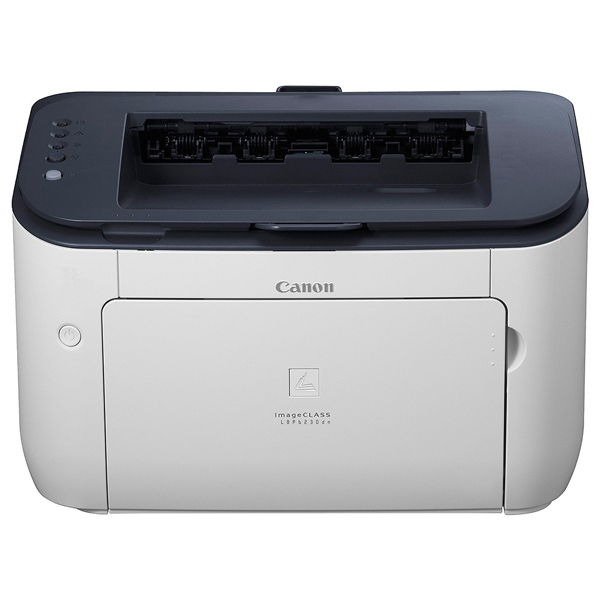
Built for a desk that already has a network drop nearby, the Canon LBP-6230dn pairs wired Ethernet with automatic duplexing - the office-ready member of the 25/26-ppm LBP6230 series, and the configuration that skips Wi-Fi rather than paying for it. Its cartridge is the Canon 126, a black toner rated at up to 2,100 pages, and offices that lean hard on the machine can step up to the Canon 126J jumbo build of the same cartridge, rated at 3,000 pages.
A networked printer rarely belongs to one person. Colleagues send jobs through the Ethernet connection all day, duplexing turns long reports into tidy two-sided stacks without anyone standing at the tray, and the cartridge quietly becomes shared infrastructure. That rhythm argues for planning toner the way the office plans paper: a known cartridge, a spare within reach, and no surprises in the middle of a print run.
Toner Cartridges for LBP-6230dn
| Cartridge | Color | Page Yield |
|---|---|---|
| Canon 126J Jumbo Toner Cartridge | Black | 3,000 pages |
| Canon 126 Toner Cartridge | Black | 2,100 pages |
| Canon 126J Jumbo Toner Cartridges - 4 Pack | Black | 3,000 pages per cartridge |
| Canon 126 Toner Cartridges - 3 Pack | Black | 2,100 pages per cartridge |
| Canon 126 MICR Toner Cartridge | Black | See product page |
| Canon 126 Toner Cartridges - 5 Pack | Black | 2,100 pages per cartridge |
| Canon 126 Premium Quality Toner Cartridges - 5 Pack | Black | 2,100 pages per cartridge |
Which cartridge should you buy?
On a shared machine, capacity is the argument that wins. The jumbo Canon 126J stretches each change to 3,000 pages, which matters when several people print through the same slot and nobody wants to be the one who finds it empty. The standard 126, at 2,100 pages, remains the right pick for a lightly used dn or as the emergency spare. Offices with steady volume often settle on a jumbo multipack, keeping one cartridge in the printer and the rest in reserve, while the MICR cartridge stays a specialist choice reserved for check runs.
Chip, toner and everyday use
Because several people rely on this printer, the compatible cartridge's chip earns its keep: toner levels report back through the network, so whoever orders supplies can see a change coming instead of hearing about it. Before fitting a replacement, give it a slow rock end to end to settle the toner, and remember that quoted yields assume roughly 5% coverage - a department printing dense contracts will land below the headline figure. Store reserve cartridges flat, sealed and away from radiators or windows.
Frequently Asked Questions
Does the LBP-6230dn have Wi-Fi?
No. The dn connects by wired Ethernet and prints two-sided automatically; wireless is the step-up feature of the LBP-6230dw instead.
What toner does the LBP-6230dn take, and how long does it last?
It takes the Canon 126 black cartridge, rated at up to 2,100 pages. The jumbo 126J version of the same cartridge raises that figure to 3,000 pages for busier offices.
Does automatic duplexing use more toner?
No. Duplexing changes how paper is used, not how much toner a page takes; the same cartridge prints the same number of pages whether they land on one side of the sheet or both.
Is the cartridge shared with the base model?
Yes. The LBP-6230 and the rest of this family use the identical Canon 126 line, so one stock of cartridges can cover several machines.
More printers that use the same cartridges
These printers run on the same Canon 126 toner family:
LBP-6230dw, LBP-6230, LBP-6200d, LBP-6200, ImageClass LBP6230DW, ImageClass LBP6230DN, ImageClass LBP6230, ImageClass LBP6200D, ImageClass LBP6200