




LaserClass 730
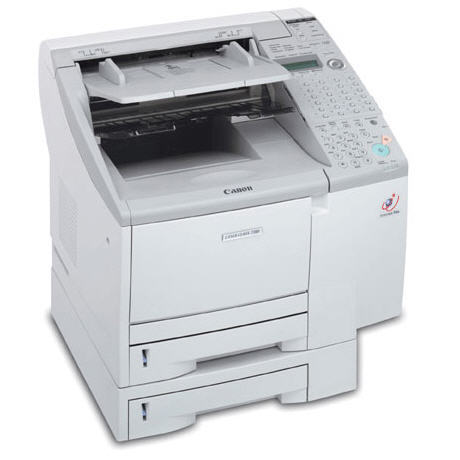
One step below the Internet-equipped 730i, the Canon LaserClass 730 keeps the proven 19 ppm fax platform and its Canon FX-7 cartridge — 4,500 pages per unit — while leaving the printer and network kits as options. It matches its siblings on the hardware that moves paper: the same 70-sheet automatic document feeder and expandable memory for stored faxes.
The 730 was the pick for offices whose fax volume had outgrown a personal machine but who did not need internet faxing: long multi-page transmissions fed through that big ADF, memory receiving when the line is busy, and a steady diet of printed confirmations. It is a workload that empties cartridges predictably, which makes bulk buying easy to justify.
Toner Cartridges for LaserClass 730
| Cartridge | Color | Page Yield |
|---|---|---|
| FX-7 Black 5 Pack | Black | 4,500 pages per cartridge |
| FX-7 Premium Black 5 Pack | Black | 4,500 pages per cartridge |
| FX-7 Black | Black | 4,500 pages |
| FX-7 Black 3 Pack | Black | 4,500 pages per cartridge |
Which cartridge should you buy?
With a 70-sheet feeder chewing through long faxes, the 730 rewards buying ahead. The 5 packs — standard or premium listing — give the lowest per-cartridge cost and fit a machine whose consumption is steady; the 3 pack is the middle ground for moderate lines. Keep at least one sealed spare beside the machine regardless: memory receiving only holds faxes until toner returns. Sites that also run the LaserClass 720 or another FX-7 model can hold one common stock, because every machine in this group takes the identical 4,500-page cartridge.
Chip, toner and everyday use
Long fax runs heat a cartridge bay, so let a freshly finished long job cool before swapping units. Fit replacements squarely with the machine ready, rock the new cartridge gently first so the toner bed is level, and expect the first page or two to confirm density. The 4,500-page figure assumes 5% coverage — received faxes and confirmation pages are mostly sparse text, so many 730s stretch a cartridge further, while copied handouts with heavy graphics shorten it. Keep spares sealed and flat, away from windows; sunlight and heat both age toner in the box.
Frequently Asked Questions
Which cartridge fits the LaserClass 730?
The Canon FX-7 black cartridge, rated at 4,500 pages. It is the only cartridge this model uses, in single, 3 pack and 5 pack boxes.
Is the FX-7 for the 730 the same as the one for the 720?
Yes — the 720, 730 and their i-suffixed siblings all run the same FX-7. One spare on the shelf covers any of them.
Why does my 730 print faxes from memory after a toner change?
While the cartridge was empty, incoming faxes were stored in memory instead of printing. Once a new FX-7 is fitted, the machine prints the backlog automatically.
Standard or premium 5 pack — what is the difference?
Both listings are FX-7 5 packs with the same 4,500-page-per-cartridge rating; the premium is a separate premium-quality listing line. Fit is identical either way.
More printers that use the same cartridges
These LaserClass models draw from the same FX-7 shelf: LaserClass 730I, LaserClass 720I, LaserClass 720, LaserClass 710, LaserCLASS 301.