




ImageRunner 2530I
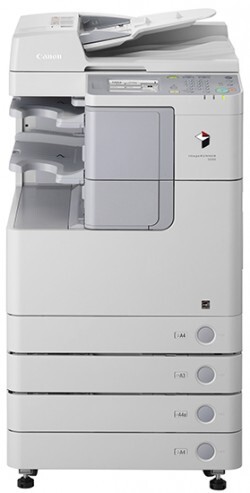
Speed headlines this page: at 30 ppm the Canon imageRUNNER 2530I is the fastest of the 2500 family, and it pairs that engine with the full color scan-and-send suite as standard. The toner underneath is deliberately unglamorous — a single black cartridge, the Canon GPR-35, rated for about 14,600 pages. Built-in Ethernet, automatic duplexing and 512MB of RAM complete a specification aimed at offices that measure a copier by how rarely it makes them wait.
A faster engine changes toner planning in one specific way: the cartridge empties on the same page count, but the calendar days between replacements shrink. A 2530I clearing departmental print queues can work through 14,600 pages noticeably sooner than its slower siblings, so reorder points that felt generous on a 2520I arrive early here. Treat the low-toner warning as a same-day task, or hold a multi-pack and remove the question entirely.
Toner Cartridges for Canon ImageRunner 2530I
| Cartridge | Color | Page Yield |
|---|---|---|
| Canon GPR-35 Toner Cartridges, 5 Pack | Black | 14,600 pages per cartridge |
| Canon GPR-35 Toner Cartridge | Black | 14,600 pages |
| Canon GPR-35 Premium Quality Toner Cartridges, 5 Pack | Black | 14,600 pages per cartridge |
| Canon GPR-35 Toner Cartridges, 3 Pack | Black | 14,600 pages per cartridge |
Which cartridge should you buy?
All four listings deliver the identical GPR-35 cartridge; the decision is purely how much buffer your print volume demands. Light, predictable use is fine with the single. Most 2530I installations, though, were bought precisely because volume is neither light nor predictable — for those, the 3 Pack is the floor and a 5 Pack is the comfortable answer, with the Premium Quality 5 Pack as the alternative grade of the same supply plan. Buying in packs also lowers the per-cartridge cost against repeat single orders, and because the whole 2500 family below shares this cartridge, surplus stock is never stranded on one machine.
Chip, toner and everyday use
Seat the new cartridge fully until it clicks; the 2530I reads the chip and confirms the new unit without menus to dig through. Remember that the 14,600-page figure assumes about 5% coverage — long duplex reports sit near it, while dense graphics pulls the real number down. When pages start to fade, rocking the cartridge gently from side to side levels the remaining toner and typically restores clean output for the rest of the run. Store unopened cartridges flat in a cool spot, and let the machine's own counter — not the calendar — tell you when to reorder.
Frequently Asked Questions
What toner does the Canon imageRUNNER 2530I take?
The Canon GPR-35 black toner cartridge, rated for approximately 14,600 pages at 5% coverage. Singles, the 3 Pack and both 5 Pack listings above are all that cartridge.
Does the 2530I use the same cartridge as the slower 2520I?
Yes — the entire 2500 family shares the GPR-35, including the ImageRunner 2520I. Only the engines differ; the supply shelf can be common.
Why does my cartridge seem to run out faster on this model?
It is printing the same number of pages in fewer days. A 30-ppm machine clears queues faster, so replacements arrive sooner on the calendar even though the page rating is unchanged.
How is the cartridge replaced?
Front cover open, old unit out, new GPR-35 rocked gently and slid in until it clicks, cover closed. The machine recognizes the fresh cartridge automatically.
More printers that use the same cartridges
The same GPR-35 serves every model in this family:
ImageRunner 2530, ImageRunner 2525i, ImageRunner 2520, ImageRunner 2525, ImageRunner 2520I