




ImageClass MF275DW
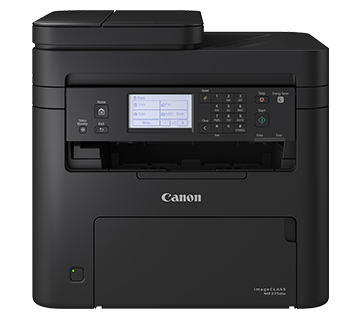
Adding fax to the MF273DW platform creates the imageCLASS MF275DW, the top of the MF270 series, with a 6-line touch LCD replacing the base model's simpler display. All four functions — print, copy, scan and fax — run at 30 pages per minute with automatic duplexing. Toner is the Canon 071, good for up to 1,200 pages, or the high-yield Canon 071H at up to 2,500 pages for offices that print and fax in real volume.
The buyers for this model are easy to picture: the clinic, law office or agency desk where fax refuses to die, documents arrive on paper, and one compact machine has to absorb all of it. The touch display matters more than it sounds — scan destinations, fax numbers and copy settings live a tap away instead of behind menu codes. Underneath, the story stays admirably plain: a single black cartridge, two yield choices, and nothing else to manage.
Toner Cartridges for ImageClass MF275DW
| Cartridge | Color | Page Yield |
|---|---|---|
| Canon 071 (MF275DW listing) Black 4 Pack | Black | up to 1,200 pages each |
| Canon 071 (MF275DW listing) Black 2 Pack | Black | up to 1,200 pages each |
| Canon 071 (MF275DW listing) Black | Black | up to 1,200 pages |
| Canon 071 Black 4 Pack | Black | up to 1,200 pages each |
| Canon 071 Black 2 Pack | Black | up to 1,200 pages each |
| Canon 071 Black | Black | up to 1,200 pages |
| Canon 071H (MF275DW listing) Black 4 Pack | Black | up to 2,500 pages each |
| Canon 071H (MF275DW listing) Black 2 Pack | Black | up to 2,500 pages each |
| Canon 071H (MF275DW listing) Black | Black | up to 2,500 pages |
| Canon 071H Black 4 Pack | Black | up to 2,500 pages each |
| Canon 071H Black 2 Pack | Black | up to 2,500 pages each |
| Canon 071H Black | Black | up to 2,500 pages |
Which cartridge should you buy?
Fax changes the calculation. Received faxes are pages you did not choose to print, and on a busy line they can quietly rival your own output — which pushes most MF275DW owners toward the 071H and its 2,500-page rating as the default rather than the upgrade. The standard Canon 071 still suits quiet desks where the fax rings weekly, not hourly. Packs are a stocking decision: a 2 pack keeps a spare ready for the cartridge that always empties on a Friday, while the 4 pack is for offices that measure toner by the quarter.
Chip, toner and everyday use
A fresh cartridge seats from the front — old unit out, a few gentle side-to-side rocks of the new one, then in until it clicks — and its chip reports the new level to the touch panel automatically. Remember that yield ratings assume roughly 5% coverage; a received fax of a dense form consumes the same toner as printing it yourself. Keep the printer's toner-low warning enabled if your office uses it: on a fax machine, running dry overnight can mean a sender's pages waiting in memory instead of on paper.
Frequently Asked Questions
How is the MF275DW different from the MF273DW?
Two additions: built-in fax, and a 6-line touch LCD in place of the base model's 5-line display. The imageCLASS MF273DW prints, copies and scans at the same 30 ppm and uses exactly the same Canon 071 and 071H cartridges.
What toner does the imageCLASS MF275DW take?
The Canon 071 at up to 1,200 pages, or the high-yield Canon 071H at up to 2,500 pages — one black cartridge, one slot, nothing else to stock.
Do received faxes use the same cartridge?
Yes. Fax pages print through the same toner cartridge as copies and computer print jobs, which is why fax-heavy offices feel cartridge life shorten and usually settle on the high-yield option.
Are the compatible cartridges covered if one fails early?
They are — Clever Supplies backs its compatible cartridges with a 1-year warranty and 1-year returns.
More printers that use the same cartridges
Same slot, same cartridges: the two relatives below can share a toner shelf with this machine: ImageClass MF273DW, LBP-122DW.