





 See Compatible Printers
 Read more about our ink!
Canon
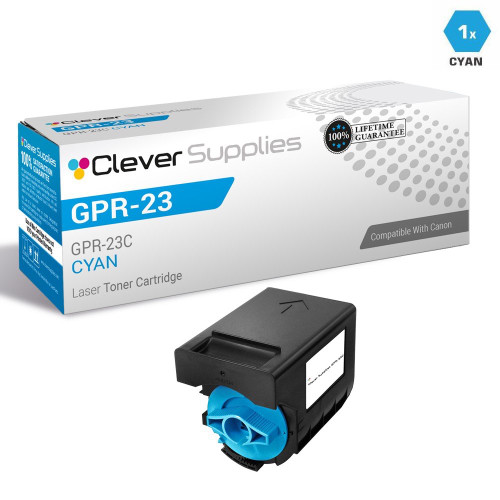
Compatible Canon GPR-23 (0453B003AA) Toner Cartridge Cyan
- Page Yield:
- 14,000 Pages
- Availability:
- In Stock
- Shipping:
- Free Shipping

Amazon Price:

- Page Yield:
- 14,000 Pages
- Availability:
- In Stock
- Shipping:
- Free Shipping
- Compatible Printers
- Color ImageRunner C3080i
- Color ImageRunner C3480i
- ImageRunner C2550
- ImageRunner C2550F
- ImageRunner C2880
- ImageRunner C2880F
- ImageRunner C2880i
- ImageRunner C3080
- ImageRunner C3080F
- ImageRunner C3080i
- ImageRunner C3380
- ImageRunner C3380F
- ImageRunner C3380i
- ImageRunner C3480
- ImageRunner C3480i
- Laser ImageRunner C2550
- Laser ImageRunner C2550F
- Laser ImageRunner C2880
- Laser ImageRunner C2880F
- Laser ImageRunner C2880i
- Laser ImageRunner C3080
- Laser ImageRunner C3080F
- Laser ImageRunner C3080i
- Laser ImageRunner C3380
- Laser ImageRunner C3380F
- Laser ImageRunner C3380i
- Laser ImageRunner C3480
- Laser ImageRunner C3480ii>
- i>
- ImageRunner C2550I
- ImageRunner C2880N
- ImageRunner C2880V2
- ImageRunner C3380N
- ImageRunner C3380V2
- ImageRunner C3480F
- ImageRunner C3880
- ImageRunner C3880F
- ImageRunner C3880I
- Specifications
- SKU:
- CAN0453B003AA-COMP
- Printer Brand:
- Canon
- OEM Number:
- 0453B003AA
- Ink Color:
- Cyan
- Page Yield:
- 14,000 Pages
- Printer Type:
- Laser Cartridge
- Condition:
- New Compatible
- Description
- Yields up to 14000 pages
- Trust compatible Canon GPR-23 Toner Cartridge to provide outstanding print quality for all your important photos and documents
- Unlike bargain replacement inks Canon Toner Cartridge are designed specifically to work with Canon printers for exceptional reliability and performance
- Ink/Toner Color: Cyan
- Ink/Toner Pack Size: 1/Pack
- Compatible with: Canon ImageRunner: C2550 C2880 C3080 C3380 C3480 C3880 C3880i series printers
- Supply Type: Toner
- Cartridge Yield Type: Standard
- Ink/Toner Cartridge Type: Compatible
- Reviews

/> 

Compatible Canon GPR-23 (0453B003AA) Toner Cartridge Cyan color with yielding capacity of up to 14000 pages render consistent better value and convenience.
Canon GPR-23 Toner cartridge in cyan color with yielding capacity of up to 14000 pages offers an exceptional reliability with Canon printers. Toner Cartridge is designed to provide great print quality for all your important photos and documents.
Features:
Frequently Asked Questions
Why does our ERP system insist on the exact code 0453B003AA instead of just "cyan toner"?
Because in the Canon GPR-23 family the four part numbers differ by a single digit — 0452B003AA is black, this one, 0453B003AA, is cyan, and the magenta and yellow sit either side of it. A purchase order that just says "cyan" invites a picking error; the part number pins the order to the cyan cartridge for the imageRUNNER C2550, C2880, C3080, C3380 and C3480 series and nothing else. This listing is the cyan specified under that code.
How do we stop the wrong color being pulled from the storeroom shelf?
The four GPR-23 cartridges look near-identical on the shelf, so disciplined sites label the shelf slot with the part number, not just the color, and check the code on the box against the requisition before the seal is broken. If your team keeps one of each color in reserve, storing them in part-number order — 0452, 0453, 0454, 0455 — makes the cyan's slot the second one along, every time.
How long does a 14,000-page cyan last on a shared departmental machine?
The GPR-23 cyan is rated at up to 14,000 pages at standard coverage. Color copying consumes cyan unevenly depending on the work: a department producing presentation decks, charts and branded documents with heavy blue content will draw this cartridge down noticeably faster than one whose color work is mostly letterheads. The black, rated at 26,000 pages, normally needs changing far less often than any of the colors.
What does the cyan cost per page?
This cartridge is $64.19 and rated at up to 14,000 pages, so the cyan share of a color page costs roughly 0.46 cents at standard coverage. That is a working figure for cost-per-copy calculations; dense photographic coverage will use toner faster than the rating assumes.
What are the signs this cyan, specifically, is running out?
Blues lose their depth first: skies print dull or drift greenish, and corporate blues come out teal, while reds and blacks still look correct. A solid blue block on a test page that prints patchy confirms the cyan is the cartridge to change — the magenta and yellow are not implicated by those symptoms.
What if we fit this cartridge and the output is still wrong?
Then the problem may sit in the machine rather than the toner, and you are not left carrying the cost of finding out: every compatible cartridge we sell is covered by a 1-year warranty and 1-year free returns. Support is available Monday to Friday, 9 AM to 5 PM CST, and the full terms are on our shipping & returns page.
How should we keep the reserve cyan so it is ready the day the machine calls for it?
Sealed, flat and in a cool, dry storeroom — and untouched until the day it is fitted. A compatible toner cartridge like the 0453B003AA does not dry out the way liquid ink does, so a reserve can wait on the shelf for months without attention. Keep it out of direct sunlight and away from heat, and there is no benefit to opening the box early to check it; the seal is what keeps it in factory condition.
Can the cyan fade partway through a long run without anyone noticing at the start?
Yes, and it happens gradually enough to slip past a busy operator. The first pages of a run print with correct blues; as the 0453B003AA empties, later pages drift — blues go dull, then greenish — while the machine keeps working. On a long client run, pull a page every so often and compare it with the first approved sheet. A visible drift between the two is the signal to change the cyan before the whole run needs reprinting.
The black has just been changed. Does the cyan need changing at the same time?
No. The four GPR-23 cartridges live independent lives — each is fitted and replaced on its own schedule, and changing one says nothing about the state of the others. The black is rated at 26,000 pages against this cyan's 14,000, so they rarely fall due together anyway. Change the cyan when its own output tells you to: fading blues and a patchy solid-blue test block, not because a neighboring slot was serviced.
We have a large photo-heavy job coming up. How should we plan the cyan around it?
Check the cartridge before the job, not during it. Full-page photographic work spends cyan far faster than the standard coverage behind the 14,000-page rating for the 0453B003AA, so a cartridge that looks half full on the gauge can be most of the way through its useful life for that kind of work. If a big run is scheduled and the cyan is already well used, fitting the reserve first is cheaper than a faded second half.
About This Canon GPR-23 Cyan Cartridge (0453B003AA)
A single compatible Canon GPR-23 cyan toner cartridge, Canon part number 0453B003AA, rated at up to 14,000 pages for the color imageRUNNER C2550, C2880, C3080, C3380 and C3480 series. It is one of four independent GPR-23 cartridges — black, cyan, magenta and yellow — each ordered and replaced by its own part number. Priced at $64.19, shipped from IL, PA, GA or CA, and backed by our 1-year warranty and 1-year free returns. See the wider range on our Canon page.
Related Items
Canon
Compatible Canon GPR-23, GPR23 Toner Cartridges Cyan (GPR-23C)
/>


Canon
Compatible Canon GPR-23 Toner Cartridges 4 Color Set (0452B003AA/ 0453B003AA/ 0454B003AA/ 0455B003AA)
/>

Canon
Compatible Canon GPR-36 (3783B003AA) Toner Cartridge Cyan
/>

Canon
Compatible Canon GPR-31 (2794B003AA) Toner Cartridge Cyan
/>