Frequently Asked Questions
When does replacing all four cartridges at once make more sense than one at a time?
When two or more colors are already showing low, or when the printer has been running on a mixed-age set and print quality has gone uneven. A single change resets every color to the same starting point, so you stop chasing one fading cartridge after another for months.
What does each cartridge in the set effectively cost?
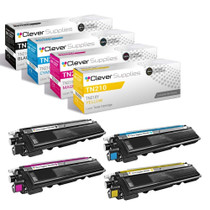
The four-cartridge set is $69.05, or $17.26 per cartridge. You get one TN210BK black, one TN210C cyan, one TN210M magenta and one TN210Y yellow — a complete set with no color missing. The $15.01 per-cartridge figure comes from the same arithmetic our Best Brother TN210 Toner Cartridges guide applies to the whole family, where this set leads the page as the complete refill and is priced against every other way of filling the four slots.
My black is fine but the colors are done — can I install just part of the set?
Yes. The four cartridges are independent, so you can fit the ones you need now and keep the rest sealed as spares. Many owners swap the three colors, keep the fresh black on the shelf, and install it when the old one finally gives out.
How much printing does a full set represent?
The black is rated at 2,200 pages and each of the three colors at 1,400 pages. For a household or small office printing mostly text with occasional color, that is a long stretch of printing from one purchase.
Will this set work in my printer?
It fits the DCP-9010CN, HL-3040CN, HL-3045CN, HL-3070CW, HL-3075CW, MFC-9010CN, MFC-9120CN, MFC-9125CN, MFC-9320CN and MFC-9320CW. Any machine built around the TN210 series takes all four of these cartridges in its existing slots — no adapters or changes are needed.
How are returns handled if the set is not right for me?
Returns are free within the first year, and every cartridge is covered by a 1-year warranty — the details are on our shipping & returns page. We dispatch from warehouses in IL, PA, GA and CA, with support available Monday–Friday, 9 AM–5 PM CST.
How do I keep track of the sealed spares a partial install leaves behind?
Label each unopened cartridge with its color and the date it went on the shelf, and store the spares together in one spot near the printer. With a TN210 set installed in stages, the spare black or color can sit for months; a labeled box tells whoever opens the drawer exactly what is inside and how long it has waited, so the right cartridge gets picked when a warning appears.
How do two-sided pages count against this set's ratings?
By sides, not sheets. The TN210BK is rated at 2,200 pages and each color at 1,400, and a duplex sheet spends two of those pages whenever both faces print. A household running long two-sided documents will see the black rating arrive in half as many sheets as a single-sided user would, even though the cartridge has delivered exactly the pages it promised.
How can I prove the new set fixed our uneven output?
Before the change, reprint one familiar page — a letterhead, a chart, a photo the office knows well — and keep it. After the full TN210 set is in, print the same file again and compare the two side by side. Balanced reds, clean blues and solid text on the second sheet are the direct evidence that the mixed-age cartridges, not the printer, were behind the decline.
When should I start planning the next purchase after fitting this set?
Watch for the second low warning rather than the first. One cartridge dipping is normal mid-life behavior on this platform, since the colors empty at different rates. When a second slot flags low, the set as a whole is entering its final stretch, and that is the moment to decide between another full set and individual cartridges — with weeks of printing still in hand, not days.
About This TN210 Four-Cartridge Set
This is the complete TN210 renewal: a 2,200-page black plus cyan, magenta and yellow cartridges rated at 1,400 pages each, for $69.05 — $17.26 a cartridge. It is the straightforward way to bring a TN210 machine back to a full, even set in one order, and you can browse the rest of the family on our Brother toner page.







 See Compatible Printers
 Read more about our ink!