





 See Compatible Printers
 Read more about our ink!
Brother
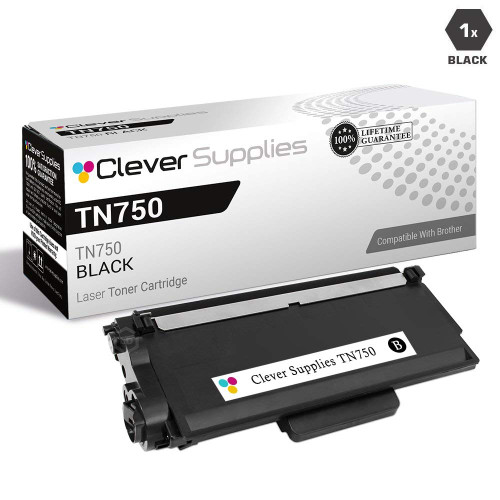
Compatible Brother DCP-8150 Toner Cartridge
- Page Yield:
- 8000
- Availability:
- In Stock
- Shipping:
- Calculated at Checkout

Amazon Price:

- Page Yield:
- 8000
- Availability:
- In Stock
- Shipping:
- Calculated at Checkout
- Compatible Printers
- Specifications
- SKU:
- DCP-8150
- Printer Brand:
- Brother
- OEM Number:
- TN750
- Ink Color:
- Black
- Page Yield:
- 8000
- Printer Type:
- Laser Cartridge
- Condition:
- New Compatible
- Description
- Reviews
-
Excellent toner cartridge
I don't think you can beat lasertonerdeals.com on the basis of quality price and service. I have been very pleased.

/> 

Keep your Brother DCP-8150 running with this compatible TN750 high-yield cartridge. Each cartridge is rated for up to 8,000 pages; the standard-yield TN720 for the same printers covers 3,000 pages, so this is the long-run option of the pair. It is covered by our 1-year warranty, and returns are free for a full year if it does not perform as it should.
Frequently Asked Questions
I have never changed a toner cartridge — how does it actually go?
It is a three-minute, no-tools job. Open the front cover of your DCP-8150, slide out the drum-and-toner assembly, press the green lock lever and lift the old cartridge out. Unpack this TN750, rock it gently side to side a few times to distribute the toner, remove the protective cover, and click it into the drum until it locks. Slide the assembly back in and close the cover. That is the whole procedure.
How do I know the old cartridge is really finished?
The printer will say so — a toner-low warning first, then a replace-toner message when output is at risk. A useful trick before replacing: remove the cartridge, rock it gently, then reinstall. That often redistributes the remaining toner for a few dozen extra pages, long enough to finish the day's work while the new one is on its way.
Is this the right cartridge for my machine?
Yes, if your printer is among the models designed for this toner platform: DCP-8110DN, DCP-8150DN, DCP-8155DN, HL-5440D, HL-5450DN, HL-5470DW, HL-5470DWT, HL-6180DW, HL-6180DWT, MFC-8510DN, MFC-8710DW, MFC-8810DW, MFC-8910DW and MFC-8950DW. This listing is the high-yield TN750 version, rated at 8,000 pages.
Should a first-time buyer start with the standard or the high-yield cartridge?
With the high-yield, and here is the honest reason: in our store the standard TN720 (3,000 pages) and this TN750 (8,000 pages) both cost $33.59. There is no saving to chase with the smaller cartridge — the TN750 just lasts about 2.7 times longer, which for a first-time owner means not repeating this purchase for a long while. For the three yield tiers side by side — TN720, TN750 and TN780 running on the same DR720 drum, with a cost-per-page figure for each — see our Brother TN720 toner guide. It also marks out the only four machines that can take the TN780.
Do I need to replace anything else at the same time?
Only if the printer asks for it. The drum is a separate part (the DR720, rated at 12,000 pages and $41.78) and it has its own life counter and its own warning. A toner change never requires a drum change — replace each part only when its turn comes.
What if I install it and something looks wrong?
Start with the simple checks: protective cover fully removed, cartridge seated until it clicks, and the corona-wire slider on the drum moved back to its home position. If prints still look off, our support team answers 9 AM–5 PM CST. And every cartridge carries a 1-year warranty with 1-year free returns, set out on the shipping & returns page — a genuine dud is replaced or refunded, not debated.
How should I store a spare TN750 at home or in a small office?
Leave it sealed in its box, stored flat in a cool, dry place away from radiators and direct sunlight. A high-yield cartridge may sit for months before a light-use DCP-8150 needs it, and an unopened TN750 handles that wait without any attention — the seal keeps the toner exactly as it was packed. Open it only when the old cartridge comes out, and it goes straight from shelf to machine.
When the time comes, which code should I reorder?
TN750 — the code printed on this high-yield cartridge. It is worth checking the label on the cartridge you remove, because two look-alike codes belong to the same machine: the TN720 is the standard 3,000-page toner, and the DR720 is the drum unit, a separate part with its own 12,000-page life. Ordering the code from the part in your hand is the simple habit that gets the 8,000-page cartridge delivered instead of a smaller toner or a drum you do not need yet.
Why might my real yield land above or below 8,000 pages?
The rating is measured on the standard test page at about 5% coverage, and your documents set the real figure. Light letters and plain memos use less toner than the test assumes, so a gentle workload can stretch a TN750 past its rating; dense pages — bold forms, heavy letterheads, big blocks of text — use more and bring the low-toner warning earlier. Either way, the cartridge is behaving normally: coverage, not the calendar, decides when it finishes.
What do I do with the empty cartridge when it finally runs out?
Slip it into the packaging the new TN750 came in, keep it upright so the residue inside stays put, and take it to a recycling collection point or a local toner recycling program when convenient. An empty cartridge still carries a dusting of toner, so its replacement's bag or box is the cleanest way to carry it. Handled that way, the swap that felt daunting the first time ends as tidily as it began.
About This TN750 Cartridge for the DCP-8150
The first cartridge change is the moment most owners learn their printer is simpler than they feared — and this high-yield TN750 is the forgiving choice for that moment. It installs in minutes, then quietly delivers up to 8,000 pages at about 0.42 cents a page, so the lesson does not need repeating any time soon. At $33.59 it costs exactly what the smaller standard cartridge costs here. When the day comes that one is not enough, the same cartridge is available in a 2-pack for $48.68. More supplies for this platform are in the Brother section.
1 Review
Related Items

Brother
Compatible Brother DCP-9045 Toner Cartridges
/>


Brother
Compatible Brother DCP-9040CN Toner Cartridges
/>
Brother
Compatible Brother DCP-8110 Toner Cartridges
/>
Brother
Compatible Brother DCP-8155 Toner Cartridge
/>