







 See Compatible Printers
 Read more about our ink!
Brother
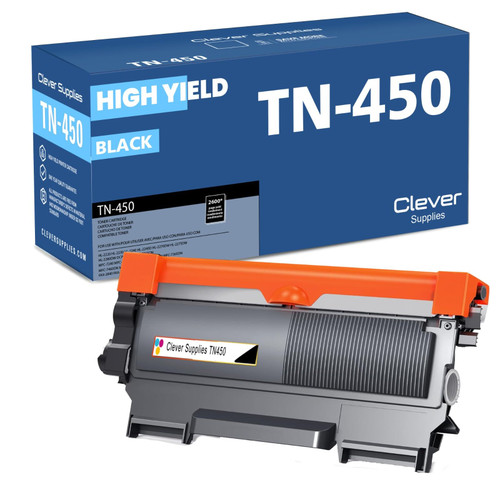
Compatible Brother DCP-7060 Toner Cartridge
- Page Yield:
- 2600
- Availability:
- In Stock
- Shipping:
- Calculated at Checkout

Amazon Price:

- Page Yield:
- 2600
- Availability:
- In Stock
- Shipping:
- Calculated at Checkout
- Compatible Printers
- Specifications
- SKU:
- DCP-7060
- Printer Brand:
- Brother
- OEM Number:
- TN450, TN420
- Ink Color:
- Black
- Page Yield:
- 2600
- Printer Type:
- Laser Cartridge
- Condition:
- New Compatible
- Description
- Reviews
-
Product is execelent for the price
Product arrived on time installed easy works great.
-
Excellent quality and performance
Excellent quality and performance. My repeat business is guaranteed.
-
Why pay retail ?????????????
At work we used to buy the name brand because the company was payng for it. Now that I'm retired and paying for it myself I was looking for value. I paid less than half of retail and the quality was equal to the name brand. sHIPPING IS VERY QUICK.
-
Professional
I have been purchasing the same Brother TN450 refill from lasertonerdeals for several months - the price is very fair - the product is very hi quality - it lasts as long or longer then the hi end hi priced name brand product refills. Very good quality and

/> 

This is the high-yield compatible toner cartridge made for the Brother DCP-7060. It carries the TN450 fill — up to 2,600 pages — and seats in the same DR420 drum unit your printer already uses, so a swap takes about a minute and the cost per page stays low.
Frequently Asked Questions
I've never changed a cartridge on a DCP-7060 — how fiddly is the first swap?
Less than it looks. Open the front cover, slide out the drum-and-toner assembly, press the green release lever and lift the old cartridge out, then click the new TN450 in until it seats and slide the whole unit back. There is no chip pairing, no menu reset and no tools involved — most first-timers are printing again in about two minutes, and the printer recognizes this cartridge on its own.
How far does one cartridge go on a desk that mostly makes copies?
The TN450 is rated at 2,600 pages at 5% coverage, and copies count exactly like prints — every copied page spends toner the same way. On a copy-desk DCP-7060 working through, say, 40 pages a day, that works out to roughly three months per cartridge at about 1.04¢ per page from the $27.13 price. Scanning, by contrast, uses no toner at all, so scan-heavy days cost you nothing.
Which printers does this cartridge fit?
DCP-7060D, DCP-7065DN, HL-2130, HL-2132, HL-2220, HL-2230, HL-2240, HL-2240D, HL-2242D, HL-2250DN, HL-2270DW, HL-2275DW, HL-2280DW, Intellifax 2840, Intellifax 2940, MFC-7240, MFC-7360N, MFC-7365DN and MFC-7460DN
When the cartridge runs out, does the drum have to be replaced too?
No — they live separate lives. The DR420 drum unit under this cartridge is rated around 12,000 pages, so it typically carries four to five TN450 cartridges before the printer asks for a new one. Swap the toner when pages fade; only think about the drum when the machine's drum message appears.
My copies came out light — did I get a bad cartridge?
Usually not. On a compact desk machine the common culprits are the toner-save (eco) setting being on, or toner that has settled after sitting. Take the cartridge out, rock it gently side to side five or six times to redistribute the toner, and check that toner-save is off for copy work. If a genuine fault remains, the cartridge is covered — see the last answer.
What protection comes with it if something does go wrong?
Every cartridge carries a 1-year warranty plus 1-year free returns under our shipping and returns policy, and support is available 9 AM–5 PM CST if you want a hand with the first install.
When I reorder, how do I avoid mixing up the TN450 toner and the DR420 drum?
By ordering the code that matches the part you are actually replacing. The TN450 is the toner cartridge — the part that runs out every 2,600 pages and the one this listing sells. The DR420 is the drum unit underneath it, a separate part rated around 12,000 pages that only gets replaced when the machine asks for a drum. Check the label on the part you removed: if it says TN450, that is the code to order, and a drum code should never be substituted for it.
Why do copies of dark originals drain this cartridge faster than plain prints?
Because coverage decides how much toner each page spends. The TN450's 2,600-page rating follows the standard 5% coverage test — a page of ordinary text. A copy of a dark photograph, a heavily shaded form or a bold letterhead can cover several times that area, and the DCP-7060 spends toner accordingly. A copy desk running dark originals all day should expect the cartridge to finish ahead of the headline figure, while light text copying can meet or beat it.
How should I handle the empty TN450 once it comes out?
Put it straight into the bag or box the new cartridge arrived in, so the toner residue inside stays contained, and keep it upright until it goes to a recycling collection point or a local toner recycling program. Empties still carry a light dusting of powder, and the replacement's packaging is the cleanest container you have to hand. Dealt with this way, the old cartridge leaves the desk without a cleanup.
How should a spare TN450 be stored on a small desk setup?
Sealed in its box, lying flat in a cool, dry spot out of direct sunlight and away from any heat source. A compact machine like the DCP-7060 usually lives in a small space, so the spare tends to live in the same drawer or shelf — that is fine, as long as the packaging stays unopened until the day of the swap. An unopened cartridge stored this way is ready to go the moment the old one fades.
About This TN450 Cartridge for the DCP-7060
The DCP-7060 earns its desk space by being small, so the cartridge that feeds it should be equally low-fuss: this compatible TN450 drops straight into the machine's existing drum unit, yields up to 2,600 pages at roughly 1.04¢ a page, and asks nothing of you beyond the two-minute swap. It is the high-yield partner this compact copier was designed around, stocked under the Brother range at Clever Supplies for $27.13.
4 Reviews
Related Items

Brother
Compatible Brother DCP-9045 Toner Cartridges
/>


Brother
Compatible Brother DCP-9040CN Toner Cartridges
/>
Brother
Compatible Brother DCP-8150 Toner Cartridge
/>
Brother
Compatible Brother DCP-8110 Toner Cartridges
/>