





 See Compatible Printers
 Read more about our ink!
Brother
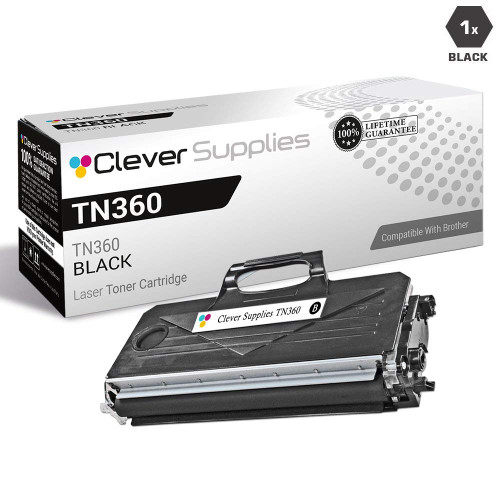
Compatible Brother DCP-7040 Toner Cartridge
- Page Yield:
- 2600
- Availability:
- In Stock
- Shipping:
- Calculated at Checkout

Amazon Price:

- Page Yield:
- 2600
- Availability:
- In Stock
- Shipping:
- Calculated at Checkout
- Compatible Printers
- Specifications
- SKU:
- DCP-7040
- Printer Brand:
- Brother
- OEM Number:
- TN330, TN360
- Ink Color:
- Black
- Page Yield:
- 2600
- Printer Type:
- Laser Cartridge
- Condition:
- New Compatible
- Description
- Reviews

/> 

For the Brother DCP-7040, this compatible cartridge is the 2,600-page high-yield choice in the TN330/TN360 family. Its standard-yield sibling, the TN330, stops at 1,500 pages — this one runs considerably longer between changes. It comes with our 1-year warranty, and you have a full year to return it free if anything is wrong.
Frequently Asked Questions
For small-stack copying and scanning at a home-office desk, why does the DCP-7040 suit a high-yield cartridge?
Copy jobs draw toner just like prints, so a morning of small stacks, forms and scanned-and-copied pages eats a standard cartridge faster than people expect. This TN360-class cartridge runs to 2,600 pages for $31.33 — about 1.21¢ a page — which means the DCP-7040 can work through those desk-side jobs for longer between changes. For the full picture on this cartridge family, see our Best Brother TN330 Toner Cartridges guide: the TN330 and TN360 listings are priced as one shared cartridge, and the guide sets both names side by side with the DR360 drum — including how the two names differ on paper and where they turn out to be the same cartridge underneath.
How should I count the yield on my DCP-7040 when half my output is copies, not prints?
Count copies and prints together — both put toner on paper — and do not count scans, which use no toner at all. On that basis the 2,600-page rating is the working budget for your DCP-7040, whether the page started on your computer or on the glass as a copy.
I have been buying TN330 cartridges for my DCP-7040 — is this TN360 a sensible switch?
Yes, it is the high-yield step up for the same machines. The TN330 is rated at 1,500 pages; this TN360 class is rated at 2,600 pages. For a DCP-7040 that copies as well as prints, that extra 1,100 pages is the difference between changing cartridges as a routine and changing them as an interruption.
My DCP-7040 copies are coming out faded — should I replace the toner or the drum?
Light or fading output usually means the toner is running low, while the drum is a separate question. The DCP-7040 takes the DR360 drum, rated at 12,000 pages, apart from the toner. Start with the toner swap this listing covers; only look at the drum if quality problems persist on a fresh cartridge.
Does this DCP-7040 cartridge fit any other Brother models in the house or office?
It is a platform cartridge, so it travels well between machines. The same cartridge also serves these Brother models: DCP-7030, DCP-7040, DCP-7045N, HL-2140, HL-2150N, HL-2170W, MFC-7320, MFC-7340, MFC-7345DN, MFC-7345N and MFC-7440N. A spare kept for the DCP-7040 may therefore already be the spare for a second machine on that list.
If the cartridge for my DCP-7040 arrives and I need to send it back, what happens?
You are backed by cover for a year: a 1-year warranty on the cartridge and free returns for 1 year too. Our shipping and returns policy explains the process in full before you order.
What should I do with a new TN360 before it goes into my DCP-7040?
Two small steps make the first pages clean ones. First, rock the new cartridge gently side to side several times before installing it, so the toner inside is evenly distributed rather than settled to one side from shipping and storage. Second, remove the protective cover fully and seat the cartridge in the drum unit until it clicks. A cartridge prepped this way prints evenly from page one instead of needing a settling-in period.
How should I judge the first pages from a fresh cartridge?
Print a few ordinary pages — a letter, a form, one of your usual copies — and compare them against output you know is good, rather than judging on the very first sheet. Look for even darkness across the page and clean white margins. If the first page or two look slightly light but each next page improves, the toner is still distributing; steady, even output after a handful of pages is the sign the TN360 has settled in properly.
How do I tell a toner warning from a drum warning on this machine?
They run on separate clocks, and the machine treats them as separate events. Gradual, even fading across the whole page is the toner running down — that is this TN360 cartridge reaching the end of its 2,600 pages. The DR360 drum lives on its own much longer cycle of 12,000 pages and is only due when the machine calls for the drum itself. Replace whichever part the machine and the symptoms point to; a toner swap never resets or replaces the drum's own count.
Should I keep the empty cartridge for a while after swapping?
Briefly, yes — it costs nothing and can save an argument. Put the empty TN360 back in the new cartridge's packaging and keep it until the replacement has printed well for a few days. With a 1-year warranty and free returns for a year behind this cartridge, the old unit is useful evidence if a question about the swap ever comes up. Once the new cartridge has clearly proven itself, send the empty for recycling.
About This DCP-7040 Toner Cartridge
Built around a DCP-7040 doing convenient small-stack copying and scanning at a home-office desk, this compatible TN360 cartridge delivers up to 2,600 pages for $31.33. Find companion cartridges in the Brother range at Clever Supplies. We dispatch from warehouses in IL, PA, GA and CA, and support is reachable 9 AM–5 PM CST on weekdays if you need help matching a cartridge.
Related Items

Brother
Compatible Brother DCP-9040CN Toner Cartridges
/>

Brother
Compatible Brother DCP-8150 Toner Cartridge
/>
Brother
Compatible Brother DCP-8155 Toner Cartridge
/>


Brother
Compatible Brother DCP-7065 Toner Cartridge
/>