




The TN760 is the high-yield workhorse for a whole generation of Brother monochrome lasers — and it is only half of a two-part system. This guide covers the toner itself, the separate DR730 drum it clicks into, the pack sizes that change the per-page math, and the one mix-up that sends more buyers to the wrong checkout than any other: ordering toner when the drum is the part that is finished.
The short answer: if the printer says Replace Toner, buy the TN760 single for $25.26; if it says Replace Drum, buy the TN760 + DR730 toner and drum set for $37.73.
Read the printer's message first. If it says Replace Toner, buy the Compatible Brother TN760 single for $25.26 — or a multi-pack if you print often. If it says Replace Drum, toner will not fix it: buy the TN760 + DR730 toner and drum set for $37.73, which is $16.08 less than the same two parts bought separately ($53.81). The drum is a separate unit rated for about 12,000 pages, roughly four TN760 cartridges.
The 5-second decision

When the drum message appears, a new toner alone changes nothing — the faded, streaked output comes from the worn drum surface. This set replaces both parts of the assembly together, at less than the two list prices combined.
View the Toner & Drum Set →
The honest one-liner: if only the toner is empty and your prints were still clean and dark, this is all you need. The drum stays in the printer — one TN760 typically runs through about a quarter of a drum's life.
View the TN760 Single →The short verdict
Start with the pack ladder, because TN760 pricing rewards buying ahead. One cartridge is $25.26. The 2-pack is $34.44 — $17.22 per cartridge instead of $25.26, saving $16.08 against two singles. The 4-pack is $52.79 — about $13.20 per cartridge, saving $48.25 against four singles and cutting the toner cost to roughly 0.44¢ per page. None of this changes the cartridge itself; every pack holds the same TN760 rated by Brother at about 3,000 pages.
Then there is the drum question, which is where buyers lose money. The TN760 at $25.26 and the DR730 drum at $28.55 total $53.81 bought separately. The combined set is $37.73 — the same $16.08 saving, and the correct purchase on the day the drum is due. For context on the genuine article: our store also lists Brother's own TN760 at $86.99, which is $61.73 more than the compatible cartridge on this page for the same rated 3,000 pages. That gap, not a fraction of a cent of running cost, is the real decision in this family.
This guide is based on the cartridges' listed prices, Brother's rated yields, and Clever Supplies policies. It is not presented as a laboratory test or a roundup of customer ratings, and we do not add review counts or stars that are not part of the buying facts.
Every TN760 option, side by side
Six ways to buy for this family — the same cartridge in different boxes, plus the drum that completes the system.

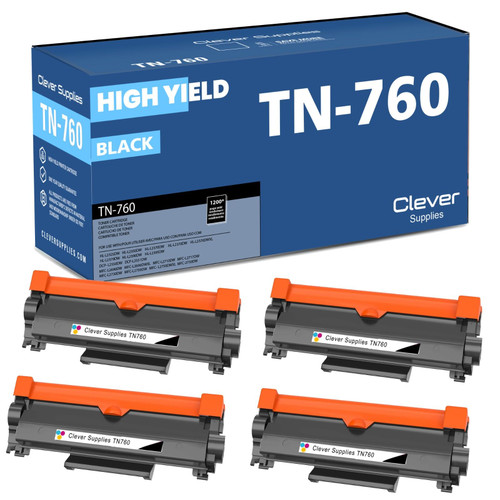
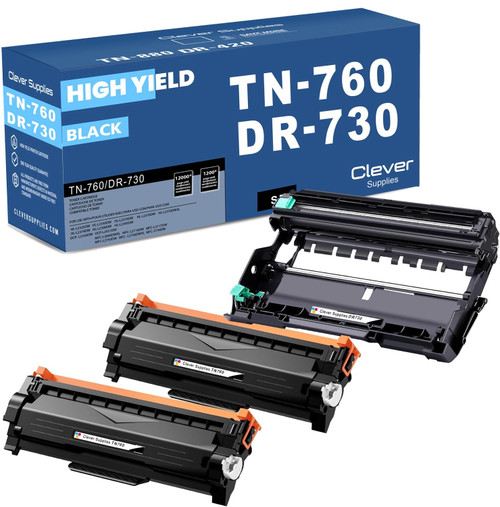

Best Brother TN760 picks by priority
Best overall: the toner and drum set, on drum day
A drum lasts about 12,000 pages, so most TN760 purchases are toner-only — and should be. But roughly every fourth toner change, the drum reaches the end of its life at about the same time. That is the day the TN760–DR730 set earns its place: both parts, one box, $16.08 saved. Printers that see heavier use can step up to the same idea with more toner in the box — the set with two TN760 cartridges and one drum is $46.91, against $79.07 for the parts separately.
Best for regular printing: the pack sizes
If your printer works every week, singles are the expensive way to buy this cartridge. Pick the pack that matches how fast you go through toner — a spare on the shelf also means the next empty cartridge is a two-minute swap instead of a delivery wait.
Best when only the drum is done: the DR730 alone
Sometimes the drum message arrives mid-toner. If the cartridge in the machine still has useful life, buy the DR730 drum unit on its own for $28.55, move your existing TN760 into the new drum, and keep printing. One caution: a drum unit contains no toner at all, so a drum alone will never fix an empty-toner message.
Brother TN760 options compared
| Option | Price checked | Brother-rated yield | Why choose it |
|---|---|---|---|
| TN760 + DR730 toner & drum set BEST VALUE | $37.73 | Toner 3,000; drum 12,000 | The complete refresh; $16.08 below the two parts bought separately. |
| TN760 single | $25.26 | 3,000 pages | The standard replacement when the printer says Replace Toner; about 0.84¢ per page. |
| TN760 2-pack | $34.44 | 3,000 pages each | $17.22 per cartridge; saves $16.08 against two singles and keeps a spare on the shelf. |
| TN760 4-pack | $52.79 | 3,000 pages each | About $13.20 per cartridge and 0.44¢ per page; saves $48.25 against four singles. |
| DR730 drum unit alone | $28.55 | About 12,000 pages | Only when the drum is due and your toner still has life; contains no toner. |
| Genuine Brother TN760 (price context) | $86.99 | 3,000 pages | Brother's own cartridge, also listed in our store; $61.73 above the compatible for the same rated yield. |
Rated yields are Brother's figures for the TN760 and DR730. Real output varies with page coverage, document type, printer settings, and how the printer is used. Drum life is rated separately from toner yield and is not interchangeable with it.
Toner vs drum: the distinction that runs this family
Every printer in this family uses a two-part assembly. The TN760 is the toner cartridge — a sealed container of black powder, rated at about 3,000 pages. The DR730 is the drum unit — the imaging cylinder the toner sits in, which transfers the image to the page and is rated at about 12,000 pages. The toner clicks into the drum, and the pair slide into the printer together. They wear out on completely different clocks, and each has its own message: Replace Toner means the powder is gone; Replace Drum (or Drum End Soon) means the cylinder's surface is at the end of its life.
This is why the most common complaint in this family — "I replaced the toner and the prints are still faded and streaky" — is usually not a bad cartridge. Repeating lines, spots in the same place on every page, and a grey background haze are drum symptoms, and no toner, from any brand, repairs a worn drum. At 12,000 pages a drum outlasts about four TN760 cartridges (or about ten of Brother's standard-yield TN730, rated at about 1,200 pages), so the drum bill arrives rarely — but when it does, it arrives as a print-quality problem, not an empty warning.
The practical routine: when a message appears, buy the part it names. When both parts are near the end together, the combined set is cheaper than the parts. And when you replace a drum, the printer's drum counter needs a reset from the front panel so the new unit starts its own 12,000-page count — the steps are in the printer's menu under the machine information or reset options.
Printer message decoder: what your Brother is telling you
| Message or symptom | What it means | What to buy or do |
|---|---|---|
| Replace Toner | The toner powder is gone. The drum underneath may still have thousands of pages of life left. | A TN760 toner — the single at $25.26, or a pack if you print often. |
| Drum End Soon | The drum is nearing the end of its roughly 12,000-page rated life; Replace Drum follows when it arrives. | Plan the drum purchase: the DR730 on its own ($28.55), or the set ($37.73) if both parts are near the end together. |
| Replace Drum | The drum cylinder's surface is at the end of its life. Toner will not fix it — this is a print-quality problem, not an empty warning. | The DR730 drum unit ($28.55), or the TN760 + DR730 set ($37.73) when the toner is due too. |
| Prints still faded or streaky after a new toner | Usually the drum, not the toner: a worn DR730 produces light prints no matter how fresh the toner is. | First clean the corona wire with the green tab on the drum unit; if output does not improve, replace the drum. |
| Repeating lines, spots in the same place, grey haze | Drum symptoms — the imaging surface is worn, and the marks repeat because the cylinder does. | Replace the drum. No toner, from any brand, repairs a worn drum. |
One more step after any drum change: reset the printer's drum counter from the front panel — the steps are in the menu under the machine information or reset options — so the new unit starts its own 12,000-page count.
Which printers use Brother TN760?
The TN760 toner and DR730 drum fit Brother's DCP-L2550DW; the HL-L2350DW, HL-L2370DW, HL-L2370DW XL, HL-L2390DW, and HL-L2395DW; and the MFC-L2690DW, MFC-L2710DW, MFC-L2717DW, MFC-L2730DW, MFC-L2750DW, and MFC-L2750DW XL. Every model in the family uses the same two parts, so a household or office running two different models from this list needs only one shelf of supplies.
Browse the model-specific toner pages for the DCP-L2550DW, HL-L2350DW, HL-L2370DW, HL-L2370DW XL, HL-L2390DW, HL-L2395DW, MFC-L2690DW, MFC-L2710DW, MFC-L2717DW, MFC-L2750DW, and MFC-L2750DW XL. Note that the newer L2400 and L2800 series machines use a different family (TN830), so match the full model name on your printer's label before ordering.
What a TN760 page really costs
Each part is costed on its own rating — toner and drum figures are never blended, because they are consumed at different rates. Toner first: the $25.26 single over about 3,000 rated pages is about 0.84¢ per page. The 2-pack lowers the cartridge price to $17.22, about 0.57¢ per page, and the 4-pack to about $13.20, about 0.44¢ per page. Drum next: $28.55 spread over its roughly 12,000-page life is about 0.24¢ per page.
Add the two running costs and the full picture emerges: about 1.08¢ per page buying toner one cartridge at a time, or about 0.68¢ per page on 4-pack toner. Against that, Brother's genuine TN760 at the $86.99 listed in our store works out to about 2.90¢ per page for toner alone — before the drum is counted at all. The pack ladder is worth real money, but the compatible-versus-genuine gap is the larger one by a wide margin.
Installation: no chip story here
Buyers arriving from the HP world often ask about chips and firmware blocks. Brother's monochrome lasers of this generation are refreshingly plain: there is no equivalent of HP's cartridge-blocking firmware behavior to plan around, and a compatible TN760 installs the way the genuine one does. Open the front cover, slide the assembly out, press the green lock lever to release the old toner from the drum, rock the new cartridge gently side to side, remove its protective cover, and click it into the drum until it locks. Slide the assembly back in and print.
Two details save most of the trouble calls. First, clean the corona wire while the drum is out — slide the green tab on the drum unit back and forth a few times and return it to its home position; it clears a surprising share of streak complaints. Second, replace only the part the message names: the toner lifts out of the drum in seconds, and there is never a reason to discard a drum with thousands of pages left in it just because the toner ran dry.
Buying checklist
Frequently asked questions
Capacity. Both are black toner cartridges for the same printers, but Brother rates the standard-yield TN730 at about 1,200 pages and the high-yield TN760 at about 3,000 — two and a half times the output from a cartridge of the same physical size. Unless a printer is used very rarely, the TN760 is the better value per page, which is why this guide is built around it.
No. Toner and drum are separate parts in this family, and a TN760 box contains toner only. The drum is included only in the combined sets, such as the TN760–DR730 toner and drum set at $37.73. If your drum still has life in it, you do not need a new one — the new toner clicks into the drum already in your printer.
That pattern usually means the drum, not the toner. A worn DR730 produces light prints, repeating marks, and background haze no matter how fresh the toner is. First try cleaning the corona wire with the green tab on the drum unit. If the output does not improve and the drum is near its roughly 12,000-page rating, the drum is the part to replace.
About 12,000 pages under Brother's rating — roughly four TN760 cartridges or about ten TN730 cartridges. Real life varies with print volume and job patterns; the printer tracks it and shows Drum End Soon, then Replace Drum, when the unit is nearing or at the end of its rated life.
Yes. The MFC-L2710DW is one of the twelve models in this family, and it uses the TN760 toner with the DR730 drum. The same is true of the other DCP, HL, and MFC models listed in the printer section above — but if your model number is from the newer L2400 or L2800 series, it belongs to the TN830 family instead.
No — that is the most expensive misunderstanding in this family. The drum is designed to serve through several toner cartridges. Replace it when the printer calls for it or when drum-type print defects appear, not on the toner's schedule. On average that works out to about one drum for every four TN760 cartridges.
Clever Supplies compatible toner and drum units carry a 1-year warranty and 1-year returns. Support is available Monday through Friday, 9 AM to 5 PM CST. Orders are shipped from warehouses in Illinois, Pennsylvania, Georgia, and California.