




Phaser C315
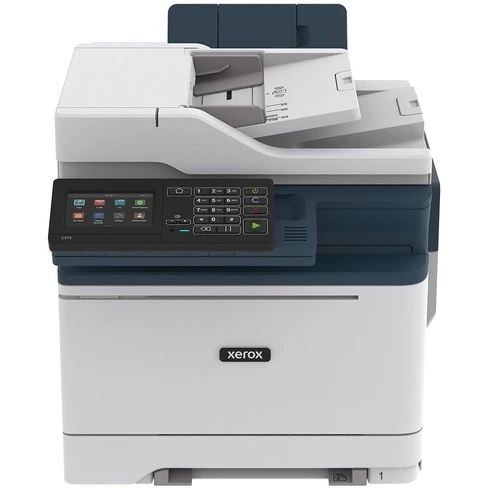
The Xerox Phaser C315 is a color laser printer built for modern small offices. Its compact footprint hides serious four-color capability, and it runs on the high-capacity cartridge family: black 006R04364, cyan 006R04365, magenta 006R04366 and yellow 006R04367 — the same family used by the Phaser C310. Singles for every color are listed below, along with a black 2 Pack and a 4 Color Set that replaces the whole family at once.
Where the C315 earns its place is color that looks like it came from a print shop: everyday documents on the one hand, marketing-ready color pages on the other. That kind of output depends on cartridges in good health — a color running on fumes shows up as washed-out graphics long before the printer stops. Offices that print client-facing color tend to replace a fading color promptly rather than squeeze the last pages out of it, and the singles below are priced and packaged for exactly that habit.
Toner Cartridges for Phaser C315
| Cartridge | Color | Page Yield |
|---|---|---|
| 006R04364 | Black | Check the product page |
| 006R04364 — 2 Pack | Black | Check the product page |
| 006R04365 | Cyan | Check the product page |
| 006R04366 | Magenta | Check the product page |
| 006R04367 | Yellow | Check the product page |
| 006R04364 / 006R04365 / 006R04366 / 006R04367 — 4 Color Set | All four colors | Check the product page |
Which cartridge should you buy?
Count how many colors are low. If it is one, buy that single and nothing else — the C315 changes cartridges one color at a time, and there is no prize for retiring toner that still has work in it. If three or four colors are nearing the end together, or you have just taken over a printer with an unknown history, the 4 Color Set is the cleaner move: four fresh cartridges, one round of changes, and levels that age together from that day on. Text-heavy offices should note the black 2 Pack — black does most of the work in mixed printing, and a spare on hand keeps a deadline from depending on a delivery. All of these cartridges are the family's high-capacity versions.
Chip, toner and everyday use
Fit each cartridge into the slot marked for its color and press until it clicks; the printer reads the chip, registers the new level and is ready to print. Running a single test page after a change is a good habit — it confirms the cartridge seated properly and shows clean color before a real job depends on it. Store unopened cartridges flat in a cool, dry place, and keep in mind that yield figures rest on 5% coverage: pages carrying photos or large color backgrounds will use a cartridge considerably faster than plain correspondence.
Frequently Asked Questions
Which cartridges does the Phaser C315 need?
Four high-capacity cartridges: 006R04364 in black, 006R04365 in cyan, 006R04366 in magenta and 006R04367 in yellow. They are available one at a time, black also in a 2 Pack, or all four in a set.
Should I buy the 4 Color Set or singles?
Singles, when only one color is low — that is the normal case. The set makes sense when most of the family is running down at once, or when you want a printer's whole supply refreshed in one visit.
Are C310 cartridges the same as C315 cartridges?
Yes. The C310 and C315 share this cartridge family, so the codes, the singles and the set are the same for both models; a spare bought for one printer fits the other.
How do I install a cartridge in the C315?
Open the front cover, pull the spent cartridge out, slide the new one into its color slot until it clicks, and close the cover. Print a test page to confirm the output is clean before you run a longer job.
More printers that use the same cartridges
The model below runs on the identical four cartridges: Phaser C310.