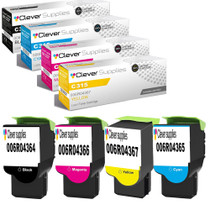
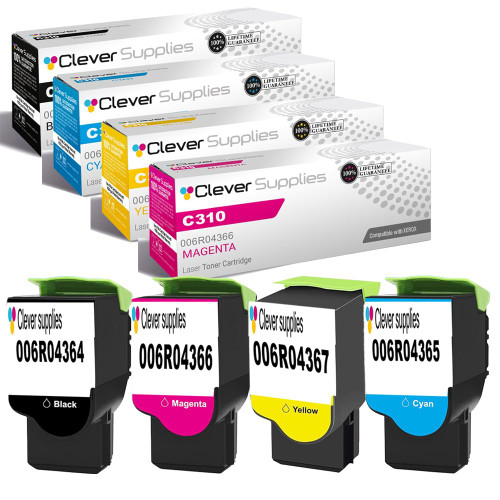
Ensure sharp, high-quality prints with the Xerox C310 toner cartridge series, which includes 006R04364 Black, 006R04365 Cyan, 006R04366 Magenta, and 006R04367 Yellow. These compatible Xerox cartridges are built to deliver deep blacks and vibrant colors for all your printing needs.
Designed for consistent performance, the Xerox C310 toner cartridge provides excellent image quality and reliable output from start to finish. Whether you're producing text-heavy documents or colorful graphics, these cartridges deliver crisp and professional results.
Compatible with both C310 and C315 printers, these toner cartridges integrate seamlessly with your Xerox devices. They are easy to install and help maintain smooth, uninterrupted workflows in any business environment.
Depend on the Xerox C310 toner cartridge to support your daily printing demands with efficiency and clarity. Ideal for offices of all sizes, these cartridges combine durability and print precision for exceptional value.
Frequently Asked Questions
What comes in this four-cartridge set?
One cartridge of each color for the C310 family: black 006R04364, cyan 006R04365, magenta 006R04366 and yellow 006R04367. Together they cover all four toner slots in the printer, so a single box handles a complete refresh rather than one color at a time.
How many pages should I expect from each cartridge?
The black 006R04364 is rated at up to 8,000 pages, and the cyan 006R04365, magenta 006R04366 and yellow 006R04367 at up to 5,500 pages each, measured at 5% coverage. For a compact desktop printer, those are generous ratings — the black in particular is sized for steady document work, not just occasional color pages.
Which printers is this set made for?
The Phaser C310 and the Phaser C315. If the cartridge coming out of your machine is stamped 006R04364, 006R04365, 006R04366 or 006R04367, this set is its family.
Only my black has run out — do I have to install all four?
No. Change the cartridge the printer is asking for and keep the other three sealed in the box. Each color is its own unit, and the stored cartridges will be ready when their turn comes.
Is this a sensible setup for a home office?
It suits one well: a single purchase covers the printer completely, the unused cartridges store in a drawer, and you are not placing a small emergency order every time a different color fades. The ratings also mean those orders are infrequent on a desktop machine.
What will I pay, and what protection is included?
The set is $212.34, with a 1-year warranty and 1-year free returns on the cartridges — see our shipping & returns page for the details. It ships from our Illinois, Pennsylvania, Georgia or California warehouses, and support is available Monday through Friday, 9 AM to 5 PM CST.
When several slots need attention at once, in what order should I fit the cartridges from this set?
One slot at a time, matched by code rather than color word: black 006R04364, cyan 006R04365, magenta 006R04366 and yellow 006R04367 each belong to a single position, and seating one cartridge fully before opening the next keeps the refresh foolproof. There is no required order between the positions themselves. When the last one is in, print one familiar color document — a page that uses all four channels — and confirm the output looks as it should before the printer goes back to the queue.
What this listing leaves out: these machines are Xerox VersaLink models, not Phasers — the C310 printer and the C315 multifunction, each in a single DNI configuration — Xerox declares this high-capacity tier’s yields under ISO/IEC 19798 (black 8,000 pages, colors 5,500), the cartridges a new machine ships with are rated at 1,500 pages for black and 1,000 per color, and every saving in the copy is figured at base prices instead of the prices checkout charges. Our Best Xerox 006R04364 Toner Cartridges guide rebuilds the arithmetic at sale prices and names the unsold standard tier below this one.
How do I check the box on arrival against what my printer actually takes?
Compare codes while everything is still sealed. The cartridges coming out of a C310 or C315 are stamped with their part numbers, so read those first, then check the set shows the same four: 006R04364, 006R04365, 006R04366 and 006R04367. A mismatch caught at the shelf, with every seal intact, is a simple exchange; the same discovery made mid-swap means a slot stands empty. Two minutes with the old cartridges is the whole of the check.
How can I learn which color our C310 gets through fastest?
Let the fitting dates tell you. Each time a cartridge from the set goes in, write the date on its box flap or in a note kept with the printer. Because the four positions empty on their own schedules, the dates quickly form a pattern: the position that cycles first — often black on a document-heavy desk — is the one to watch, and when its turn comes around again you can top it up with a single instead of waiting for a full set.
Once the new set is in, how do I confirm the color balance before an important job?
Proof before you commit. Print one copy of a document the office knows well — the letterhead page or a standard color chart — and hold it next to an earlier print of the same file that was accepted as right. With fresh cartridges in all four positions, reds, blues and greens should sit where the reference puts them. If a single color family looks off while the rest match, reseat that position's cartridge first; balance problems after a full refresh are usually a seating issue, not four bad cartridges.
About This Xerox C310 4 Color Set
A complete four-color refresh for the Phaser C310 desktop printer, built on the family's own part numbers: black 006R04364 (up to 8,000 pages) alongside cyan 006R04365, magenta 006R04366 and yellow 006R04367 (up to 5,500 pages each). One cartridge per color, priced together at $212.34. Toner for other models is stocked across the Xerox range.








 See Compatible Printers
 Read more about our ink!