Frequently Asked Questions
Why does the blue on my printed page never quite match the blue on my monitor?
Because the two blues are built from different ingredients. Your screen mixes glowing red, green and blue light; the printer has to fake that same blue out of ink on paper, and on a Phaser 6140 the recipe is mostly cyan with a measured dose of magenta. That makes this 106R01477 the cartridge that decides whether your blues read as blue at all — when it runs strong, corporate blues and link blues land where you expect them; when it fades, the paper version drifts long before the screen version changes, because the screen never runs out of anything.
We mostly print invoices with a small blue logo — how long does 2,000 pages actually last us?
Longer than the raw number suggests. The 2,000-page rating assumes about 5% of each sheet is covered in cyan, which is roughly what a logo, a blue heading and a hyperlink or two add up to on a typical business page. A small office printing a few dozen such pages a day is usually looking at many months from one cartridge, and the running cost works out to roughly 1.57 cents per page across the cartridge's life — the color on your paperwork is a lot cheaper than it feels when you buy the box.
How do I make sure I am reordering this exact cartridge and not a look-alike?
Ignore the words and read the number. "Cyan cartridge" describes hundreds of products across the Xerox range, but 106R01477 names one: the cyan unit for the Phaser 6140 family. The code is printed on the label of the cartridge you pull out of the machine, so compare that string of digits with the one in this listing's title and you have removed every guess from the order. No other identification step is needed — if the digits match, it is the right unit.
There are pale streaks running through the blue parts of my pages, but black text is flawless — cartridge or machine?
Almost certainly the cartridge, and the pattern is the giveaway: a fault that only touches one color lives in that color's supply, not in the shared parts of the printer. As the 106R01477 nears the end, its remaining toner stops spreading evenly, so blue areas develop light bands while everything printed from the black cartridge stays crisp. Ease the unit out, rock it gently side to side a few times to redistribute what is left, and the streaks often clear for a short while — that is your signal to order, not a cure.
Should I replace it at the first low warning, or squeeze it until it stops?
Order at the warning; install at the stop. The low message appears while there is still usable toner in the unit, so swapping that moment wastes part of what you paid for — but waiting to even order until the machine refuses to print turns a routine swap into a stalled workday. With a spare on the shelf, running the old cartridge to genuinely empty costs you nothing, and the change itself takes about a minute once the printer asks for it.
What protection comes with this cartridge once it arrives?
Every unit carries a 1-year warranty, and returns stay free for a full year if it turns out not to suit your machine; the details live on our shipping and returns page. Stock ships out of our Illinois, Pennsylvania, Georgia and California warehouses, and a real person answers support Monday through Friday, 9 AM to 5 PM CST.
How should a spare cyan cartridge be stored while it waits its turn?
Sealed, flat and sheltered. Keep the 106R01477 in its bag and box, lying flat in a cool, dry cupboard away from direct sunlight and heat sources — a windowsill or a spot beside a radiator will age toner powder faster than months on a shelf will. Stored that way, a spare bought when the low warning first appears is still in perfect condition when the installed unit finally stops, which for a light-color office can be a comfortable while later.
After fitting the new cyan, how do I prove the change actually fixed my blues?
Reprint the page that exposed the problem. If a chart, a logo sheet or a photo page showed washed-out blues before the swap, run the identical file again on the fresh 106R01477 and compare the two sheets side by side: the blues should sit where the screen promised, evenly, edge to edge. Keep the old cartridge until that comparison passes. Judging by a familiar page, rather than by the printer simply printing again, is what separates a fix from a hope.
Which of my documents will show a fading cyan first?
The ones that mix it, not the ones that name it. Greens are built largely from cyan, so a green logo or a green chart bar drifting toward blue is often the earliest visible symptom — before a solid blue area looks wrong at all. Photographs with sky and water show it next, as their blues thin out. Plain text will never warn you, because it draws nothing from this cartridge. If your color mixtures start lying while text stays perfect, the 106R01477 is the first suspect.
What should I do with the empty cyan cartridge?
Hold it briefly, then route it to recycling. Leave the spent 106R01477 in its box until the replacement has printed a few real jobs cleanly — a new unit that misbehaves is far easier to sort out while you still hold the old one and its label. After that proving stretch, the empty can go through your office's cartridge collection or a local recycling program rather than general trash. The habit costs a corner of shelf for a few days and closes the swap properly.
About This Xerox 106R01477 Cyan Toner Cartridge
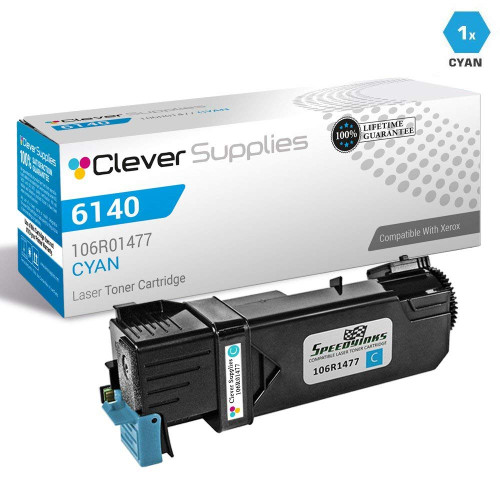
This is the code-first listing for the Phaser 6140 family's cyan supply: a single compatible cartridge, part number 106R01477, priced at $31.41 and rated at up to 2,000 pages. It serves the Phaser 6140, Phaser 6140N and Phaser 6140DN — three names for one platform that all drink from the same cyan unit. If your printed blues have started arguing with your screen, this is the half of the argument that lives in the printer. The rest of the family's supplies sit on our Xerox page.






 See Compatible Printers
 Read more about our ink!