





 See Compatible Printers
 Read more about our ink!
Samsung
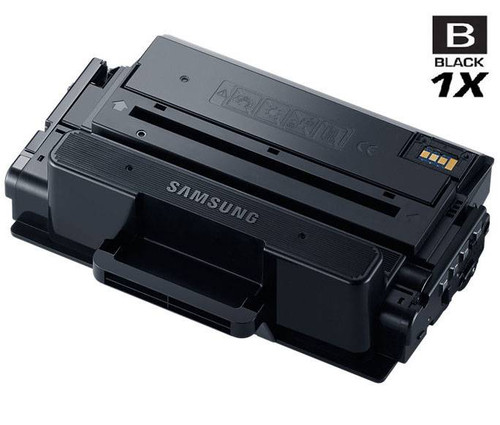
Compatible Samsung ProXpress M3320DN High Yield Laser Toner Cartridge Black

Amazon Price:

- Page Yield:
- 5,000 Pages
- Availability:
- In Stock
- Shipping:
- Calculated at Checkout
- Compatible Printers
- ProXpress M3320ND
- ProXpress M3370FD
- SL-M3820DW
- SL-M3870FW
- SL-M4020ND
- SL-M4070FRi>
- ProXpress M3320DN
- Specifications
- SKU:
- ProXpress-M3320DN
- Printer Brand:
- Samsung
- OEM Number:
- MLT-D203L
- Ink Color:
- High Yield Black
- Page Yield:
- 5,000 Pages
- Printer Type:
- Laser Cartridge
- Condition:
- New Compatible
- Description
- Yields up to 5000 pages
- Trust compatible Samsung ProXpress M3320DN toner cartridges to provide outstanding print quality for all your important photos and documents
- Unlike bargain replacement toners Samsung toner cartridges are designed specifically to work with Samsung printers for exceptional reliability and performance
- Ink/Toner Color: Black
- Ink/Toner Pack Size: 1/Pack
- Supply Type: Toner
- Compatible with: Samsung SL M4070 SL M3320 SL M3370 SL M3870 SL M4020 ProXpress M3320 M3820 M4020 M4070 etc. series laser printers
- Cartridge Yield Type: High Yield
- Ink/Toner Cartridge Type: Compatible
- Reviews

/> 

Compatible Samsung ProXpress M3320DN High Yield Laser Toner Cartridge Black offers vibrant print quality exceptional reliability and performance for your photos and documents.
Samsung Mono black toner cartridge with high performance provides better print quality for your photos and documents. Cartridge yields standard 5000 pages and is Compatible with Samsung SL M4070 SL M3320 SL M3370 SL M3870 SL M4020 ProXpress M3320 M3820 M4020 M4070 etc. series laser printers
Features:
Frequently Asked Questions
Our ProXpress M3320DN is shared by the whole team — how quickly will we use up 5,000 pages?
Faster than a single-desk printer would, simply because several people's work lands on the same machine. Shared workgroup printers commonly turn out 1,500 to 3,000 pages a month, which puts one MLT-D203L cartridge at roughly two to three months of service. If your team prints long documents daily, plan toward the shorter end; the 5,000-page rating assumes light, standard test-page coverage, and dense pages use more toner.
What running cost does this cartridge give the M3320DN?
At $49.51 against a 5,000-page rating, the toner cost is about 0.99 cents a page — effectively a cent a page for budgeting purposes. For a shared machine that is a comfortable figure, and it is the high-yield MLT-D203L that achieves it: the standard-yield MLT-D203S carries a smaller fill, so its per-page cost on the same printer works out higher even though the cartridge itself is cheaper to buy.
How can we tell how much printing this cartridge has left?
The printer's supplies status gives you the practical answer — check the toner level through the control panel or the machine's status page before a big run. The page count is the other useful gauge: if you know roughly when the cartridge went in and how much the team prints in a month, you can see the end coming weeks ahead and reorder in good time rather than in a panic.
Does this cartridge fit other Samsung printers in our office?
Very likely, if they are from the same generation. The MLT-D203L serves the whole ProXpress workgroup family — the M3370 and M3820 series as well as the M3320DN — and is also listed for the SL-M4020ND, SL-M3870FW and SL-M3820DW. That commonality is handy for a shared office: one cartridge type on the shelf can cover several machines.
Our prints have a repeating mark down the page — is that the toner?
Usually not. Fading and light print suggest the toner is running low, but a mark that repeats at the same spacing on page after page comes from the imaging drum. On this platform the drum is the separate MLT-R203 unit, and it lives through several toner cartridges before it needs attention. Swapping the toner will not cure a drum mark, so it is worth telling the two symptoms apart before you order.
What cover backs this purchase?
A one-year warranty and free returns for a year. If the cartridge faults within that period — leaking, streaking or failing early — it comes back to us free of charge, with the full terms on the shipping and returns page. Stock ships from our warehouses in IL, PA, GA and CA, and support is on hand Monday to Friday, 9 AM to 5 PM CST.
How does duplex printing on the M3320DN count against the cartridge's 5,000 pages?
Each printed side counts. A duplex sheet carries two imaged sides, so a 100-sheet two-sided document spends 200 pages of the MLT-D203L's rating, not 100. Teams new to duplexing sometimes think a cartridge has underperformed when it is really the arithmetic that changed — the printer's page counter, which counts sides, is the figure to reconcile against the rating, not the ream count.
On a shared M3320DN, who should keep an eye on the toner level?
One named person, with everyone else knowing who it is. Shared machines fail socially before they fail technically: each user assumes someone else has ordered. Have that one person check the supplies status weekly, keep a spare MLT-D203L by the machine, and make the house rule simple — whoever fits the last spare says so the same day. That small routine is what keeps a workgroup printer from standing empty.
Would running internal documents in draft mode stretch this cartridge further?
Yes — draft and toner-save settings lay down less toner per page, so internal drafts, proof copies and circulation documents cost less of the MLT-D203L's fill, and they come off lighter by design. Keep final, customer-facing work on the normal setting, where density matters, and let the drafts ride on the lighter one. Just remember the setting when judging output: a pale draft is the mode working, not the cartridge failing.
Why keep the cartridge we have just taken out for a day or two?
Because it is the fastest diagnostic you own. If the fresh MLT-D203L prints oddly, refitting the old one for a single page tells you whether the oddness followed the cartridge or stayed with the printer — a repeating mark that persists across both points at the MLT-R203 drum, not the toner. Once the new cartridge has settled and is printing cleanly, the old one can go for recycling.
About This Cartridge for the Samsung ProXpress M3320DN
An MLT-D203L high-yield cartridge sized for a shared M3320DN: 5,000 pages at $49.51, around a cent a page, covered by a year's warranty and a year of free returns. It belongs to our compatible Samsung ProXpress range and is dispatched from our warehouses in IL, PA, GA and CA.
Related Items
Samsung
Compatible Samsung ProXpress M3320DN High Yield Laser Toner Cartridge Black 5 Pack
/>


Samsung
Compatible Samsung ProXpress M4020 High Yield Laser Toner Cartridge Black
/>

Samsung
Compatible Samsung ProXpress M3820DW High Yield Laser Toner Cartridge Black
/>

Samsung
Compatible Samsung ProXpress M4070 High Yield Laser Toner Cartridge Black
/>