





 See Compatible Printers
 Read more about our ink!
Okidata
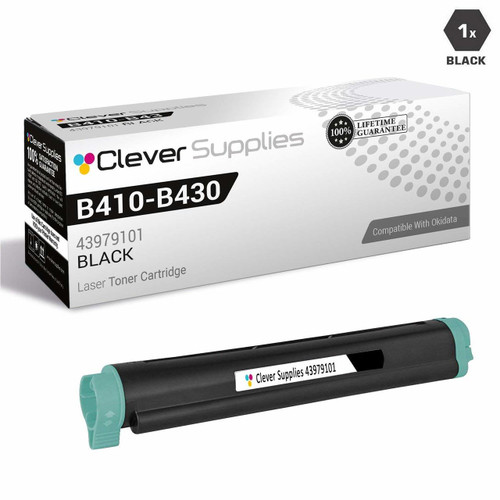
Compatible Okidata MB470 MFP Laser Toner Cartridge Black
- Page Yield:
- 3,500 Pages
- Availability:
- In Stock
- Shipping:
- Calculated at Checkout

Amazon Price:

- Page Yield:
- 3,500 Pages
- Availability:
- In Stock
- Shipping:
- Calculated at Checkout
- Compatible Printers
- Specifications
- SKU:
- Oki-MB470-MFP
- Printer Brand:
- Okidata
- OEM Number:
- 43979101
- Ink Color:
- Black
- Page Yield:
- 3,500 Pages
- Printer Type:
- Laser Cartridge
- Condition:
- New Compatible
- Description
- Yield up to: 3500 Pages
- Ink/Toner Color: Black
- Ink/Toner Pack Size: 1/Pack
- Supply Type: Toner
- Compatible with: Okidata B: 420 430 430d 6250 MB: 460 470 480 series printers
- Cartridge Yield Type: Standard
- Ink/Toner Cartridge Type: Compatible
- Reviews

/> 

Compatible Okidata MB470 MFP Laser Toner Cartridge Black fade-resistant pigment for professional laser documents with lasting impact.
Okidata MB470 MFP Toner cartridge in black color yields approximately 3500 pages print. Toner cartridge produces high quality reliable printing in your home or office.
Features:
Frequently Asked Questions
How should a busy office plan toner for an MB470 MFP?
Start by counting everything the machine produces — prints, copies and received faxes all draw from the same cartridge. If your MB470 MFP turns out 700 pages a month across all functions, one 43979101 cartridge rated at 3,500 pages lasts about 5 months. Doubling that volume halves the life, so the combined page count is the only number that matters for planning.
What does that work out to per page?
The cartridge costs $27.70 and is rated at 3,500 pages, so each page — printed, copied or faxed — carries roughly 0.79 cents of toner cost. At 700 pages a month, that is about $5.53 a month in toner for the whole machine, which makes the MB470 MFP a cheap unit to keep fed.
Can I stretch a cartridge that is nearly empty?
A little. When output starts to lighten, pull the cartridge out and rock it gently from side to side to redistribute the toner that is left. On an MFP this often restores acceptable quality for the next batch of copies or faxes while a replacement ships. It is a short-term trick, not a refill — keep the new cartridge coming.
Is there anything to check before I assume the cartridge is empty?
If one function looks bad and another looks fine — copies pale but prints crisp, for example — the cartridge may not be the whole story, since a dirty scanner glass affects only copies. But if everything the MB470 MFP produces is fading the same way, toner is the common factor and the cartridge is the place to start.
What warranty and returns cover does it come with?
A 1-year warranty, plus free returns for a full year — if the cartridge fails early or turns up defective, sending it back costs you nothing. The full process is on our shipping and returns page, and support is available Monday to Friday, 9 AM to 5 PM CST.
How quickly can a replacement get to us?
We ship from warehouses in Illinois, Pennsylvania, Georgia and California and dispatch from the one nearest you. With stock in four regions, a replacement 43979101 for a shared office machine usually has a short trip.
After fitting a new cartridge, how do I check every function of the MFP in one pass?
Run the machine through its three voices: print a page from a computer, copy a page at the glass, and — if a colleague can send one — receive a test fax. All three draw on the same fresh 43979101, so all three should emerge with the same even darkness. Any function that still looks weak while the others are strong is telling you its problem lies outside the toner supply.
Why does a shared MFP deserve a spare on the shelf more than a personal printer does?
Because its failures are public and unscheduled. The MB470 MFP prints other people's copies and incoming faxes all day, including jobs nobody in the room requested. When its cartridge fades, work belonging to the whole office degrades at once. A sealed spare beside the machine converts that event into a two-minute interruption instead of a stalled queue waiting on a delivery.
Do copies of dark, dense originals use more toner than ordinary office prints?
Yes — coverage is coverage, whichever door the page enters by. A copy of a photograph, a shaded form or a bold graphic original lays down far more toner than a page of plain text, so a morning spent copying dense originals can pull the 43979101 down faster than a day of memos. When you estimate a cartridge's remaining life on an MFP, the density of what passes over the glass counts as much as the page total.
Why do received faxes so often reveal a dying cartridge before prints do?
Because fax pages arrive on the machine's schedule, not yours. Nobody previews them, nobody chooses a lighter setting, and they print at whatever toner level the moment finds — so a cartridge in its last stretch announces itself on an incoming fax while the prints you send still look acceptable. A pale morning fax is worth treating as the cartridge's early confession, and a prompt swap protects the faxes still to come.
About This MB470 MFP Cartridge
Sold as a single unit for $27.70, this compatible cartridge matches the Okidata 43979101 and is rated at 3,500 pages in the MB470 MFP — a rating that printing, copying and faxing all share. At roughly 0.79 cents per page across every function, it is an economical way to run a multifunction machine. Other models in the fleet are covered in our Okidata range.
Stocked alongside it for the same machines: the MB470 MFP 5 pack, the high-yield 43979201 cartridge and the matching 43979001 drum unit. Owners of Oki B430d, MB460 and MB470 all reorder this same 43979101.
Related Items

Okidata
Compatible Okidata MB470 MFP Laser Toner Cartridges Black 5 Pack
/>

Okidata
Compatible Okidata MB470 Laser Toner Cartridge Black
/>

Okidata
Compatible Okidata MB470 Laser Toner Cartridges Black 5 Pack
/>
Okidata
Compatible Okidata MB480 MFP Laser Toner Cartridge Black
/>