




X264dn
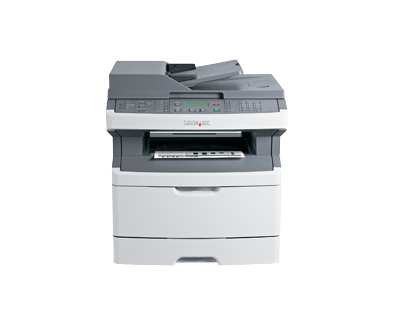
Automatic two-sided printing and Ethernet sharing turn the Lexmark X264dn into a proper workgroup machine rather than a personal one, and its supply choice matches that ambition. Everything it prints, copies or scans is produced by a single high-yield black cartridge, the X264H11G, rated for roughly 9,000 pages. A department can run for months between swaps, and when the low-toner warning finally appears there is exactly one part number to reorder.
The dn badge tells the story of this model: duplex and network, both standard. Set two-sided printing as the office default and paper consumption drops on every long report, every meeting pack, every doubled-sided handout — savings that compound quietly across the machine's working life. Lexmark also rates a standard-yield cartridge for this engine at about 3,500 pages, and it fits fine, but on a shared machine that prints all day the high-yield cartridge is the one that keeps cost per page down and interruptions rare. Print shops, schools and busy offices that queue jobs from several desks will feel that difference most.
Toner Cartridges for X264dn
| Cartridge | Color | Page Yield |
|---|---|---|
| X264H11G — single cartridge | Black | ~9,000 pages |
| X264H11G — 2 pack | Black | ~9,000 pages each |
| X264H11G — 4 pack | Black | ~9,000 pages each |
Which cartridge should you buy?
Start with the yield math. At roughly 9,000 pages, the high-yield X264H11G lasts about two and a half times as long as the standard-yield cartridge rated near 3,500 pages, and longer life almost always means a lower cost per page. On a personal printer that trade might not matter; on a shared X264dn that several people depend on, it decides how often someone has to stop work and swap toner. Our recommendation for most offices is the 2 pack: one cartridge in the machine, one waiting in the cabinet, and a reorder only when the spare goes in. Teams that print in volume — end-of-month reporting, course packs, client files — should step up to the 4 pack and think about toner a few times a year instead of every few weeks.
Chip, toner and everyday use
The cartridge's chip talks to the printer the moment it is installed, so toner levels show correctly on the panel and through the network interface your office already uses to check the machine. Swapping takes a minute: open the front door, pull the spent cartridge straight out, give the new one a gentle side-to-side rock to distribute the powder, strip the packaging seals, and slide it home until it seats. If a long run of pages starts to look light near the end of a cartridge's life, removing it and rocking it the same way often coaxes out a few hundred extra pages while the replacement ships. Store spares flat, sealed, and out of direct sun.
Frequently Asked Questions
Which toner does the Lexmark X264dn take?
The cartridge stocked for this machine is the high-yield black X264H11G, rated for about 9,000 pages. It is the only supply the X264dn consumes — printing, copying and scanning output all come from that one cartridge.
How does the high-yield cartridge compare with the standard one?
Lexmark rates the standard-yield cartridge for this engine at roughly 3,500 pages, against about 9,000 for the X264H11G. The high-yield version costs more per cartridge but less per page, and it cuts the number of swaps a busy shared machine needs each year.
Can one cartridge serve several of our machines?
Yes — this is a shared platform. The same X264H11G runs in the X363 and X364 families as well as the X264 line, so a mixed fleet can be stocked from a single shelf of cartridges.
Are these cartridges original Lexmark products?
No, they are premium compatibles made to fit and print like the original. They carry our 1-year warranty and 1-year returns coverage, and the built-in chip keeps the printer's toner reporting working normally.
More printers that use the same cartridges
Every model below runs on the same X264H11G cartridge family: