




BizHub C452
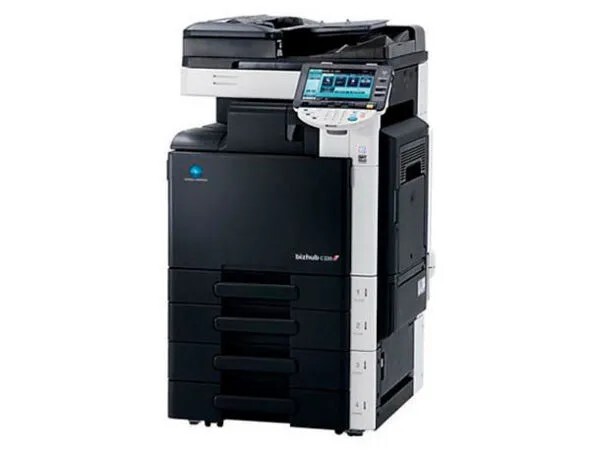
The BizHub C452 is a high-volume Konica Minolta color MFP, and everything it prints comes out of the TN-613 toner family: black TN-613K (Konica Minolta number A0TM130), cyan TN-613C (A0TM430), magenta TN-613M (A0TM330) and yellow TN-613Y (A0TM230). This page carries the family in depth — the four A-code singles, a second line of singles and multi-cartridge sets — so a department can reorder exactly the position that ran dry instead of replacing the set wholesale.
High-volume color is where toner economics compound fastest. A C452 does not sip toner; it works through four cartridges across thousands of departmental pages, and small per-cartridge savings repeat themselves every single cycle. That is the case for compatible TN-613 cartridges on this machine: the volume that makes OEM pricing painful is the same volume that makes the compatible alternative add up. Because each color is its own cartridge, the machine also tells you precisely where the money goes — the color that empties first is a fingerprint of what your department actually prints.
Toner Cartridges for BizHub C452
| Cartridge | Color | Page Yield |
|---|---|---|
| TN-613K (A0TM130) | Black | See product page |
| TN-613C (A0TM430) | Cyan | See product page |
| TN-613M (A0TM330) | Magenta | See product page |
| TN-613Y (A0TM230) | Yellow | See product page |
| TN613 Black 2-Pack (TN613K) | Black | See product page |
| TN613 Cyan (TN613C) | Cyan | See product page |
| TN613 Magenta (TN613M) | Magenta | See product page |
| TN613 Yellow (TN613Y) | Yellow | See product page |
| TN-613 3 Color Set (A0TM430 / A0TM330 / A0TM230) | Cyan / Magenta / Yellow | See product page |
| TN-613 4 Color Set (A0TM130 / A0TM430 / A0TM330 / A0TM230) | Black / Cyan / Magenta / Yellow | See product page |
| TN-613 Premium Quality 4 Color Set | Black / Cyan / Magenta / Yellow | See product page |
| TN613 4 Color Set (TN613K, TN613C, TN613M, TN613Y) | Black / Cyan / Magenta / Yellow | See product page |
| TN613 3 Color Set (TN613C, TN613M, TN613Y) | Cyan / Magenta / Yellow | See product page |
| TN613 5 Color Set (TN613K, TN613C, TN613M, TN613Y) | Black / Cyan / Magenta / Yellow | See product page |
| TN613 6 Color Set (TN613C, TN613M, TN613Y) | Cyan / Magenta / Yellow | See product page |
| TN613 8 Color Set (TN613K, TN613C, TN613M, TN613Y) | Black / Cyan / Magenta / Yellow | See product page |
Which cartridge should you buy?
Match the purchase to the position that is empty. When a single color runs down, its single cartridge — TN-613M for magenta work, TN-613Y for yellow — puts the machine back in service without retiring three healthy cartridges. Reserve the set listings for planned refreshes: a 4 Color Set makes sense when several positions are low together, and the 2 Black pack suits text-heavy months when TN-613K cycles twice as fast as the colors. For the shelf, a full spare set plus one extra black covers most C452 offices; black leads depletion wherever documents are mostly text, so it earns the extra slot. Every listing above is a compatible cartridge backed by a 1-year warranty and 1-year returns.
Chip, toner and everyday use
The C452 identifies each cartridge by its chip, and it expects all four positions filled before it will print anything — there is no running a color job around an empty black, or a black job around an empty yellow. When a warning appears, note which position it names; the fix is that cartridge, not a set. Keep the spare set sealed and stored flat in a cool, dry place, and install replacements promptly once a cartridge is truly empty rather than shaking it through another week — a rocked cartridge buys pages in an emergency, but running a position dry mid-job is how deadlines get missed on a machine this size.
Frequently Asked Questions
Can the BizHub C452 use cartridges from an older Konica Minolta generation?
No. The TN-613 family belongs to this C452 generation and does not interchange with cartridges from earlier C-series models. A cartridge from the wrong TN family risks fit and recognition problems, so match the TN-613 code — or its A0TM number — before ordering.
How many spare TN-613 cartridges should a C452 office keep?
One full CMYK set plus an extra black is the practical reserve. Black depletes first in text-heavy environments, while the colors follow your document mix, so the spare shelf should mirror that pattern rather than holding four of everything.
Can the C452 keep printing color work if the black cartridge is empty?
No. An empty TN-613K stops the engine just as an empty color would; all four cartridges need toner available for any output at all. That interlock is exactly why the extra black spare earns its shelf space.
What is the difference between the two TN-613 lines on this page?
Both lines are compatible cartridges for the same four positions; they are simply listed under two naming styles — the A-code singles (A0TM130 and its partners) and the TN613-named singles and sets. Order whichever listing matches the code on your purchase order; the positions and fit are the same.
More printers that use the same cartridges
The TN-613 family is shared across this BizHub group: BizHub C452DS, BizHub C552, BizHub C552DS, BizHub C652, BizHub C652DS.