






 See Compatible Printers
 Read more about our ink!
Hewlett Packard
CS Compatible Replacement for HP CE260A Toner / HP 648A Toner Cartridge Black

Amazon Price:

- Page Yield:
- 8500
- Availability:
- In Stock
- Shipping:
- Free Shipping
- Compatible Printers
- Specifications
- SKU:
- CE260A
- Printer Brand:
- Hewlett Packard
- OEM Number:
- CE260A
- Ink Color:
- Black
- Page Yield:
- 8500
- Printer Type:
- Laser Cartridge
- Condition:
- New Compatible
- Description
- Reviews

/> 

This listing is the compatible version of the Hewlett Packard CE260A toner cartridge; it is the black member of that four-cartridge series, the set that also runs in the HP CP4020 and CP4525 lines. One cartridge is rated to print up to 8,500 pages. Every cartridge is backed by our 1-year warranty and 1-year free returns. Every configuration this family is sold in — for the Color LaserJet Enterprise CP4025 and CP4525 series printers: the four-color set, the tri-color set, the six-color set and the black, cyan and magenta singles — is compared side by side in our Best HP 647A & 648A (CE260–CE263) Toner Cartridges guide.
Frequently Asked Questions
Which cartridge is this, exactly?
This is the CE260A black toner cartridge, also listed under the HP 648A family name. It is a single black cartridge for the Color LaserJet CP4025dn and the other CP4025/CP4525-series printers that take this cartridge family, and it is rated at 8,500 pages. If your reorder note says CE260A or 648A black, this is the cartridge it refers to — one black unit, priced at $57.20.
Why does the black cartridge on a color printer run out first?
Because most of what an office prints is text: letters, invoices, reports and forms are black-only pages, while the color cartridges sit idle on those jobs. On top of that, the black cartridge also lays down the text layer on color pages. A department machine can go through black two or three times faster than any single color, so black is usually the first supply to plan around.
How can I tell how much black toner is left?
Print a supplies status page from the control panel, or open the printer's embedded web server in a browser and read the black gauge there. The estimate is a planning guide rather than an exact page counter — heavy, dense pages use toner faster than light memos — but when the gauge drops into the low band, having a spare on the shelf is the difference between a two-minute swap and a stopped workgroup.
What is involved in changing the cartridge?
Open the front door, pull the old cartridge straight out by its handle, and keep it upright. Take the new cartridge out of its bag, rock it gently side to side a few times so the toner inside is evenly distributed, remove the protective tape, and slide it into the black slot until it seats. Close the door and the printer is ready — no tools and no settings to change.
How should a spare cartridge be stored?
Keep it sealed in its bag, flat, in a cool dry cabinet away from direct sunlight and heat vents. Stored that way, a spare keeps its full life until the day it is opened, so buying ahead for a busy department carries no penalty. Write the purchase date on the box if you rotate more than one spare, and always use the oldest first.
What cover and delivery terms come with it?
Every cartridge we sell is backed by a 1-year warranty and 1-year free returns, and the full terms are on our shipping and returns page. Orders leave from our warehouses in Illinois, Pennsylvania, Georgia and California, so transit time depends on which warehouse serves your address. Questions before or after an order: our support team answers Monday through Friday, 9 AM to 5 PM CST.
Why might this cartridge finish well before its 8,500 pages?
The rating is measured on standard test pages with light coverage. Real departments print denser work — full-page graphics, heavy charts, bold headline blocks — and every dense page lays down far more toner than a test page does. A graphics-heavy CP4025dn can therefore see noticeably fewer pages from its CE260A, while a machine living on plain memos may run past the rating. Treat the figure as a yardstick and the supplies gauge as the truth.
How will I know the cartridge is truly at its end?
Output fades evenly across the whole page — text goes uniformly gray rather than patchy. At that point a gentle side-to-side rock redistributes the last of the toner and buys a short run of acceptable pages. When the fading returns within a day or two of rocking, the cartridge is finished; repeated shaking after that only produces reprints, so plan the swap instead.
The first pages from a brand-new cartridge look slightly light — should I worry?
Usually not. Toner settles during shipping and storage, and a new CE260A sometimes needs a handful of ordinary pages before its output reaches full, even density. Print a short run of regular documents and watch the density settle. If pages are still light after a dozen or so, pull the cartridge out, rock it gently once more and reseat it firmly — a unit that is not fully seated can mimic a weak cartridge.
When a color runs out, does this cartridge have anything to do with it?
No. Black is one of four independent positions in the printer, and the three colors are separate cartridges that are ordered and changed on their own schedules. This CE260A only ever serves the black slot. Watch each position's gauge on the supplies status page and replace whichever position falls first — a color change never requires touching the black cartridge, and the black keeps printing through it.
About This CE260A Black Cartridge
This HP CE260A compatible cartridge is built for the daily reality of a shared color laser: long text runs, mixed reports and the occasional color deck, with black doing most of the work. Its 8,500-page rating suits departments that measure toner in weeks rather than months, and at $57.20 it keeps the cost of that everyday black output predictable. Keep one working in the machine and one sealed on the shelf, and black toner stops being an interruption.
Related Items

Hewlett Packard
CS Compatible Replacement for HP CE260A Toner Cartridge Black/ HP 647A Toner
/>


Hewlett Packard
CS Compatible Replacement for HP CE261A Toner Cartridge Cyan/ HP 648A Toner
/>
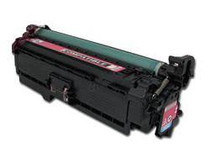
Hewlett Packard
CS Compatible Replacement for HP CE263A Toner / HP 648A Toner Cartridge Magenta
/>

Hewlett Packard
CS Compatible Replacement for HP CE261A Toner / HP 648A Toner Cartridge Cyan
/>