




Color LaserJet 4650N
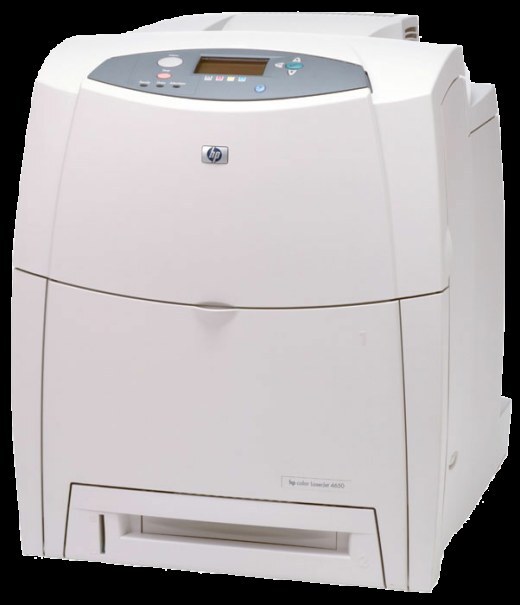
A shared color printer earns its keep in the queue, and the Color LaserJet 4650N was built for exactly that: a networked workgroup color laser that a whole office sends jobs to throughout the day. It runs the HP 641A cartridge family — C9720A black, C9721A cyan, C9722A yellow and C9723A magenta. Because shared color printing drains yellow and magenta fastest, those two colors also come in extended-yield 641X versions, C9722X for yellow and C9723X for magenta, and a 641X black, C9720X, is stocked alongside them.
One machine serving many desks has its own supplies rhythm. Nobody owns the 4650N, so nobody watches its toner the way a personal printer gets watched — the first sign of trouble is usually a faded chart in somebody's meeting handout. What the office prints decides which color dies first: slide decks and marketing proofs burn through magenta and yellow, while report-heavy teams mostly drain black. Keeping one spare of each color near the machine turns a toner stop into a two-minute swap instead of a stalled queue.
Toner Cartridges for Color LaserJet 4650N
| Cartridge | Color | Page Yield |
|---|---|---|
| C9720A | Black | See product page |
| C9721A | Cyan | See product page |
| C9722A | Yellow | See product page |
| C9723A | Magenta | See product page |
| C9720X | Black | See product page |
| C9721A | Cyan | See product page |
| C9722A | Yellow | See product page |
| C9723A | Magenta | See product page |
| C9720A | Black | See product page |
| C9721A | Cyan | See product page |
| C9722A | Yellow | See product page |
| C9723A | Magenta | See product page |
| C9723A | Magenta | See product page |
| C9721A | Cyan | See product page |
| C9723A | Magenta | See product page |
| C9722A | Yellow | See product page |
| C9722X | Yellow | See product page |
| C9723X | Magenta | See product page |
Sets and multipacks stocked for this family:
- 641A four-color set (CS listing)
- 4650n four-color set (CS listing)
- 4650 black two-pack
- 4650 three-color set
- 4650 five-color set
- 4650dn black two-pack
- 4650dn three-color set
- 4610n four-color set
- 4650 four-color set
- 4650dn four-color set
- 4650n four-color set
Which cartridge should you buy?
Start with the color your queue actually burns. On a shared 4650N that is usually yellow or magenta, and for those two the extended-yield 641X versions are the economical habit: fewer swaps, fewer interruptions, and a lower cost per page over the cartridge's life. Black is a separate decision — text-heavy teams can stay with the standard black or stock a black two-pack so a spare is always on the shelf. When two or more colors are flagged low at the same time, a four-color set refreshes the whole machine in one order and one round of swaps. If only one color is low, buy that single; replacing cartridges with toner left in them is money out of the office budget for nothing.
Chip, toner and everyday use
Each cartridge carries a chip the printer reads for level reporting, so a fresh cartridge has to seat fully before the panel will register it — push it in until it settles, and peel the protective seal away completely before it goes in. When a color starts to fade mid-job, pull that cartridge out and rock it gently from side to side; the remaining toner redistributes and usually carries the job to the end of the day. Page yields are estimates based on standard coverage, so a graphics-heavy office will see lower real counts than a text-heavy one. Keep spare cartridges sealed, flat and out of direct light until the moment they are needed.
Frequently Asked Questions
What toner does the Color LaserJet 4650N take?
Four cartridges from the HP 641A family: C9720A in black and C9721A, C9722A and C9723A in cyan, yellow and magenta. Yellow and magenta also exist in extended-yield 641X form as C9722X and C9723X, and there is a 641X black, C9720X.
Why do yellow and magenta run out first on the 4650N?
Shared office color work — charts, logos, highlighted documents and slide decks — leans far harder on yellow and magenta than on cyan or black text toner. The printer reports each color separately, so the supplies page tells you exactly which one is next.
Does the Color LaserJet 4650N need all four cartridges to print?
Yes, all four cartridges need to be installed for the machine to run, even when a job is mostly black text. An empty color will hold up the queue, which is why busy offices keep a sealed spare of each color within reach of the printer.
How do I find the 4650N IP address when setting up a driver?
Print a configuration page from the control panel and the network address is listed on it. Plugged into Ethernet, the printer picks up an address automatically from most office routers, and that printed page gives you the number to point the driver at.
More printers that use the same cartridges
The same 641A cartridges also serve these models in the 4600 and 4650 lines: Color LaserJet 4600, Color LaserJet 4600DN, Color LaserJet 4600DTN, Color LaserJet 4600HDN, Color LaserJet 4600N, Color LaserJet 4610, Color LaserJet 4610N, Color LaserJet 4650, Color LaserJet 4650DN, Color LaserJet 4650DTN, Color LaserJet 4650HDN, HP 641A.