






 See Compatible Printers
 Read more about our ink!
Dell
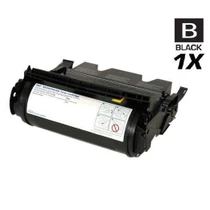
Compatible Dell 341-3568 Black Toner Cartridge/ (JH565/ KH225)
- Page Yield:
- 2,000 Pages
- Availability:
- In Stock
- Shipping:
- Calculated at Checkout

Amazon Price:

- Page Yield:
- 2,000 Pages
- Availability:
- In Stock
- Shipping:
- Calculated at Checkout
- Compatible Printers
- Color Laser 3010cni>
- Color Laser 3010
- Color Laser 3010CN
- Dell (341-3568, 341-3571, 341-3570, 341-3569)
- Specifications
- SKU:
- 341-3568
- Printer Brand:
- Dell
- OEM Number:
- 341-3568, JH565
- Ink Color:
- Black
- Page Yield:
- 2,000 Pages
- Printer Type:
- Laser Cartridge
- Condition:
- New Compatible
- Description
- Yields up to 2000 pages
- Compatible Dell 341-3568 Black Toner Cartridge (JH565 KH225) consistently produces high-resolution printouts with enhanced graphics and sharp text
- Unlike bargain brand toners Dell 341-3568 Black Toner Cartridge (JH565 KH225) is specifically engineered to work in Dell printers for optimum quality and performance
- Packaging: Each
- Compatible with: Dell 3010 3010cn laser printer
- Print technology: Laser
- Coverage percent: 5%
- Reviews
-
Cheap alternative
Great alternative to expensive toner cartridges. I recommend this for anyone with the Dell. I buy more whenever I'm down to one.
-
A+ as always
Highly recommended seller.
-
Good quality products
The print quality seems to be as good as the original ones from Dell. However the black cartridge print quality diminished a couple of weeks after installing (very light grey instead of black). Sent an email to their customer service and received a respon
-
Quick Delivery
We ordered a large quantity of these toner cartridges they have a very good shelf life and we have not had a single problem with any of the cartridges. We did purchase some cheap/low quality cartridges in the past and most did a very poor quality printing
-
Great product !!
I bought this last month and the installation went easily. It has been working great without paper jams!!
-
It works no issues
Product is as represented. It fit well and the instruction sheet was a plus. I had to reboot the printer for it to recognize the cartridge. Quality is satisfactory. So far so good.
-
Got the part SUPER fast...thank-you!
Part worked well for a replacement...no errors no problems with the printer after install. For the price I can't beat it.

/> 

Dell 341-3568 Black Toner Cartridge (JH565 KH225) delivers consistent quality with high-resolution printouts sharper images and text
Dell 341-3568 Black toner cartridge consistently produces high-resolution printouts with enhanced graphics and sharp text. Toner cartridge is compatible with Dell 3010 3010cn printers and yields up to 2000 pages.
Features:
Frequently Asked Questions
What does one printed page actually cost with the 341-3568?
This cartridge costs $37.16 and is rated at 2,000 pages, which works out to roughly 1.86 cents per page — about $18.58 for every 1,000 pages. We will be straight with you: that is not bargain-basement page pricing. The Dell 3010 takes small cartridges, and small cartridges almost always carry a higher per-page cost than big high-yield ones. What the 341-3568 offers instead is a modest upfront price for a printer that was built for light, everyday black-and-white output.
How long does a 2,000-page rating last in a small office?
It depends entirely on how much your Dell 3010 prints. At around 10 pages a day, the 341-3568 covers roughly 200 days of printing. At 50 pages a week it stretches to about 40 weeks, and at 100 pages a week you are looking at roughly 20 weeks. These figures follow the standard 5% coverage rating, so dense pages with heavy text blocks, logos or shading will use the toner faster than light memos do.
Why is this same cartridge also seen under the numbers JH565 and KH225?
Dell has referenced this black cartridge by more than one part number over the years. The 341-3568, JH565 and KH225 all point to the same black cartridge for the Dell 3010, which is why our listing carries the alternate numbers in its name. If the cartridge coming out of your printer is stamped with any of those three numbers, this is the replacement you are looking for.
What are the signs that the 341-3568 is running low?
On the 3010, a tiring black cartridge usually shows up as prints that look washed out, horizontal streaks, or text that is dark on one side of the page and pale on the other. Gently rocking the cartridge side to side can redistribute the remaining toner and buy a little more life, but once output stays gray after that, the cartridge is genuinely spent and it is time to swap in a fresh 341-3568.
Is this a genuine Dell cartridge?
No — this is a compatible 341-3568 built to match the original's fit and 2,000-page rating, and we label it plainly as compatible rather than dressing it up as Dell-made. It is covered by our one-year warranty, so if it fails or underperforms within that year, we make it right.
What happens if I order the wrong cartridge or it arrives with a problem?
You get a full year of free returns on this cartridge, so there is no risk in trying it. The full terms are on our shipping & returns page. Orders ship from our warehouses in Illinois, Pennsylvania, Georgia and California, and if you want help confirming the 341-3568 is right for your 3010 before you order, our support team is available Monday to Friday, 9 AM to 5 PM Central.
Is it worth keeping a spare 341-3568 for such a light-duty printer?
Yes — the economics differ from a big printer, but the logic is the same. At 10 pages a day a cartridge lasts most of a year, so a spare is a small, one-off outlay that sits sealed until the day the installed one fades. When that day comes, the swap takes minutes and you then have months of printing in hand while you order the next spare at leisure. No rush orders, no gap in a printer the office quietly depends on.
How should we judge the first prints from a new cartridge?
Print a document you know well — the same letterhead or report you print every week — and look at the third or fourth page rather than the first. A new 341-3568 settles over its opening pages, so early sheets can look slightly uneven without meaning anything. By page three the output should be the dense, even black you expect from the 3010; compare it with a good older copy if you keep one, and the judgment takes seconds.
Prints look pale but the cartridge is nearly new — what else could it be?
Paper is the usual second suspect. Damp or low-grade paper takes toner poorly and can make a healthy 341-3568 look washed out; try a fresh ream from a sealed pack before condemning the cartridge. Check also that the cartridge is fully seated — a unit sitting slightly out of position prints light on one side. Toner is the most common cause of pale output, but it is not the only one, and the cheap checks come first.
What should we do with the old cartridge once the new one is in?
Keep it for the first few days. If the new 341-3568 prints well across that window, the old one has done its job as a comparison point and can go out with toner recycling or your office's cartridge collection. If a problem appears, the old cartridge goes back in for one test print — that single swap tells you whether the fault followed the cartridge or lives in the 3010 itself. Mark the spent unit so it is not mistaken for the spare.
About This Dell 341-3568 Black Toner Cartridge
The Dell 341-3568 (also referenced as JH565 and KH225) is the black toner cartridge for the Dell 3010 laser printer, rated at 2,000 pages and priced at $37.16 — roughly 1.86 cents per page. This compatible version matches the original cartridge's fit and rated yield, and it comes backed by a one-year warranty and one-year free returns from Clever Supplies. You can browse the rest of our range for this printer family on our Dell page.
7 Reviews
Related Items

Dell
Compatible Dell 341-3568/ 341-3571/ 341-3570/ 341-3569 Laser Toner Cartridge 4 Color Set
/>



Dell
Compatible Dell 5210 Toner Cartridge Black (341-2916)
/>
Dell
Compatible Dell 341-2919 Toner Cartridge High Yield Black
/>


Dell
Compatible Dell 5210 Toner Cartridges Black 3 Pack (341-2916)
/>