Frequently Asked Questions
The 3115cn copies and scans as well as prints. Does copying use the same toner?
Yes — every copy that comes out of the 3115cn is printed by the same four cartridges that handle its print jobs: the 310-8092 black, the 310-8094 cyan, the 310-8096 magenta and the 310-8098 yellow, each rated at 8,000 pages. That surprises offices that budget toner by print volume alone, then watch color cartridges drain faster than expected because the copier glass is busy all day. A multifunction machine's true toner appetite is prints plus copies, and color copies sip from all three color cartridges at once. Planning around the full set accounts for both workloads.
What comes in this set?
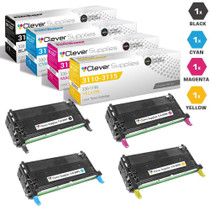
Four high-yield compatible cartridges, one for each slot of the 3115cn: the black 310-8092, the cyan 310-8094, the magenta 310-8096 and the yellow 310-8098. Each is rated at 8,000 pages at the standard 5% coverage used across the industry. Because the four ratings are equal, the set is balanced by design — no slot is the designated weak link — and a full change renews print and copy output together.
Our copies have gone pale but prints still look acceptable. What's happening?
Copies expose a weakening cartridge before prints do, because a copy starts from a scanned original and any density loss shows twice — once in the scan's expectations and once in the output. Pale, washed copies with acceptable prints usually mean one cartridge is nearing the end of its rating: flat blues point to the cyan 310-8094, tired reds to the magenta 310-8096, weak yellows and greens to the 310-8098, and gray, thin text to the black 310-8092. Replacing the full set restores both functions at once and ends the guesswork about which slot goes next.
How does the $312.58 price translate for an MFP's workload?
About $78.15 per cartridge, and roughly 0.98 cents per page against each cartridge's 8,000-page rating. For a multifunction machine the useful way to read that is total cost of output: every printed page and every copied page comes out of the same four slots, so one set price covers the machine's entire output function. One $312.58 line item renewing everything is simpler to budget than four separate purchases scattered across the year.
What if a cartridge fails partway through its life?
It is covered. Every cartridge in the set carries a 1-year warranty, and the set has 1-year free returns if a cartridge does not perform as it should — the terms live on our shipping and returns page. These are compatible cartridges, not Dell-manufactured ones; for a machine that prints, copies and scans for a whole office, that warranty window is what keeps an early failure from becoming an unplanned expense.
Where does the set ship from, and can we get help installing it?
Sets leave from one of our four US warehouses — Illinois, Pennsylvania, Georgia or California — whichever is nearest to you. Support is available Monday to Friday, 9 AM to 5 PM CST if a cartridge seats oddly or output does not clean up after a change. The broader compatible range for the 3115cn and its sister models is on our Dell toner page.
Can we use the 3115cn's counters to plan toner around print and copy volume together?
Yes — read the machine's total output counter rather than the print counter alone. Every printed page and every copied page draws on the same four cartridges, the 310-8092, 310-8094, 310-8096 and 310-8098, so the combined count is the figure that maps onto their 8,000-page ratings. Note the total when a set goes in and check it monthly; when the combined count approaches the set's working life, order the next set before either function runs dry.
Do double-sided copies count double against the ratings, the way duplex prints do?
They do — the rating counts printed sides, whichever function produced them. A two-sided copy of a two-page original is two sides of output from the 310-8092, 310-8094, 310-8096 and 310-8098, on a single sheet. Offices that duplex most copies will find the cartridges' real sheet count looks like half the rating while the side count is exactly on it. It is worth remembering when the numbers seem to disagree: the cartridges count sides, the paper tray counts sheets.
Should we keep a simple change log on a shared multifunction machine?
It pays for itself quickly. A note taped inside the supply cupboard — date, which of the 310-8092, 310-8094, 310-8096 or 310-8098 was changed, and the counter reading at the time — tells the next person everything they need: which slot is oldest, which is freshest, and how fast the machine is consuming each color. On a 3115cn used by a whole office, that thirty-second habit ends the guesswork about whether a pale copy means a new problem or a cartridge everyone forgot was due.
What should we do with the four empties after a full change on the 3115cn?
Box them together. As each spent cartridge comes out — 310-8092, 310-8094, 310-8096, 310-8098 — put it into the packaging its replacement arrived in, which keeps residue contained, and hold the four until the new set has proved itself on both prints and copies. A shared machine's empties have a way of migrating to desks and windowsills; one collection box by the machine keeps them in a single place so they can leave the office in one trip.
About This Dell 3115cn Set
This is the complete four-cartridge compatible high-yield toner set for the Dell Color Laser 3115cn multifunction printer: the 310-8092 black, the 310-8094 cyan, the 310-8096 magenta and the 310-8098 yellow, each rated at 8,000 pages, priced at $312.58 for the set. It ships from one of our warehouses in Illinois, Pennsylvania, Georgia or California, and it is covered by our 1-year warranty and 1-year free returns.







 See Compatible Printers
 Read more about our ink!