






 See Compatible Printers
 Read more about our ink!
Hewlett Packard
CS Compatible Replacement for HP 826A Toner Cartridges Black (CF310A)

Amazon Price:

- Page Yield:
- Black: 29000
- Availability:
- In Stock
- Shipping:
- Free Shipping
- Compatible Printers
- Color LaserJet M855dn
- Color LaserJet M855x+
- Color LaserJet M855xh
- Color LaserJet Enterprise M855dn
- Color LaserJet Enterprise M855x+
- Color LaserJet Enterprise M855xh
- Enterprise M855dn
- Enterprise M855x+
- Enterprise M855xh
- LaserJet M855dn
- LaserJet M855x+
- LaserJet M855xh
- LaserJet Enterprise M855dn
- LaserJet Enterprise M855x+
- LaserJet Enterprise M855xhi>
- HP 826A
- Specifications
- SKU:
- CS-HP--826A-BK
- Printer Brand:
- Hewlett Packard
- OEM Number:
- CF310A
- Ink Color:
- Black
- Page Yield:
- Black: 29000
- Printer Type:
- Laser Cartridge
- Condition:
- New Compatible
- Description
- Reviews

/> 

Clever Supplies brand products are made in the USA! Why pay more for cheaper product with a high defective rate? You will end up having to send it back to the manufacturer. Get a quality product that you KNOW will work. Purchase the Clever Supplies Products Compatible for HP 826A (CF310A) Black and experience the difference! All Clever Supplies brand products are backed by '100% Quality Satisfaction' 1 year warranty against defects in materials and workmanship for all toner products. Free tech support for a Clever Supplies problems for all Clever Supplies brand products. The use of Clever Supplies brand replacement laser toner cartridges and supplies does not void printer warranty. Premium Quality Replacement Toner Cartridge is made by ISO9001 Certified Factory to Meet or Exceed OEM Standards. These units are manufactured 100% brand new with all new parts including OPC drums, wiper blades, a smart chip and other internal parts, they are an economical alternative to expensive OEM CF310A Compatible Toner Cartridges. This is a Compatible for HP toner cartridges Black guaranteed to perform with HP Laser Printers. It replaces the original HP 826A toner cartridge Black. The compatible replacement for CF310A. We offer a 100% Quality Satisfaction Guarantee on our Compatible for CF310Alaser toner cartridges and supplies. For use in the following printers:Color LaserJet Enterprise M855dn, Color LaserJet Enterprise M855x+, Color LaserJet Enterprise M855xh Every configuration this family is sold in — for the Color LaserJet Enterprise M855 series printers: the four-color set, the tri-color set, all four singles, the two-, three- and five-black packs and the five-, six- and eight-cartridge sets — is compared side by side in our Best HP 826A (CF310–CF313) Toner Cartridges guide.
Frequently Asked Questions
Which cartridge is this, exactly?
This is the CF310A — the black cartridge in the HP 826A series, listed under its part number so you can match it against the code stamped on the empty cartridge you pulled out. If the label on your old black cartridge reads CF310A, this is the same cartridge position it came from. It is the black supply for the Color LaserJet M855dn family and the rest of the M855 line.
How many pages should I expect from one cartridge?
The CF310A is rated at 29,000 pages under the standard test method, which assumes light text coverage on each page. A desk that prints dense invoices, statements and contracts will land below that figure, while a memo-and-email workload can stretch past it. Treat 29,000 as the planning number and the printer's supply gauge as the day-to-day truth.
Our text is printing gray instead of black — is the cartridge finished?
A slow, even fade from black to gray is the classic sign that the toner is nearly gone. Print the supplies status page from the control panel to confirm the level before you order. Rocking the cartridge gently side to side can redistribute what is left and buy a few dozen acceptable pages, but once the fade starts, the end is close — have the replacement on hand.
How do I swap it when the printer stops mid-run?
Wait for the job to pause, open the front door and pull the old cartridge straight out by its handle. Take the new CF310A out of its bag, remove the shipping seal and guards exactly as the packaging shows, and slide it in until it clicks. Close the door and the printer will calibrate itself; the queued job can then be resumed. Keep the new cartridge sealed until the moment you actually need it.
We keep a spare in the supply cabinet — how should it be stored?
Leave it in its sealed bag, lying flat in its box, at normal room temperature and out of direct sunlight. Heat and humidity are what age a stored cartridge, not time on the shelf by itself. Put the newest delivery behind the older spare so stock rotates instead of sitting for years.
What if the cartridge arrives damaged or prints badly from the start?
Every cartridge we sell is covered by a 1-year warranty, and our shipping and returns policy gives you 1-year free returns if something is wrong out of the box. Orders ship from our warehouses in Illinois, Pennsylvania, Georgia and California, and our support team is available Monday through Friday, 9 AM to 5 PM CST if you need a hand.
What should we do with the empty CF310A once it comes out?
Keep it in the bag and box the new cartridge arrived in, which keeps any residual toner contained and the cartridge protected until it leaves the building. Most offices route spent toner cartridges through their usual electronics or office-supply recycling stream; the practical points are to seal it up promptly, store it with the other empties awaiting pickup rather than in the toner cabinet, and never mix empties in with the sealed spares, so nobody installs a dead cartridge by mistake.
What does a page from this cartridge actually cost us?
At $151.71 for a rated 29,000 pages, the black toner in a page works out to roughly half a cent. Dense statement and invoice runs push the real figure up because coverage per page is heavier than the test assumption, and light memo traffic pulls it down. For chargeback or departmental budgeting, half a cent per page is the honest planning number, with the supplies gauge telling you how your own coverage compares.
Can a cartridge we pulled early go back in later?
Yes. If you swap in a fresh CF310A ahead of a big run and the old one still has life in it, note the approximate level and the date on its box and keep it as the emergency bridge spare. When it goes back in, the printer reads its level and carries on. A part-used cartridge stored sealed and flat loses nothing meaningful, and having one on the shelf turns a surprise empty into a two-minute pause.
Why does the black level fall during weeks when most of the queue is color work?
Because the text inside those color documents still prints from the black cartridge. A color report is usually a black document wearing color charts: the paragraphs, tables, headers and footers all draw on the CF310A, and only the graphics touch the color channels. So a week of proposals and presentations drains black steadily even though nobody printed a 'black job' — another reason the gauge, not the job list, is the reliable reorder signal.
About This CF310A Black Cartridge
On an enterprise color machine it is easy to forget that black does most of the actual work: invoices, statements, packing lists, reports and contracts all come out of this one cartridge. The CF310A's 29,000-page rating exists so that kind of volume does not turn into a weekly interruption.
This compatible cartridge is $151.71 and is built to the same fit and page-yield specification as the original 826A black. Order it by the CF310A code on your supply list and it will match the cartridge your M855 asks for by name.
Related Items


Hewlett Packard
CS Compatible Replacement for HP 826A Toner Cartridges 2 Black Set (CF310A)
/>



Hewlett Packard
CS Compatible Replacement for HP 826A Toner Cartridges 5 Black Set (CF310A)
/>
Hewlett Packard
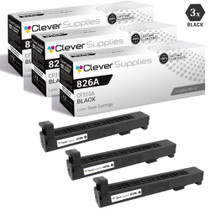
CS Compatible Replacement for HP 826A Toner Cartridges 3 Black Set (CF310A)
/>


Hewlett Packard
CS Compatible Replacement for HP M855dn Toner Cartridges Black (CF310A)
/>