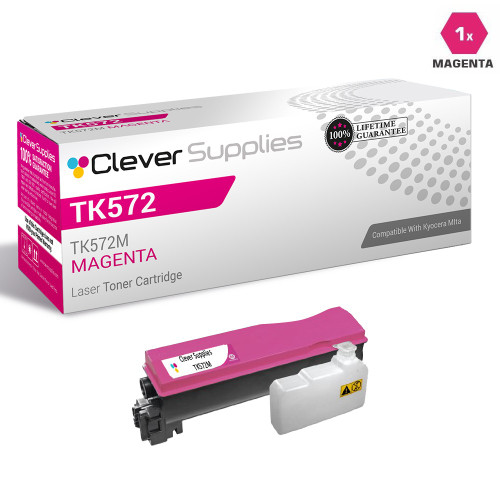
Clever Supplies brand products are made in the USA! Why pay more for cheaper product with a high defective rate? You will end up having to send it back to the manufacturer. Your time is valuable. Get a quality product that you KNOW will work. Purchase the Clever Supplies Compatible for Kyocera-Mita TK572 (TK572M) Magenta Toner Cartridge and experience the difference! All Clever Supplies brand products are backed by '100% Quality Satisfaction' 1 year warranty against defects in materials and workmanship for all toner products. Free tech support for any problems for all Clever Supplies brand products. The use of Clever Supplies brand replacement laser toner cartridges and supplies does not void printer warranty. Premium Quality Replacement Toner Cartridge is made by ISO9001 Certified Factory to Meet or Exceed OEM Standards. These units are manufactured 100% brand new with all new parts including OPC drums, wiper blades, a smart chip and other internal parts, they are an economical alternative to expensive OEM TK572M Compatible Toner Cartridges. The Compatible Toner Cartridges will produce the same amount of page yield as an OEM cartridge would. This is a Compatible for Kyocera-Mita TK572 Toner Cartridges guaranteed to perform with Kyocera-Mita Laser Printers. It replaces the original Kyocera-Mita TK572 Magenta. The use of compatible replacement Cartridges and supplies does not void Printer Warranty. Our Compatible for TK572M. Cartridge is a replacement for OEM Kyocera-Mita. We offer a 100% Quality Satisfaction Guarantee on our Compatible for TK572M Laser Toner Cartridges and supplies. For use in the following printers: ECOSYS P7035cdn, FS-C5400, FS-C5400DN
Frequently Asked Questions
Our reds have started printing orange — is that this cartridge's job to fix?
Very likely, yes. Red is built from magenta plus yellow, so when the magenta cartridge runs low the reds slide toward orange and skin tones go muddy, while blues and greens still look fine. The cartridge behind those symptoms is the TK572M — the M suffix is the magenta marker — and replacing that one unit is what brings the warm colors back. Check the code on the cartridge you pull out; if it reads TK572M, this is its replacement.
Why does only part of the color palette fade when magenta runs out?
Every color on the page is mixed from the four cartridges, and each mix leans on magenta to a different degree. Purples, reds and pinks depend on it heavily, so they drift first and most visibly; a page of blue charts can look almost untouched on the same day a brochure cover looks wrong. That selective fading is the classic signature of one low color unit rather than a printer fault, and on the FS-C5400DN it points straight at the magenta slot.
Is the 12,000-page rating for this magenta cartridge on its own?
Yes — 12,000 pages is this cartridge's own rating at the standard 5% coverage, counted only on the pages where magenta is actually laid down. Most office pages use far less magenta than black text, so in day-to-day mixed printing a color unit commonly outlasts several black cartridges; the rating is a measuring standard, not a countdown that expires on a fixed date.
Can I change just the magenta and leave the other cartridges alone?
Absolutely — each color lives in its own slot and is replaced independently. Open the cover, slide out only the magenta unit, fit the new TK572M until it seats, and close up; the black, cyan and yellow cartridges are not disturbed and their remaining life is untouched. The whole change takes a couple of minutes mid-job, with no tools involved.
The new cartridge is in, but the pinks still look washed out — what now?
Start with the simple checks: confirm the cartridge is pushed fully home, then remove it and rock it gently side to side to even out the toner before refitting. Print a few color pages — output usually settles within a short run as the fresh toner works through. If strong color still looks pale after that, contact us rather than replacing other cartridges on guesswork; a genuinely underperforming unit is a warranty matter.
What protection comes with this cartridge?
Every unit is backed by a 1-year warranty and 1-year free returns, and the full terms are on our shipping & returns page. If the cartridge streaks, leaks or gives out well inside its 12,000-page rating, you are covered — reach out and we will arrange the replacement or refund.
What quick checks confirm magenta is the culprit before I order?
Print one page you know well — a brochure cover or a photo the office uses often — and compare it against how it should look. If blues and greens still print true and black text is sharp while reds, pinks and skin tones are the parts that have drifted, the evidence points at the magenta slot and not the machine. Then pull the cartridge and read its code: TK572M on the unit you removed confirms this listing is the replacement to order.
We have a big photo-heavy run coming up — how should I prepare?
Check the magenta level before the run rather than during it. Photographs draw on magenta harder than any other office work, so a cartridge that looks adequate for a week of letters can run dry in the middle of a brochure job. If the level is already low, fit the new TK572M before the run starts and keep the part-used unit labeled as an emergency spare for text work, instead of gambling the big job on what is left.
How should a spare magenta be kept so it is ready months from now?
Sealed in its packaging, lying flat, in a cool dry cabinet away from sunlight and heat sources. Stored that way, a compatible cartridge waits patiently and loses nothing. When its turn comes, give it a gentle side-to-side rock before fitting so the toner that settled in storage spreads evenly, then let the first few pages of normal work confirm the color is laying down as it should.
Should I throw the old magenta away as soon as the new one is fitted?
Not immediately. Keep the empty for the first few days while the replacement proves itself on your real documents — if output disappoints early, the old unit is useful evidence and costs nothing to hold. Once the new TK572M is clearly performing, the empty goes to a recycling collection point or office-supply take-back bin. Throughout, the cartridge stands on its own, exactly as its 1-year warranty and 1-year free returns treat it.
About This TK572M Magenta Toner Cartridge
Magenta is the quiet half of every warm color your office prints — the reds in a logo, the warmth in a photograph, the pink in a chart — and the TK572M is the magenta unit rated at 12,000 pages for the Kyocera FS-C5400DN. It is one of four independent cartridges in our Kyocera Mita compatible range for this printer, priced at $68.95 as a single so you only ever buy the color that has actually run out. Orders ship from our IL, PA, GA and CA warehouses, and our support team is on hand Monday to Friday, 9 AM to 5 PM CST if you want help confirming the code before checkout.






 See Compatible Printers
 Read more about our ink!