






 See Compatible Printers
 Read more about our ink!
Kyocera-mita
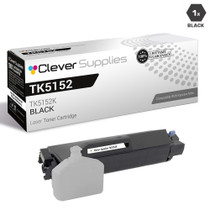
Compatible Kyocera-Mita TK5152 (TK5152K) Toner Cartridge Black

Amazon Price:

- Page Yield:
- Black: 12000
- Availability:
- In Stock
- Shipping:
- Calculated at Checkout
- Compatible Printers
- Specifications
- SKU:
- CS-Kyocera-Mita-TK5152-Black
- Printer Brand:
- Kyocera-Mita
- OEM Number:
- TK5152K
- Ink Color:
- Black
- Page Yield:
- Black: 12000
- Printer Type:
- Laser Cartridge
- Condition:
- New Compatible
- Description
- Reviews



Kyocera Mita TK5152, TK5152K, TK5152C, TK5152M, TK5152Y, these cartridges are meticulously crafted for the ECOSYS M6035cidn, ECOSYS M6535cidn, and ECOSYS P6035cdn printers, ensuring exceptional print quality and reliability in diverse office settings. The TK5152K black toner cartridge is engineered to produce sharp and clear text documents, perfect for business reports, contracts, and everyday printing tasks. With its high yield and efficiency, this cartridge offers cost-effective printing solutions for offices with high-volume printing needs. For color printing tasks, the TK5152C cyan, TK5152M magenta, and TK5152Y yellow toner cartridges provide precise color reproduction and vibrant hues. Whether it's colorful presentations, marketing materials, or graphics, these cartridges produce professional-quality prints that captivate the audience. In addition to toner cartridges, toner cartridges are essential for maintaining print quality. The Kyocera Mita TK5152 toner cartridge is designed to complement the printer's performance, delivering vibrant colors and sharp images. Whether it's photographs, illustrations, or creative designs, the TK5152 toner cartridge ensures exceptional print quality, enhancing overall output. Kyocera Mita printers, such as the ECOSYS M6035cidn and ECOSYS P6035cdn models, are renowned for their durability and efficiency in demanding office environments. With features like high-speed printing and advanced color management, these printers streamline document workflows, boosting productivity and reducing operational costs.
Frequently Asked Questions
We have both a multifunction and a plain printer — same black cartridge for both?
Yes. The TK5152K covers the ECOSYS M6035cidn, the ECOSYS M6535cidn and the ECOSYS P6035cdn, so the copy-scan-print unit and the print-only unit on the other desk draw from the same box. This single cartridge is $35.21.
How do I verify the code before ordering?
Look at the cartridge already installed: TK5152K is printed on its label. You can also print a status page from any of these machines — the supply section lists the cartridge code the printer is running.
Does installation differ between the MFP models and the P6035cdn?
No. The handling is the same across all three: open the unit, remove the spent cartridge, seat the new one, close up. The machines differ in features, not in how they take toner.
What should I expect from the 12,000-page rating?
It is the standard-coverage benchmark. A P6035cdn churning through text documents will live near it; an MFP printing image-heavy copies will land lower. Plan reorders by your page counter rather than by the calendar.
What if the cartridge disappoints?
A 1-year warranty and 1-year free returns stand behind it, and our support team is on hand Monday through Friday, 9 AM to 5 PM CST. Shipments leave from warehouses in IL, PA, GA and CA.
Where do I read the delivery and return specifics?
On our shipping and returns page, which covers timing, carriers and how a return is started. The rest of the Kyocera-Mita range, including the color cartridges for these machines, is one click beyond that.
Does one spare on the shelf really cover three different machines?
Yes — that is the practical payoff of the shared code. The M6035cidn, M6535cidn and the print-only P6035cdn all take the same TK5152K, so a single sealed spare answers whichever machine flags low first. Keep it where both desks can reach it, and the office holds one backup instead of three. Just replace the spare promptly after it is used, since three machines draw on the same safety net.
How do I keep reorder timing straight when the machines print at different rates?
Follow each machine's page counter, not a shared calendar. The P6035cdn doing plain text may take a year over one TK5152K while an MFP making image-heavy copies burns one far sooner. A note on the spare's box — which machine took the last cartridge, and its counter reading — turns the next reorder into arithmetic instead of guesswork, and shows which machine is really driving your toner spend.
The P6035cdn barely prints — anything to check when it finally needs the spare?
Expect the first pages to look pale, even with a fresh cartridge following a settled one. Toner compacts during long idle stretches, so remove the cartridge, rock it gently side to side to level the contents, refit it and run a few test pages before judging the output. The same settling can affect a spare stored for a long time, which the same gentle rock fixes before fitting.
What should I do with the cartridge that comes out?
Put it in the new TK5152K's box and route it through electronics or office-supply recycling instead of the trash. Because three machines share the supply, empties can appear from any desk — one agreed collection spot keeps them from piling up beside individual printers. Keep any cartridge you suspect of a fault out of that pile; it goes back under the 1-year warranty rather than into recycling.
About This Cartridge
One black TK5152K that treats three ECOSYS machines as a single supply line — buy it for whichever of the M6035cidn, M6535cidn or P6035cdn is flashing low, and it fits. Rated at 12,000 pages under standard coverage and backed for a full year, it is the simple single-unit restock for a mixed desk setup.
Related Items
Kyocera-mita
Compatible Kyocera-Mita TK5152 Toner Cartridge Black (TK5152K)
/>



Kyocera-mita
Compatible Kyocera-Mita TK5152 (TK5152K) Toner Cartridge Black
Kyocera-mita
Compatible Kyocera-Mita TK5152 Toner Cartridge 2 Black (TK5152K)
/>

Kyocera-mita
Compatible Kyocera-Mita TK5152 Toner Cartridge 3 Black (TK5152K)
/>