







 See Compatible Printers
 Read more about our ink!
Hewlett Packard
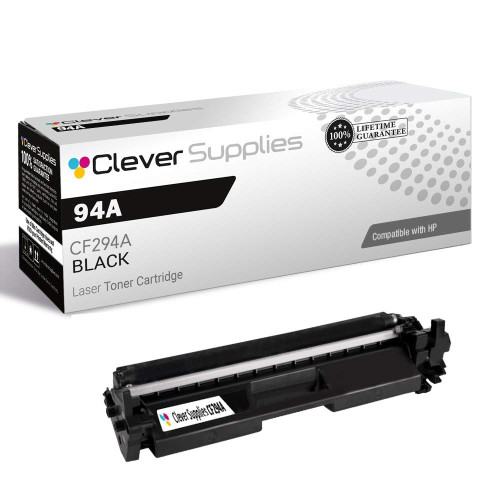
Compatible HP 94A (CF294A CF294X) Toner Cartridge Black

Amazon Price:

- Page Yield:
- Black: 1200
- Availability:
- In Stock
- Shipping:
- Calculated at Checkout
- Compatible Printers
- Specifications
- SKU:
- CS-HP-94A-BK
- Printer Brand:
- Hewlett Packard
- OEM Number:
- CF294A CF294X
- Ink Color:
- Black
- Page Yield:
- Black: 1200
- Printer Type:
- Laser Cartridge
- Condition:
- New Compatible
- Description
- Reviews



For exceptional black-and-white printing, the HP 94A and 94X cartridges are the perfect companions to the LaserJet Pro M118dw. This printer delivers fast and reliable performance, making it ideal for both home and office use. Additionally, the MFP M148dw offers multifunction capabilities, including printing, scanning, and copying, all in one compact device, enhancing productivity in any workspace. When it comes to black ink options, the CF294A and CF294X cartridges provide excellent quality and longevity. Whether you opt for standard or high-yield cartridges, you can expect consistent and sharp prints with every use. The HP 94A and 94X cartridges are designed to work seamlessly with the LaserJet Pro series, ensuring hassle-free printing and optimal results. In terms of reliability, the HP 94A and 94X toner cartridges stand out for their consistent performance and compatibility with HP printers. Whether you're printing documents, reports, or presentations, you can rely on these cartridges to deliver crisp, professional-quality prints every time. In conclusion, the HP 94A and 94X cartridges, paired with the LaserJet Pro M118dw and MFP M148dw series, offer exceptional black-and-white printing solutions for various needs. With their reliability, quality, and compatibility, these cartridges are essential for anyone seeking efficient and high-quality printing results.
Frequently Asked Questions
What does a dying cartridge look like on the page?
Text that grays down the center of the sheet first, then fine lines that start to crumble at the edges. Rocking the old cartridge gently can coax a little more from it, but when the fading returns inside a few days, the toner is honestly spent — and this cartridge is the cure.
Why two codes — CF294A and CF294X — on one listing?
Because the listing is catalogued under both designations of HP's 94 family. Within that family the A and X codes name its two capacity builds, and this listing carries the pair side by side. Read the label on the cartridge inside your LaserJet Pro M118dw; a match with either code means a match with this cartridge.
Which printers does it serve?
The LaserJet Pro M118dw, and the LaserJet MFP M148dw and M148fdw that share its engine. Outwardly every cartridge in the family is the same black shell, which is exactly why the label check matters more than the look of the thing. For the full comparison of the 94A offers — this single against the two-pack and the four-pack — see the Best HP CF294A (94A) Toner Cartridges buying guide.
How involved is fitting it?
Barely a minute's work, and no tools. The old cartridge lifts out by its handle; rock the new one gently so the toner settles, peel the shipping tape, lower it home. Close up, run one test page, and solid black text confirms you are finished.
What is the $31.61 for?
A single black cartridge on its own — no pack, no plan, nothing riding along. It is a compatible build matched to the original's fit, sized for the M118dw and the M148 machines named above.
What protection comes with the cartridge?
Behind it stand a 1-year warranty and 1-year free returns — see our shipping and returns page for the plain terms. We hold stock in warehouses in California, Georgia, Illinois and Pennsylvania, and people answer questions Monday through Friday, 9 AM to 5 PM CST.
There is no spare in the cupboard — when should I order?
The moment the printer shows its low-toner warning. A single CF294A has no reserve behind it, so the warning is the order signal, not a suggestion to wait: order that day and the replacement lands before the cartridge runs dry mid-job.
What should I check before opening the sealed carton?
Read the code on the label first: it should say CF294A. A sealed carton with the wrong code is a simple exchange, while an opened cartridge is a longer conversation. Check the seal as well — if it is torn or loose, photograph it and call support before fitting the cartridge.
How do I prove the new cartridge is printing properly?
Print a page you printed before the swap — a letter or a form you know well — and compare the two sheets. Deep, even black and crisp fine lines mean the new unit is working. If the first page looks gray in the middle, rock the cartridge gently and print again before deciding anything is wrong.
Should I throw the old cartridge away right after the swap?
Not yet. Keep it in its carton for a few days while the new CF294A proves itself. If the fresh cartridge misbehaves, the old unit is the comparison that tells support whether the fault followed the cartridge or stayed with the printer — and then it goes for recycling.
About This HP 94A Black Cartridge
Carried in the HP toner cartridges range at Clever Supplies under both CF294A and CF294X, this compatible black cartridge looks after the LaserJet Pro M118dw and MFP M148 series. It is the uncomplicated answer for the morning a compact printer starts printing in gray.
Related Items


Hewlett Packard
Compatible HP 94A (CF294A CF294X) Toner Cartridge 2 Black



Hewlett Packard
Compatible HP 94A (CF294A CF294X) Toner Cartridge 4 Black


Hewlett Packard
Compatible HP 94X (CF294X CF294A) Toner Cartridge Black


Hewlett Packard
Compatible HP 94X (CF294X CF294A) Toner Cartridge 2 Black