







 See Compatible Printers
 Read more about our ink!
Hewlett Packard
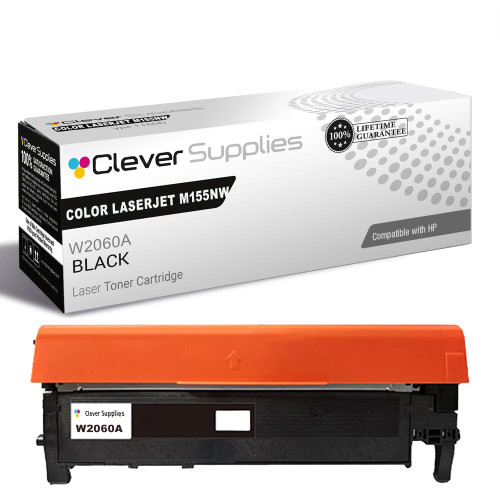
Compatible HP 215A (W2310A) Toner Cartridge Black
- Page Yield:
- Black: 1050
- Availability:
- In Stock
- Shipping:
- Free Shipping

Amazon Price:

- Page Yield:
- Black: 1050
- Availability:
- In Stock
- Shipping:
- Free Shipping
- Compatible Printers
- Specifications
- SKU:
- CS-HP-215A-CLJ-M155NW-BK
- Printer Brand:
- Hewlett Packard
- OEM Number:
- W2310A
- Ink Color:
- Black
- Page Yield:
- Black: 1050
- Printer Type:
- Laser Cartridge
- Condition:
- New Compatible
- Description
- Reviews



Deliver sharp, vivid prints every time with the HP 215A toner cartridge series, including HP 215A W2310A Black, W2311A Cyan, W2313A Magenta, and W2312A Yellow. Each cartridge is designed to produce crisp black text and rich, vibrant colors for all your everyday printing needs. Optimized for consistent quality, the HP 215A toner cartridge ensures smooth performance and outstanding results from the first page to the last. Whether youre printing business documents or colorful graphics, these cartridges provide dependable clarity and detail. Compatible with COLOR LASERJET M155NW, COLOR LASERJET M182N, COLOR LASERJET M182NW, and COLOR LASERJET M183FW, the HP 215A cartridge series offers seamless integration and reliable operation across all supported printer models. Count on the trusted performance of HP 215A toner cartridge technology to keep your workflow running smoothly. These cartridges are built for easy installation, efficient output, and high-quality results that meet your everyday printing demands.
Frequently Asked Questions
My text has gone gray and washed out — is that the cartridge or the printer?
Most often it is the toner running low or settling unevenly, not a hardware failure. Remove the W2310A, rock it slowly side to side to redistribute the powder, and print a supplies page. If the gray returns within a few sheets, the cartridge is genuinely spent and this is its replacement. One more check helps: print the same page twice. Toner starvation fades evenly across both copies, whereas a warm-up quirk usually clears by the second sheet.
Which number do I quote when I reorder?
W2310A — the HP 215A black. Read it straight off the label of the cartridge you removed; ordering by that code avoids the look-alike cartridges built for neighbouring models.
What page count should I plan around?
Plan on roughly 850 pages of ordinary documents. Dense coverage — full-page handouts, dark graphics — shortens the run, while light memos and forms stretch it further than the rating suggests.
Does swapping the cartridge mean recalibrating anything?
No. The printer recognizes the new unit on its own and the first pages may run a brief automatic calibration. After that it is ordinary printing; there are no menus to reset and nothing to register.
What cover stands behind this cartridge?
A 1-year warranty stands behind every unit, and 1-year free returns apply if a cartridge misbehaves. Parcels leave warehouses in Illinois, Pennsylvania, Georgia and California, and help is on hand Monday through Friday, 9 AM to 5 PM CST.
Can I fit it myself, or is this a technician's job?
It is a one-minute, tool-free swap designed for the owner: open the top, lift the old cartridge out, seat the new one, close the lid. The printer does the rest.
Rocking cleared the grayness for a while, but streaks are back — will a new cartridge fix that?
Usually, yes. On this platform the imaging surface is built into the cartridge itself, so fitting a fresh W2310A renews the print surface at the same time as the toner supply. Streaks and marks that live on that surface leave with the old unit. If the identical streak survives a brand-new cartridge at the same position on the page, the cause is in the printer — that is the point to involve support.
When is the smartest moment to make the swap?
Before a big print run rather than in the middle of it. Dense work — full-page handouts, dark graphics — spends the cartridge fastest, and a unit already printing gray will not survive a long run gracefully. Check the pages before a heavy job: if text has lightened, fit the fresh W2310A first and let the run print at full strength from page one to the last sheet.
Should the old cartridge be kept after fitting the new one?
Only until the new cartridge has proved itself. Print a few ordinary pages; if they come out dark and even, the diagnosis is closed and the old W2310A can go into the new cartridge's box and out with the recycling. Keeping it a day or two costs nothing and gives you a swap-back test if the grayness oddly persists — after that, it is just shelf clutter.
What if a brand-new cartridge also prints gray?
Let the printer run its brief automatic calibration and print several pages first — the opening sheets can mislead. If pages are still washed out with a fresh, correctly seated W2310A, the cartridge is unlikely to be the cause: reseat it once to be sure, then contact the support desk, Monday through Friday, 9 AM to 5 PM CST. A defective unit is covered by the 1-year warranty and 1-year free returns in any case.
About This W2310A Black Toner Cartridge
This is the compatible 215A black for small color LaserJets like the Color LaserJet M155nw, priced at $67.13. It is written for the moment a machine starts printing in shades of gray — the fix is a fresh W2310A, not a repair bill.
Because the imaging surface is renewed with every cartridge on this platform, a swap clears most print-quality complaints in one step. Keep the old unit's code in mind, match it, and the diagnosis ends with a darker page.
Every model in the family is covered: Color LaserJet M182nw, Color LaserJet M183fw, Color LaserJet M155nw and Color LaserJet M182n. The color channels are bought separately — W2311A cyan cartridge, W2313A magenta cartridge and W2312A yellow cartridge — or all together in the 215A four-color set; text-heavy desks also keep the W2310A black 2-pack on hand.
Related Items


Hewlett Packard
Compatible HP 215A (W2310A) Toner Cartridge Black



Hewlett Packard
Compatible HP 215A (W2310A) Toner Cartridge Black


Hewlett Packard
Compatible HP 215A (W2310A) Toner Cartridge Black


Hewlett Packard
Compatible HP 215A (W2310A) Toner Cartridge Black