







 See Compatible Printers
 Read more about our ink!
Hewlett Packard
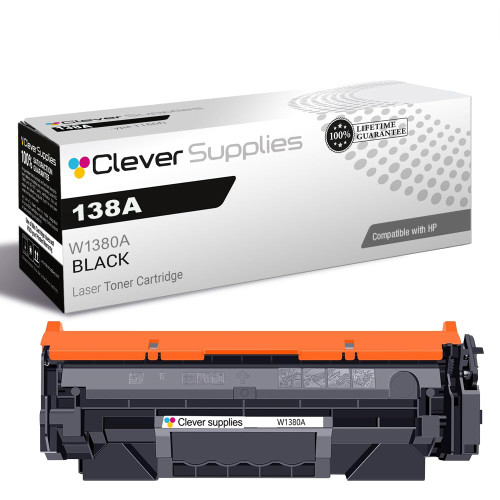
Compatible HP 138A (W1380A) Toner Cartridge Black
- Page Yield:
- Black: 1500
- Availability:
- In Stock
- Shipping:
- Calculated at Checkout

Amazon Price:

- Page Yield:
- Black: 1500
- Availability:
- In Stock
- Shipping:
- Calculated at Checkout
- Compatible Printers
- Specifications
- SKU:
- CS-HP-138A-Black
- Printer Brand:
- Hewlett Packard
- OEM Number:
- W1380A
- Ink Color:
- Black
- Page Yield:
- Black: 1500
- Printer Type:
- Laser Cartridge
- Condition:
- New Compatible
- Description
- Reviews



Print with precision using the HP 138A toner cartridge, featuring the HP 138A W1380A BLACK. This compatible HP cartridge is engineered to produce crisp black text and consistent quality across all types of documents. Built for everyday performance, the HP 138A toner cartridge ensures reliable operation and excellent print clarity from the first page to the last. Whether you're printing invoices, reports, or internal communications, this cartridge provides clean and professional results. Compatible with LASERJET PRO 3001DW, LASERJET PRO 3002DW, LASERJET PRO 3101FDW, and LASERJET PRO 3102FDW, this toner installs easily and integrates seamlessly with your HP device for uninterrupted productivity. Depend on the quality and consistency of the HP 138A toner cartridge to meet your daily printing needs. With trusted HP performance and sharp output, this cartridge is an ideal choice for efficient home and office printing.
Frequently Asked Questions
How do I know this is the cartridge my printer actually takes?
Lift the empty cartridge out and read the code stamped on its label. If it says W1380A, this is the same supply: a single black HP 138A cartridge built for printers like the LaserJet Pro 3001dw and its MFP 3101 siblings. The stamped code is the check that matters — not the box art, not the cartridge color. For a side-by-side comparison of every HP 138A and 138X configuration this store sells — pack prices, per-page costs and which box fits how you print — see our guide: Best HP W1380A & W1380X (138A & 138X) Toner Cartridges.
How far does the 2,600-page rating go in a home office?
The rating assumes about five percent of each page is covered in text. That is a little over five reams of letters, forms and everyday documents. If you print around 150 pages a month, one cartridge typically carries you well past a year before the low warning shows.
My pages started fading before any low-toner warning. Is that normal?
It can be. Toner powder settles toward one end of the cartridge as it empties, so print can look washed out while a little toner remains. Rock it gently side to side five or six times and reinstall it; if the fading returns within a few pages, the cartridge is genuinely near the end.
Is fitting it any different from the original cartridge?
No. Open the printer's top access, slide the old unit out, peel the sealing tape from the new one, and push it in until it clicks. Run one test page afterwards — the first print sometimes looks light while toner distributes, then settles to full density.
Is the $44.75 price for one cartridge or some kind of refill?
One complete, ready-to-use black cartridge. Nothing needs filling, drilling or transferring from the old unit — the imaging drum is built into the cartridge itself, so a fresh cartridge also refreshes the drum surface your pages are imaged on.
What happens if the cartridge arrives damaged or prints badly?
It is covered by a 1-year warranty and 1-year free returns, with the full terms on our shipping and returns page. Orders ship from warehouses in Illinois, Pennsylvania, Georgia, California, and our support team is available Monday through Friday, 9 AM to 5 PM CST if you would rather talk it through first.
If I buy this cartridge a little early, how should it wait for installation day?
Leave the W1380A sealed in its bag and box, stored flat somewhere cool and dry, out of direct sunlight and away from heaters. Toner powder does not dry out, so an early purchase loses nothing by waiting — the cartridge keeps its full 2,600-page rating for many months on the shelf. When the old unit finally fades, the spare is already in the room.
Does the 3101fdw's copying and scanning change how fast this cartridge empties?
Copying does; scanning does not. Every copy the LaserJet Pro 3101fdw makes is a printed page and spends toner from the installed 138A just like a print job, while a scan only reads the original. Home offices that copy forms and documents regularly should expect the cartridge's real life to reflect prints plus copies, not the print count alone.
What does one printed page cost with this cartridge?
At $44.75 against the 2,600-page rating, the plain arithmetic gives about 1.7 cents per page at standard text coverage. Everyday letters and forms sit near that coverage, so the figure is a fair planning number for a home office. Pages filled with tables, shading or graphics spend more powder per sheet and raise the true cost a little.
What should I do with the old cartridge once the new one is in?
Keep it for the first few days while the new W1380A proves itself across your normal documents. Once output is consistently clean, place the empty in the new cartridge's packaging to contain any loose powder and send it through a cartridge recycling channel rather than the household bin. There is nothing to refill or transfer — the spent unit leaves whole.
About This HP 138A Black Toner Cartridge
This compatible HP 138A (W1380A) black cartridge is part of the HP toner cartridges range at Clever Supplies, made for compact LaserJet Pro printers that handle a desk's worth of everyday printing. It suits home offices that print steadily but not heavily, and owners who would rather match the stamped code once than guess.
Check the badge on your machine against the full list — LaserJet Pro 3001dw, LaserJet Pro 3002dw, LaserJet Pro 3101fdw and LaserJet Pro 3102fdw are the four it fits. Heavier users can step up to the high-yield 138X (W1380X) cartridge, rated at 9,200 pages, in the same single cartridge format. The same cartridge comes as a 138A (W1380A) two-pack for shelf spares.
Related Items


Hewlett Packard
Compatible HP 138A (W1380A) Toner Cartridge Black



Hewlett Packard
Compatible HP 138A (W1380A) Toner Cartridge Black


Hewlett Packard
Compatible HP 138A (W1380A) Toner Cartridge Black


Hewlett Packard
Compatible HP 138A (W1380A) Toner Cartridge Black