





 See Compatible Printers
 Read more about our ink!
Canon
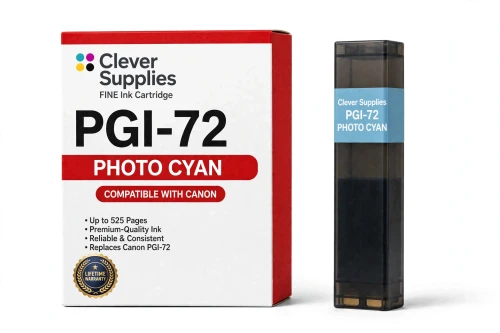
Compatible Canon PGI-72 Photo Cyan Ink Cartridge
- Page Yield:
- 525 pages
- Shipping:
- Calculated at Checkout

Amazon Price:

- Page Yield:
- 525 pages
- Shipping:
- Calculated at Checkout
- Compatible Printers
- Specifications
- SKU:
- CS-CN-72-PC
- Condition:
- New (compatible)
- OEM Part #:
- PGI-72
- Color:
- Photo Cyan
- Ink Type:
- Pigment
- Page Yield:
- 525 pages
- Chip:
- Yes — new compatible chip
- Warranty:
- Lifetime Warranty
- Returns:
- 1 Year
- Description
- Reviews
The Clever Supplies compatible Canon PGI-72 Photo Cyan ink cartridge replaces the Canon PGI-72 and fits the PIXMA PRO-10 — the only printer in this family. It is rated at about 525 pages; our cartridge is filled to the same specification with pigment ink and carries a new compatible chip that reports ink levels to the printer.
A new compatible chip is fitted, so the printer reads ink levels normally and no "non-genuine" workaround is needed for everyday printing. Canon firmware updates can occasionally change cartridge recognition — if that ever happens after an update, the lifetime warranty covers the cartridge and we will put it right.
Shop the PGI-72 family: PGI-72 Matte Black, PGI-72 Photo Black, PGI-72 Cyan, PGI-72 Magenta, PGI-72 Yellow, PGI-72 Photo Magenta, PGI-72 Gray, PGI-72 Red, PGI-72 Chroma Optimizer, PGI-72 Set of 10.
Printer series: PIXMA printers — every model in the Compatible Printers list below takes this cartridge.


CLEVER SUPPLIES · CANON PGI-72 INK
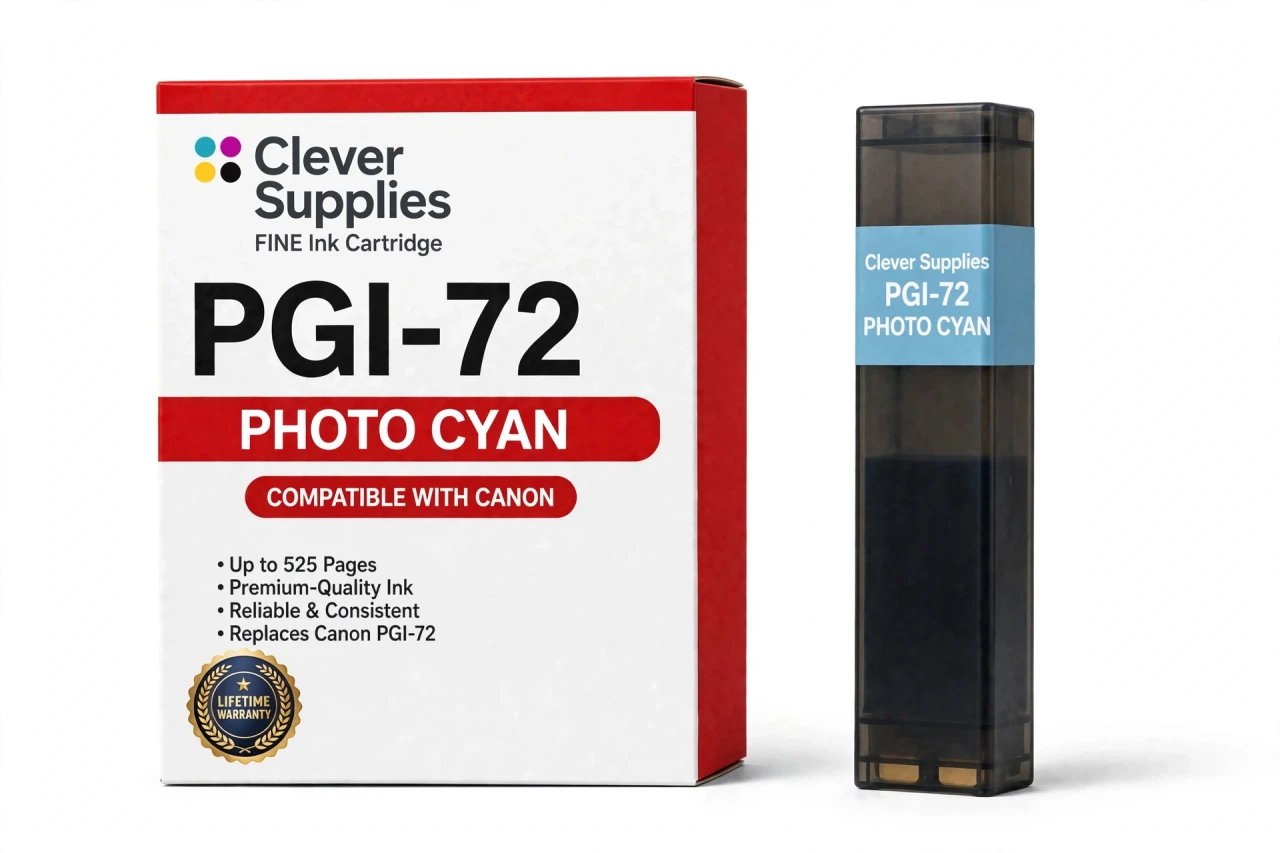
Compatible Canon PGI-72 Photo Cyan Ink Cartridge
Replaces Canon PGI-72
525 pages · Pigment ink · New compatible chip
Fits: PIXMA PRO-10
Covered by the Clever Supplies Lifetime Warranty
Frequently Asked Questions
Why does the PRO-10 carry a second, lighter cyan?
For the parts of a photograph where full-strength cyan would be too heavy. This PGI-72 photo cyan is a diluted cyan made for highlights and pale gradients: the top of a sky, shallow water, mist, and the lightest blue in a portrait background.
Where will I see the difference it makes?
In any large, pale area. With it working, those areas hold a clean, continuous tone that survives close inspection.
Which printer uses this photo cyan?
The Canon PIXMA PRO-10 is the only printer listed for this cartridge. Within that printer it partners the full-strength PGI-72 Cyan: the standard tank builds saturated blues and deeper tones, this tank builds the highlights, and the driver blends them without any setting for you to manage. The pairing is fixed by the ten-tank design. Compatibility is confirmed under Compatible Printers on this page, and no smaller PIXMA model takes this tank.
What happens to sky gradients when photo cyan runs low?
The printer leans on full-strength cyan instead, and pale blues turn coarser and step in visible bands. The print may still complete, which makes the fault easy to miss until two versions sit side by side. Replacing this single tank restores the fine end of every blue gradient without touching the other nine tanks.
What yield should I plan around?
The listed rating is 525 pages against the original specification. Paper size multiplies everything on a photo printer.
Will the printer recognize this compatible tank?
Yes. It carries a new compatible chip, so the PRO-10 recognizes it and tracks the photo cyan level normally. If a Canon firmware update ever triggers a recognition message, reseat the cartridge and restart the printer before anything else. A cartridge that remains unrecognized, leaks, or prints poorly is covered by the Lifetime Warranty, with replacement or refund on contact. That cover includes this light color exactly as it includes the main colors.
My pale blues look grainy even though the tank is not empty. Why?
Run a nozzle check and look at the photo cyan band specifically. Also confirm you are printing at a quality setting suited to photos, since draft settings coarsen every gradient. If the band stays broken after cleaning, the tank is the likely cause; its partner PGI-72 Photo Magenta deserves the same check for pale warm areas.
Can I substitute standard cyan in this slot to finish a print?
No. A substitution would corrupt every pale gradient in the job and waste the sheet. The design instead makes the correct fix cheap and quick: swap in this single tank when its turn comes.
Is this cartridge made by Canon?
No. It is a Clever Supplies compatible cartridge built to the PGI-72 specification and filled to the original specification. It is not a Canon product and not a refilled tank. Buying the light colors as singles matches how they are actually consumed, in step with your subjects rather than in lockstep with the whole set, although the PGI-72 Set of 10 remains the clean choice when all ten slots need attention at once.
What cover comes with this cartridge?
The Clever Supplies Lifetime Warranty covers leaking, failure to be recognized, and poor print quality, with replacement or refund when you contact us. Returns are available for 1 Year. Because bright, pale work can stall on this one tank, a sealed spare is cheap insurance for a deadline.
Related Items
Canon
Compatible Canon PGI-72 Cyan Ink Cartridge
The Clever Supplies compatible Canon PGI-72 Cyan ink cartridge replaces the Canon PGI-72 and fits the PIXMA PRO-10 — the only printer in this family. It is rated at about 525 pages; our cartridge is...


Canon
Compatible Canon PGI-9 Photo Cyan Ink Cartridge
The Clever Supplies compatible Canon PGI-9 Photo Cyan ink cartridge replaces the Canon PGI-9 and fits 4 verified printers — the PIXMA iX7000 and the rest of the list under Compatible Printers below...
Canon
Compatible Canon PGI-29 Photo Cyan Ink Cartridge
The Clever Supplies compatible Canon PGI-29 Photo Cyan ink cartridge replaces the Canon PGI-29 and fits the PIXMA PRO-1 — the only printer in this family. Our cartridge is filled to the same...
Canon
Compatible Canon PGI-72 Photo Black Ink Cartridge
The Clever Supplies compatible Canon PGI-72 Photo Black ink cartridge replaces the Canon PGI-72 and fits the PIXMA PRO-10 — the only printer in this family. It is rated at about 525 pages; our...