






 See Compatible Printers
 Read more about our ink!
Canon
Compatible Canon GI-25 Yellow Ink Bottle
- Page Yield:
- 3,000 pages
- Shipping:
- Calculated at Checkout

Amazon Price:

- Page Yield:
- 3,000 pages
- Shipping:
- Calculated at Checkout
- Compatible Printers
- Specifications
- SKU:
- CS-CN-GI25-Y
- Condition:
- New (compatible)
- OEM Part #:
- GI-25
- Color:
- Yellow
- Ink Type:
- Pigment
- Volume:
- 37 ml
- Page Yield:
- 3,000 pages
- Chip:
- No chip — refill bottle
- Warranty:
- Lifetime Warranty
- Returns:
- 1 Year
- Description
- Reviews
The Clever Supplies compatible Canon GI-25 Yellow ink bottle refills 2 verified MegaTank printers — the MAXIFY GX1020 and the rest of the list under Compatible Printers below. Canon rates this bottle at about 3,000 pages; our bottle is filled to the same 37 ml specification with pigment ink and covered by the Clever Supplies lifetime warranty.
The GX refill system is keyed and self-stopping — each bottle fits only its own color tank, fills to the line and shuts off on its own. Keep the cap on between refills and a part-used bottle stores without drying out.
Shop the GI-25 family: GI-25 Black, GI-25 Cyan, GI-25 Magenta, GI-25 Set of 4, GI-25 Set of 10.
Printer series: MAXIFY printers — every model in the Compatible Printers list below takes this bottle.


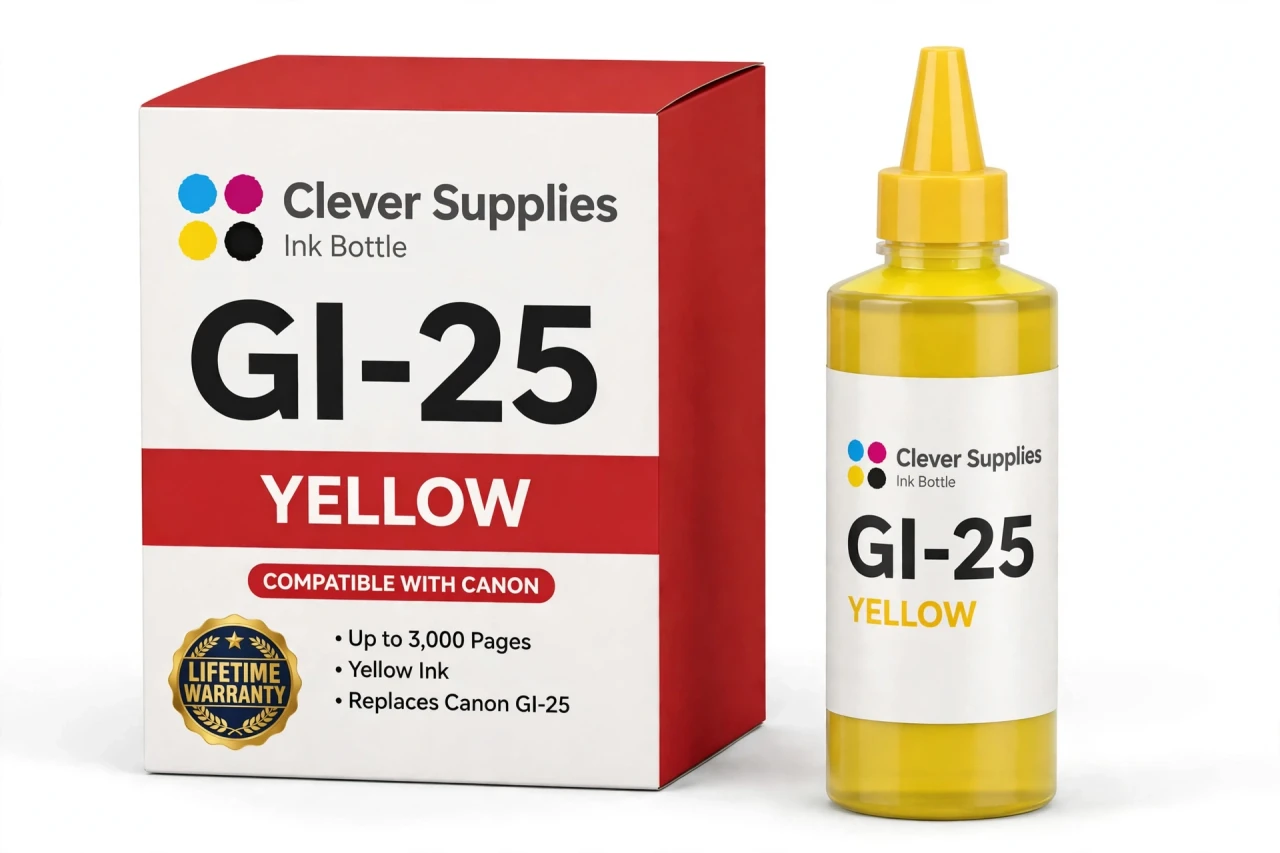
CLEVER SUPPLIES · CANON GI-25 INK
Compatible Canon GI-25 Yellow Ink Bottle
Replaces Canon GI-25
37 ml · Up to 3,000 pages · Pigment ink
Fits: MAXIFY GX1020, MAXIFY GX2020
Covered by the Clever Supplies Lifetime Warranty
Frequently Asked Questions
Why is yellow the tank people forget to check?
Because its absence hides. A low yellow tank does not stop text printing, and its first symptom — greens drifting blue, warm graphics cooling off — is easy to blame on the document itself. This GI-25 yellow bottle carries 37 ml of pigment ink.
Which printers does this yellow bottle fit?
The Canon MAXIFY GX1020 and the Canon MAXIFY GX2020 — and no others. Those two MAXIFY GX models are the entire GI-25 installed base, and their yellow tank opening is keyed for this bottle. PIXMA G family bottles will not seat on a GX tank, and this bottle will not seat on theirs.
What yield should I plan around for this bottle?
Canon rates it at up to 3,000 pages under ISO/IEC 24711 conditions at around 5% coverage. Treat that as a benchmark for mixed office documents. A color presentation deck can use yellow many times faster than memos do.
What does pigment yellow do on plain office paper?
Pigment ink rests on the paper surface, so yellows stay bright on uncoated stock instead of sinking in and going dull. Greens built from cyan over yellow look vivid, chart highlights pop against white pages, and the color tolerates handling and highlighter pens well.
How do I refill the yellow tank, in order?
First, open the yellow tank cap and no other. Second, uncap this bottle and seat its keyed nozzle fully onto the yellow opening. Third, wait while the ink flows — the GX system stops on its own at the full line, so there is nothing to squeeze. Finally, remove the bottle, recap it and close the tank cap.
How can I read the yellow level when the ink is so pale?
Look at the tank window straight on, at eye level, in normal room light, and judge the surface line of the ink column rather than its color depth. Yellow shows against the tank's molded lower line once you look for the boundary instead of the tint.
Is there a chip to deal with on this bottle?
No chip exists anywhere in the GI-25 refill system. The bottle is a keyed container, the tank is a reservoir, and the printer reads the physical level. That means no recognition errors and no reset sequence after a refill. Pour, close and get back to work.
How do I store this bottle between refills without ruining it?
Cap it immediately after use, stand it upright and park it at room temperature away from windows, heaters and direct sunlight. Keep it away from children.
Greens print blue even though the yellow tank shows ink. What should I try?
Print a nozzle check and examine the yellow block closely. If it shows gaps or prints weakly, run a cleaning cycle and test again — a partially blocked yellow channel produces exactly that blue-green shift. If the pattern is solid, check for an economy or draft color setting in the driver.
Where do the other GX colors come from, and what backs this bottle?
The matching bottles are the GI-25 Black, GI-25 Cyan and GI-25 Magenta, and the GI-25 Set of 4 restocks every tank together. This is a Clever Supplies compatible GI-25 bottle built to the same specification and yield as the Canon original, covered by a Lifetime Warranty with 1 Year returns.
Related Items
Canon
Compatible Canon GI-290 Yellow Ink Bottle
The Clever Supplies compatible Canon GI-290 Yellow ink bottle refills 6 verified MegaTank printers — the PIXMA G1200 and the rest of the list under Compatible Printers below. Canon rates this bottle...


Canon
Compatible Canon GI-25 Black Ink Bottle
The Clever Supplies compatible Canon GI-25 Black ink bottle refills 2 verified MegaTank printers — the MAXIFY GX1020 and the rest of the list under Compatible Printers below. Canon rates this bottle...

Canon
Compatible Canon GI-25 Cyan Ink Bottle
The Clever Supplies compatible Canon GI-25 Cyan ink bottle refills 2 verified MegaTank printers — the MAXIFY GX1020 and the rest of the list under Compatible Printers below. It is rated at about...

Canon
Compatible Canon GI-25 Magenta Ink Bottle
The Clever Supplies compatible Canon GI-25 Magenta ink bottle refills 2 verified MegaTank printers — the MAXIFY GX1020 and the rest of the list under Compatible Printers below. Canon rates this...