





 See Compatible Printers
 Read more about our ink!
Brother
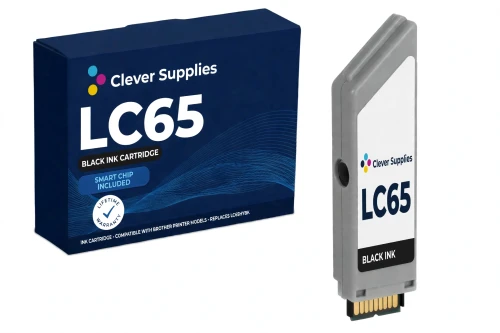
Compatible Brother LC65HY LC65HYBK Black Ink Cartridge
- Page Yield:
- Up to 900 pages (ISO/IEC 24711)
- Shipping:
- Calculated at Checkout

Amazon Price:

- Page Yield:
- Up to 900 pages (ISO/IEC 24711)
- Shipping:
- Calculated at Checkout
- Compatible Printers
- Specifications
- SKU:
- CS-BR-65-BK
- Condition:
- New Compatible
- OEM Part #:
- LC65HYBK
- Color:
- Black
- Page Yield:
- Up to 900 pages (ISO/IEC 24711)
- Chip:
- New compatible chip
- Warranty:
- Lifetime Warranty
- Returns:
- 1-Year Free Returns
- Description
- Reviews
Twice the standard black, for a short list of printers: our compatible LC65HYBK is rated up to 900 pages under ISO/IEC 24711, exactly double the LC61BK. The catch is the fit list — the LC65HY tier works in only four models (MFC-5890CN, MFC-5895CW, MFC-6490CW, MFC-6890CDW). If your printer is one of the four, this is the black that halves your cartridge changes; if it is not, the cartridge your printer takes is the LC61BK.



Every cartridge here is an individual Innobella-platform cartridge with a new compatible chip — the LC61 family reads its cartridges electronically, so the chip is part of the product, not an accessory. The tiers share one cassette family: on the models that accept both, LC61 and LC65HY cartridges can be mixed color by color, so you can upgrade only the slot that empties fastest.
Our lifetime warranty stands behind it, and returns are free for the first year. With Brother's own LC61 line discontinued, a compatible cartridge with a fresh chip and an honestly published yield is the straightforward way to keep this printer printing.
Shop the Brother LC65HY family: LC61BK Black Ink Cartridge · LC61C Cyan Ink Cartridge · LC61M Magenta Ink Cartridge · LC61Y Yellow Ink Cartridge · LC65HYC Cyan Ink Cartridge · LC65HYM Magenta Ink Cartridge · LC65HYY Yellow Ink Cartridge · Set of 4 BK C M Y Ink Cartridge · Set of 4 BK C M Y Ink Cartridge · Set of 10 BCMY Ink Cartridge · Set of 10 BCMY Ink Cartridge
Browse by series: MFC MULTIFUNCTION SERIES
Frequently Asked Questions
What is the page yield of the LC65HYBK?
Up to 900 pages, rated to ISO/IEC 24711 — Brother's published figure for the LC65HY black cartridge. We print the manufacturer's own rating; compatible listings that promise far more for this code are not quoting a Brother measurement.
Which printers does it fit?
Only four printers: MFC-5890CN, MFC-5895CW, MFC-6490CW and MFC-6890CDW. That short list is the whole point of this tier — the other 23 models in the wider LC61 family do not accept LC65HY cartridges.
What exactly is in the box?
This listing is a single black cartridge: one compatible LC65HYBK. The other three colors are separate listings, because on this platform every slot is replaced individually.
How do I check my printer takes this cartridge?
Match the code on your current cartridge or in your printer's consumables list against the code on this page — LC65HYBK — and confirm your model appears in the Compatible Printers list below. Note the code carefully: some sellers shorten the high-yield codes to forms like 'LC65BK', which is not a Brother OEM code; the official high-yield codes carry the HY (LC65HYBK, LC65HYC, LC65HYM, LC65HYY).
Brother discontinued this line — is this cartridge still supported?
Brother lists the LC61 series as discontinued, which is exactly why this compatible exists: the printers remain in service long after the original supply line ends. The cartridge itself is covered by our lifetime warranty regardless of the OEM line's status.
How should I handle the cartridge when installing it?
Hold it by the housing, keep fingers off the chip contact, and do not remove any seal or cap until you are ready to install. Seat it in the correct color slot until it clicks, then run a nozzle check if the printer has been idle.
What warranty and returns does it carry?
A lifetime warranty — a cartridge that fails to perform is replaced — and free returns within the first year. The 1-year returns period follows our standing compatible-product policy.
Why are the four colors sold individually?
Because the printer is built that way: four separate slots, four separate levels. An individual system means a low yellow never makes you discard half-full cyan and magenta — you replace the slot that is actually empty.
My printer takes LC61 cartridges. Will this LC65HY cartridge fit it too?
Only if it is one of the four: MFC-5890CN, MFC-5895CW, MFC-6490CW or MFC-6890CDW. Brother's own LC65HY fit list stops at those four models. Every other LC61 printer — including the MFC-J630W and the DCP models — uses the standard LC61 tier, and we will not list this cartridge as fitting them.
Will my printer recognize this cartridge?
This cartridge carries a new compatible chip. If your printer's firmware has been updated, recognition issues can occasionally occur — remove the cartridge, check the chip contact is clean and untouched, reseat it firmly until it clicks, and restart the printer. We do not claim any compatible cartridge is recognized in every firmware state; if yours will not read after reseating, our warranty process is the next step, not a workaround.
Can I mix LC61 and LC65HY cartridges in the same printer?
Yes — on the four LC65HY models the two tiers mix freely, slot by slot. You can run this high-yield cartridge beside standard LC61 cartridges in the other slots and upgrade one color at a time.
Is this a genuine Brother cartridge?
No — it is a Clever Supplies compatible cartridge built to the LC65HYBK specification, with a new compatible chip, and labeled compatible on the box and on this page. It is not manufactured by Brother.
Related Items

Brother
Compatible Brother LC65HY LC65HYM Magenta Ink Cartridge
Built for the four biggest printers in the family, our compatible LC65HYM is rated up to 750 pages under ISO/IEC 24711 — against 325 pages for the standard-yield LC61M. It fits only the MFC-5890CN,


Brother
Compatible Brother LC65HY LC65HYC Cyan Ink Cartridge
Our compatible LC65HYC is the high-yield cyan for the four printers in this family that accept the LC65HY tier — MFC-5890CN, MFC-5895CW,

Brother
Compatible Brother LC65HY LC65HYY Yellow Ink Cartridge
Our compatible LC65HYY brings the high-yield tier's 750-page rating (ISO/IEC 24711) to the yellow slot of the family's four LC65HY printers: MFC-5890CN,

Brother
Compatible Brother LC65HY Set of 10 BCMY Ink Cartridge
The stock-up box for the family's four high-yield printers: 4 x LC65HYBK black and 2 x each of LC65HYC, LC65HYM and LC65HYY. Per-cartridge ratings: black up to 900 pages, each color up to 750...