




ImageRunner 2535
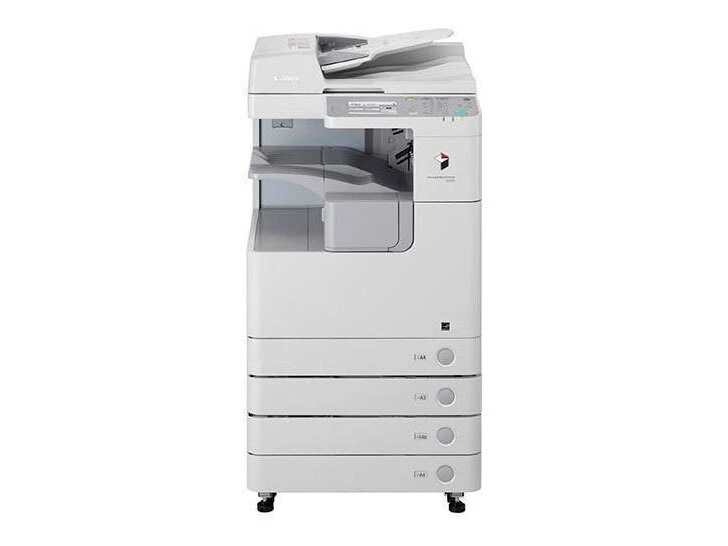
Think of the Canon imageRUNNER 2535 as the workhorse of its family in plainest form: 35 pages per minute, automatic duplexing and standard network printing, and none of the Universal Send extras of its ‘i’ sibling — fax stays on the options list rather than in the box. Everything it prints comes from one black supply, the Canon GPR-34 cartridge, rated at up to 19,400 pages and also sold under the short code GPR34BK.
The 2535 suits departments that need dependable copy and print throughput and see no reason to pay for scan-to-email hardware they will never switch on. It is a shared, networked machine meant to sit at the center of a workgroup and be fed paper and toner on a predictable rhythm; running costs stay easy to forecast precisely because a single high-yield cartridge does all the work.
Toner Cartridges for ImageRunner 2535
| Cartridge | Color | Page Yield |
|---|---|---|
| Canon GPR-34 Toner Cartridge, Black | Black | 19,400 pages |
| Canon GPR-34 Toner Cartridges, Black 2 Pack (GPR34BK) | Black | 19,400 pages per cartridge |
| Canon GPR-34 Toner Cartridges, Black 3 Pack | Black | 19,400 pages per cartridge |
| Canon GPR-34 Toner Cartridges, Black 3 Pack (GPR34BK) | Black | 19,400 pages per cartridge |
| Canon GPR-34 Toner Cartridges, Black 5 Pack (GPR34BK) | Black | 19,400 pages per cartridge |
| Canon GPR-34 Toner Cartridges, Black 10 Pack (GPR34BK) | Black | 19,400 pages per cartridge |
| Canon GPR-34 Premium Quality Toner Cartridges, Black 3 Pack | Black | 19,400 pages per cartridge |
| Canon GPR-34 Toner Cartridges, Black (GPR34BK) | Black | 19,400 pages |
Which cartridge should you buy?
Every listing above is the same GPR-34 cartridge, so the choice is purely how many to keep around. At roughly 19,400 pages per unit, even a busy department changes toner infrequently, and a single cartridge is a reasonable order for one lightly used machine. Most workgroups are better served by the 2 Pack: one cartridge in the machine, one on the shelf, no emergency orders. Offices running several GPR-34 models — the 2535 and 2545 families all share this supply — can standardize on the 5 or 10 Pack and stop tracking which machine eats which cartridge. The Premium Quality 3 Pack is the step-up build in a mid-size bundle. Compatible cartridges carry a 1-year warranty and 1-year returns.
Chip, toner and everyday use
Replacement happens at the front of the machine. Pull the empty cartridge, give the new one a gentle side-to-side rock to loosen and level the toner, and slide it in until it clicks into place. Page ratings are quoted at about 5% coverage, so a department printing dense forms should expect fewer pages than the headline figure. If prints fade near the end of a cartridge’s life, that same rocking trick redistributes what is left and usually buys time for the next delivery. Keep the spare somewhere cool and dry, still sealed, and the swap stays a two-minute job.
Frequently Asked Questions
What toner does the imageRUNNER 2535 use?
The Canon GPR-34 black toner cartridge, rated for up to 19,400 pages. Listings may call it GPR34BK instead; that is the short code for the identical cartridge, not a different product.
Does the 2535 scan to email or folders?
Not in this base configuration. Scan-to-email and folder delivery are Universal Send features, and on this family they belong to the ImageRunner 2535I. The 2535 focuses on copying and network printing.
Is fax built into the 2535?
No. Fax is an optional add-on for this model rather than standard equipment, so a 2535 without the fax board fitted will copy and print but not send faxes.
How many pages should I realistically expect per cartridge?
Plan around the rated 19,400 pages at 5% coverage, then shade downward for graphics-heavy or coverage-dense documents. Light text work can meet or beat the rating; mixed office output usually lands a bit below it.
More printers that use the same cartridges
Three sibling models run on the same GPR-34 cartridge: ImageRunner 2535I, ImageRunner 2545, ImageRunner 2545I.