




ImageClass MF448dw
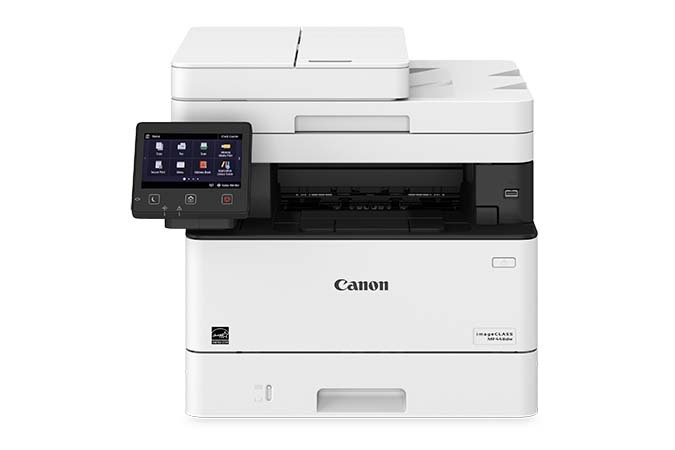
On the imageCLASS MF448dw the scanner outruns the printer: it captures 70 images per minute in a single pass, reading both sides of the sheet at once, while the print engine works at 40 pages per minute. Add Canon's Application Library for one-touch workflows, plus fax, duplex printing and networking as standard, and this is a digitizing station that also prints. It runs on the Canon 057 black cartridge rated for 3,100 pages, with the Canon 057H high-yield cartridge, at about 10,000 pages, available when print volume catches up with scan volume.
Offices clearing filing cabinets into searchable archives will feel that 70-ipm feeder first: boxes of two-sided records move through in one pass each. Printing follows the same rhythm — the pages this machine produces are usually the output of those workflows — so a single long-running black cartridge suits it better than a shelf of variety.
Toner Cartridges for ImageClass MF448dw
| Cartridge | Color | Page Yield |
|---|---|---|
| Canon 057 Black 2 Pack | Black | 3,100 pages per cartridge |
| Canon 057 | Black | 3,100 pages |
| Canon 057 Black 4 Pack | Black | 3,100 pages per cartridge |
| Canon 057H Black 2 Pack | Black | About 10,000 pages per cartridge |
| Canon 057H | Black | About 10,000 pages |
| Canon 057H Black 4 Pack | Black | About 10,000 pages per cartridge |
Which cartridge should you buy?
Match the cartridge to which engine works harder. If this machine mostly scans and prints modestly, the standard 057's 3,100 pages already cover long stretches between orders. Where the archive project also means reprinting files, contracts and mailings, the 057H's roughly 10,000 pages keep the printer fed between supply runs. Multi-packs belong in the project cupboard: a scanning campaign that stalls for want of toner wastes the feeder's speed advantage. Whichever size you choose, these Clever Supplies compatibles are covered by a 1-year warranty and 1-year returns.
Chip, toner and everyday use
Toner level reporting comes from the cartridge chip, and the compatible cartridges here carry chips the MF448dw reads normally, so the gauge and the control panel stay truthful. When a change is due, the used cartridge slides out from the front and the replacement seats in seconds. Remember that rated yields assume around 5% coverage — pages that pair scanned images with shaded forms draw more toner than plain correspondence. Keep the next cartridge sealed on the shelf beside the paper stock so a swap never waits on a delivery.
Frequently Asked Questions
What toner does the imageCLASS MF448dw take?
One black cartridge: the Canon 057, rated for 3,100 pages, or the high-yield Canon 057H at about 10,000 pages. Nothing else in the catalog fits this model.
Does scanning use up toner?
No. Scanning a page consumes no toner at all — only printing and copying draw from the cartridge. A scan-heavy week digitizing archives can pass without the toner gauge moving at all.
What does single-pass duplex scanning change?
The feeder reads both faces of a sheet in one pass instead of flipping it, which is how this model reaches 70 images per minute and why two-sided archives digitize so quickly. It affects paper handling, not which cartridge you buy.
My copies look light even though the gauge shows toner left. What helps?
Rock the cartridge gently from side to side to redistribute the toner inside, then reinstall it. Uneven settling near the end of a cartridge is common, and leveling it usually evens the print out for the pages that remain.
More printers that use the same cartridges
The Canon 057 cartridge is shared across the platform — the same supply fits: ImageClass MF449dw, ImageClass MF445dw, ImageClass LBP228dw, ImageClass LBP227dw, ImageClass LBP226dw.