




Canon CRG-111
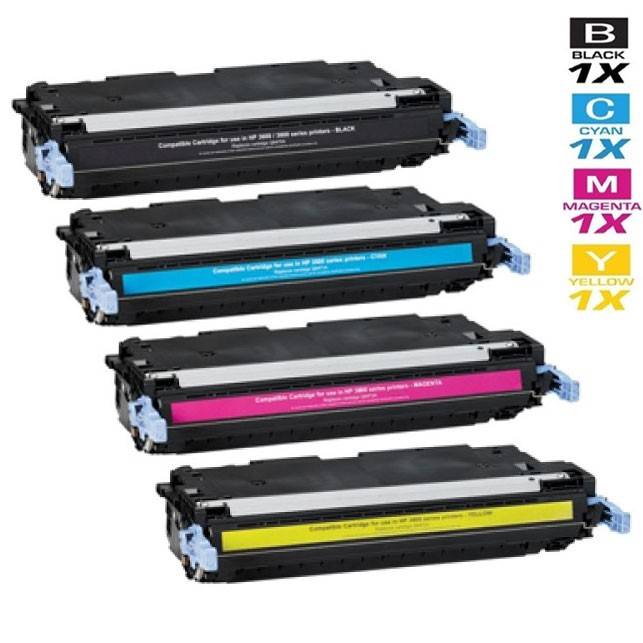
The Canon CRG-111 is the four-cartridge color toner family for Canon's departmental color machines — the imageCLASS MF9130c, MF9150c, MF9170c, MF9220cdn and MF9280cdn multifunction models and the LBP5300-series color printers listed below. Each color has its own part number: black (1660B001AA), cyan (1659B001AA), magenta (1658B001AA) and yellow (1657B001AA), sold as singles and in the sets in the table below.
These are departmental machines — the color printer a whole floor shares — and they print in a pattern consumer machines never see: long runs of black documents punctuated by genuinely heavy color work, charts, reports and presentation decks that drain all four cartridges in proportion. In that environment the four cartridges behave like four separate supplies that happen to live in one machine. A department that waits until a color runs dry before ordering will lose a day of color printing to delivery time, so the working habit is to watch the levels the machine reports and keep the next cartridge for the lowest color already in the building. The CRG-111 family rewards that habit, because every color is a standard, separately stocked cartridge with a part number that maps one-to-one onto the slot it fills.
Canon CRG-111 Toner Cartridges
| Cartridge | Color | Page Yield |
|---|---|---|
| Compatible Canon CRG-111 (1660B001AA) Toner Cartridge Black | Black | See product page |
| Compatible Canon CRG-111 (1659B001AA) Toner Cartridge Cyan | Cyan | See product page |
| Compatible Canon CRG-111 (1658B001AA) Toner Cartridge Magenta | Magenta | See product page |
| Compatible Canon CRG-111 (1657B001AA) Toner Cartridge Yellow | Yellow | See product page |
| Compatible Canon CRG-111 Toner Cartridges 4 Color Set (1660B001AA/ 1659B001AA/ 1658B001AA/ 1657B001AA) | Black | See product page |
| Compatible Canon CRG-111 Premium Quality Toner Cartridges 4 Color Set (1660B001AA/ 1659B001AA/ 1658B001AA/ 1657B001AA) | Black | See product page |
| Compatible Canon 111 (1660B001AA 1659B001AA 1657B001AA 1658B001AA) Toner Cartridge 5 Color Set | Black | See product page |
Which cartridge should you buy?
Replace colors individually as the machine calls for them — that is the economical default, and singles of all four colors are in the table. Reach for the 4-color set when the machine's levels show several cartridges low together, when a department is commissioning a machine and wants a full spare set in the cabinet from day one, or when a full refresh is simply due. The premium-quality 4-color set is the same combination in the store's premium-quality build. The 5-color set adds a second black cartridge to the four colors, which matches how these machines actually consume toner: black is used on nearly every page, color or not, so it runs out well ahead of the colors it was installed with. If you are choosing one set for the shelf, the 5-color set is the one shaped like real departmental use; keep singles of whichever color your office's charts lean on as the top-up between sets.
Chip, toner and everyday use
Each CRG-111 cartridge sits in a color-coded position, and the machine reads the cartridge as soon as the door closes — there is no setup step. Before installing, rock the new cartridge gently end to end several times; on cartridges this size, settled toner is the most common cause of a pale first run. Pull the seal in one steady motion, slide the cartridge in until it seats, and let the machine calibrate: after a color change, running the machine's built-in calibration from its maintenance menu restores even color balance more reliably than test-printing your way there. Replace one flagged color at a time and leave healthy cartridges in place — pulling a half-full cartridge out and reseating it invites toner dust and solves nothing. Keep shelf spares sealed and upright, away from sunlight, and remember that stated yields assume about 5% coverage per color; a department printing full-bleed charts will cycle every cartridge faster than the figures suggest.
Printers that use the Canon CRG-111
The Canon CRG-111 family serves these departmental color printers: ImageClass MF9150C, ImageClass MF9170C, ImageClass MF9220CDN, ImageClass MF9280CDN, ImageClass MF9130C, ImageClass MF9220, ImageClass MF9280, LBP-5300, LBP-5360, LBP-5400, LBP-5630, ImageClass MF9150, ImageClass MF9170, Color ImageRunner LBP5360, ImageRunner LBP5360, ImageRunner LBP5300, ImageRunner LBP5400.
Frequently Asked Questions
Which CRG-111 part number is which color?
Black is 1660B001AA, cyan is 1659B001AA, magenta is 1658B001AA and yellow is 1657B001AA. The machine's toner screen names the color it needs; match it to the number here, or read the number straight off the cartridge you are replacing.
What is the difference between the 4-color set and the 5-color set?
The 4-color set holds one cartridge of each color — black, cyan, magenta and yellow. The 5-color set adds a second black cartridge, because black is consumed on almost every page these machines print and typically runs out first. Both sets fit the same printers; the choice is about how your department prints.
Is the Canon 111 the same as the CRG-111?
Yes — the same cartridge family appears under both namings; some listings shorten CRG-111 to 111. The part numbers are the reliable identifier: if your machine takes 1660B001AA black and its 1657–1659 color companions, you are in the CRG-111 family regardless of which name is printed on the box.
Can I replace just the cyan cartridge in my MF9220cdn?
Yes. The cyan cartridge (1659B001AA) is sold on its own, and changing it leaves the black, magenta and yellow cartridges in place. Color cartridges in this family are always changed one at a time, as the machine flags them.