






 See Compatible Printers
 Read more about our ink!
Brother
Brother TN223Y Yellow Genuine OEM Toner Cartridge - 1,300 pages

Amazon Price:

- Page Yield:
- Color: 1300 pages
- Availability:
- In Stock
- Shipping:
- Free Shipping
- Compatible Printers
- HL-L3210CW
- HL-L3230CDW
- HL-L3270CDW
- HL-L3290CDW
- MFC-L3710CW
- MFC-L3750CDW
- MFC-L3770CD
- Brother-TN630
- Brother-TN660
- DCP-L2500D
- DCP-L2520
- DCP-L2520DW
- DCP-L2540
- DCP-L2540DN
- DCP-L2540DW
- DCP-L2560DW
- DCP-L3510CDW
- DCP-L3550CDW
- HL-3210CW
- HL-3230CDN
- HL-3230CDW
- HL-3270CDW
- HL-3290CDW
- HL-L2300
- HL-L2300D
- HL-L2305W
- HL-L2315DW
- HL-L2320
- HL-L2320D
- HL-L2340
- HL-L2340DW
- HL-L2360DW
- HL-L2361
- HL-L2361DW
- HL-L2365
- HL-L2365DW
- HL-L2380
- HL-L2380DW
- HL-L2560
- HL-L2560DW
- HL-L2560DWR
- HL-L2660
- HL-L2660DW
- HL-L3230CDN
- MFC-L2680W
- MFC-L2685DW
- MFC-L2700
- MFC-L2700DW
- MFC-L2705
- MFC-L2705DW
- MFC-L2707DW
- MFC-L2720
- MFC-L2720DW
- MFC-L2740DW
- MFC-L3730CDW
- MFC-L3770CDW
- MFC-Z5000
- Specifications
- SKU:
- CS-Bro-TN223-OEM-Y
- Printer Brand:
- Brother
- OEM Number:
- TN223Y
- Ink Color:
- Yellow
- Page Yield:
- Color: 1300 pages
- Printer Type:
- Laser Cartridge
- Condition:
- New
- Description
- Reviews



The brand new TN-223Y is a genuine Brother laser toner cartridge for your Brother printer. Brother TN-223Y laser toners deliver excellent, dependable results, page after page. You can depend on Brother TN-223Y toner cartridges.Work with HL-L3210CW, HL-L3230CDW, HL-L3270CDW, HL-L3290CDW, MFC-L3710CW, MFC-L3750CDW, MFC-L3770CDW
Frequently Asked Questions
Yellow is barely visible on paper — why does the printer stop when it runs out?
Because yellow is doing invisible structural work in almost every color on the page. Greens, oranges, warm grays and natural skin tones are all built with the TN223Y as an ingredient, and color lasers refuse to print with an empty slot rather than hand you documents with the color balance destroyed. The paradox of this cartridge is that you almost never see yellow itself — you see what happens to everything else when it fades: greens slide blue, oranges go pink, and highlights lose their warmth.
How can I tell the yellow is low when I can't see yellow?
Read the symptoms in the colors that depend on it. If greens print bluer than the screen shows, if oranges and warm browns look thin, or if the printer's own toner gauge shows the TN223Y trailing the TN223C and TN223M, the yellow is the suspect. A test page from the machine's menu prints solid color blocks that make it obvious. Rocking the TN223Y gently side to side and reprinting a color page is the quick field check: a brief improvement confirms a cartridge at the end of its fill.
How long should one TN223Y last in a typical home or office?
The rating is 1,300 pages, and for yellow that number stretches a long way in ordinary use. Yellow is consumed in the smallest quantities of the three colors in most documents — a home user printing occasional photos and color pages can see a TN223Y last well over a year, and a general office usually replaces yellow least often of all four slots. Only genuinely warm-toned, graphics-heavy work — food photography, autumnal marketing, dense charts — drinks it at a pace anywhere near the black TN223BK.
Which printers does the TN223Y fit?
This cartridge serves Brother's TN223 color laser platform — the HL-L3210CW, HL-L3230CDW, HL-L3270CDW and HL-L3290CDW printers, plus the MFC-L3710CW, MFC-L3750CDW and MFC-L3770CDW all-in-ones. In each of them the TN223Y occupies the yellow slot, working alongside the TN223BK black, TN223C cyan and TN223M magenta. These machines also run the high-yield TN227 series, and the slots are interchangeable: a printer currently printing with a TN227Y can drop in this standard-yield TN223Y instead.
Should I buy the single yellow or the three-color set?
If only yellow has faded, buy the single — that is what it is for. The TN223C, TN223M and TN223Y are each $118.64 bought one at a time, $355.92 for the three, while the genuine three-color set is $329.25. So the set only earns its money when all three colors are genuinely near the end together; replacing healthy cyan and magenta early just parks working toner in the bin. Check the machine's toner gauges: one low color means a single TN223Y, three low colors mean the set.
What happens if the cartridge turns up damaged or faulty?
Start by getting in touch with us rather than fitting the cartridge. Every genuine Brother product we sell can be sent back within 30 days of it reaching you, whatever the reason, and a unit that arrives damaged or turns out to be faulty is exactly what that window exists for. The step-by-step process is laid out on our shipping and returns page. Past returns, cover comes from Brother itself: this is the manufacturer's own sealed cartridge, so it carries the manufacturer's warranty. If the box or the cartridge looks wrong on arrival, leave it uninstalled and contact us first — that keeps the return straightforward. Our support team is on hand from 9 in the morning until 5 in the afternoon (CST), Monday through Friday, if you'd rather talk it through before sending anything back.
Can I buy a TN223Y ahead of time and keep it sealed on the shelf?
Yes, and with yellow that is often the sensible pattern, because this slot can take well over a year to empty in a home. Keep the TN223Y sealed in its bag, stored flat at room temperature and out of direct sunlight. Toner is a dry powder, so nothing dries out or settles in a way a gentle rock before fitting will not fix. Open the bag only when the old cartridge actually comes out.
How do I make sure I am reordering the yellow and not a near-identical code?
Read the code letter by letter before you open anything. The final letter is the slot: TN223Y is the yellow, and a C or M at the end would be a different color entirely. Also check the number, because these printers accept the high-yield TN227Y in the same slot — it fits, but it is a different cartridge with a different rating from this standard 1,300-page TN223Y. Catching a mismatch while the box is still sealed keeps the 30-day return window simple.
Do copies on the MFC models spend this yellow the same way prints do?
Yes. On the MFC-L3710CW, MFC-L3750CDW and MFC-L3770CDW, a copy is a printed page as far as the cartridge is concerned, so color copies draw on the TN223Y exactly like pages sent from a computer. Scanning is the exception — sending a document to email or a folder uses the lamp and sensor only and spends no toner at all. If a shared all-in-one seems to fade faster than its print volume suggests, the copy tray is usually the missing pages.
What should I do with the empty TN223Y once the new one is in?
Keep it beside the printer for the first few color jobs. If greens and warm tones print correctly with the replacement fitted, the empty has done its last job and can go to a toner recycling collection rather than household trash. Holding it briefly costs nothing and gives you a comparison unit if output still looks wrong — at that point the fault lies elsewhere in the machine, not in either cartridge.
About This Genuine Brother TN223Y Yellow Toner Cartridge
This is Brother's own TN223Y, the standard-yield yellow built for the TN223 color laser family (HL-L3210CW through MFC-L3770CDW). Brother rates it for 1,300 pages, and our price of $118.64 sits well below the $166.10 list figure. Yellow is the least visible and most quietly essential color on this platform, holding greens, oranges and skin tones together, and this is the factory fill the machines were tuned for. We hold stock in Illinois, Pennsylvania, Georgia and California, and your order is dispatched from one of those four warehouses. You can browse the wider genuine line in the Brother range at Clever Supplies.
Related Items

Brother
Brother TN223C TN223M TN223Y Cyan Magenta Yellow Genuine OEM Toner Cartridge 3 Color Set - 1,300 pages each


Brother
Brother TN223M Magenta Genuine OEM Toner Cartridge - 1,300 pages

Brother
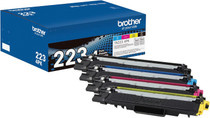
Brother TN223BK TN223C TN223M TN223Y Black Cyan Magenta Yellow Genuine OEM Toner Cartridge 4 Color Set - Black: 1,400 pages, Color: 1,300 pages each

Brother
Brother TN223C Cyan Genuine OEM Toner Cartridge - 1,300 pages