Frequently Asked Questions
Does scanning on our 6128MFP use up toner?
No. Scanning and copying a document to a file or email uses the scanner, not the toner cartridges — only pages that actually come out of the printer consume toner. On a front-desk machine that scans intake forms all day and prints far less, the cartridges (black 106R01455, cyan 106R01452, magenta 106R01453, yellow 106R01454) last considerably longer than the copy count alone would suggest.
Which supply numbers belong to this machine?
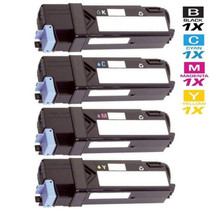
The Phaser 6128MFP takes black 106R01455 rated at 3,100 pages, plus cyan 106R01452, magenta 106R01453 and yellow 106R01454 rated at 2,500 pages each. This set contains one of each. Confirm the numbers on the machine's supplies screen before ordering and the match is settled.
We copy a lot of color-coded forms. Which color empties first?
Whichever color dominates your forms. The three colors carry equal 2,500-page ratings, so a form set heavy on blue headers burns cyan faster, while black at 3,100 pages carries the body text. Watch the supplies screen rather than guessing — the MFP reports each cartridge separately, and only the empty one needs to come out.
Can the receptionist change a cartridge between patients?
Yes — it is a front-access, one-cartridge-at-a-time job that takes a couple of minutes and needs no tools or technician. Pull the spent unit, seat the new one, close up, and the machine is ready for the next copy or print job. The other three cartridges stay exactly where they are.
How does delivery work, and what backs the purchase?
Orders ship from whichever warehouse — IL, PA, GA or CA — sits closest to you, with the details laid out on our shipping and returns page. Each cartridge is covered by a 1-year warranty and 1-year free returns, and support is available Monday through Friday, 9 AM to 5 PM CST if anything needs sorting out.
Should a small clinic keep a spare set on hand?
It is the cheapest insurance against a dead machine at check-in time. The cartridges keep fine sealed in a cool cabinet drawer, and having black 106R01455 plus the three colors ready means a low-toner warning is a two-minute swap instead of a wait for a delivery. The full Xerox range is on the brand page for any other devices in the building.
A streak shows up in only one color on our forms. How do we find the culprit cartridge?
Start with the streak itself: a band or smear takes the color of the channel producing it. A magenta-toned streak on the page points at the magenta cartridge, 106R01453, not at the other three. Pull that one cartridge, check that it is seated properly, and print the same form again. If the streak stays with that cartridge after reseating, the unit itself is the problem rather than the machine.
Why keep the carton and labels until a new cartridge has printed cleanly?
The labels carry the part numbers — 106R01455, 106R01452, 106R01453, 106R01454 — and if a fresh unit prints badly from its first pages, having the box and label at hand makes the exchange under the 1-year warranty and 1-year free returns a two-minute conversation instead of a search. Once a cartridge has proven itself over its first days of real work, the carton can be recycled with a clear conscience.
The front desk cannot stop for toner. When should we actually place the reorder?
At the first low-toner warning, not when a cartridge runs dry. Orders ship from whichever of the IL, PA, GA or CA warehouses is closest, but transit still takes time, and a clinic's printing never checks the calendar before spiking. The warning is the planning window the machine gives you — use it to order the next set of 106R01455, 106R01452, 106R01453 and 106R01454 while the current cartridges still have work in them.
Why do our color forms look flatter on the heavy stock we use for certificates?
Yield ratings and output expectations assume plain paper at standard coverage. Heavy certificate stock takes toner differently from everyday paper, so the same cyan, magenta and yellow can look flatter or less saturated on it. Before blaming a cartridge, print the same page on plain paper: if it looks right there, the cartridges are fine and the stock is the variable. Judge toner health on plain paper, always.
About This Phaser 6128MFP Four-Color Toner Set
The Phaser 6128MFP earns its desk space by printing, copying and scanning in one footprint, and this set matches that workload: a 3,100-page black cartridge for forms and records, and cyan, magenta and yellow at 2,500 pages each for the color work that comes with them. One of each of the four cartridges, $83.25 for the set, verified against the machine's own supply numbers before you order.







 See Compatible Printers
 Read more about our ink!