




SCX-5935FN
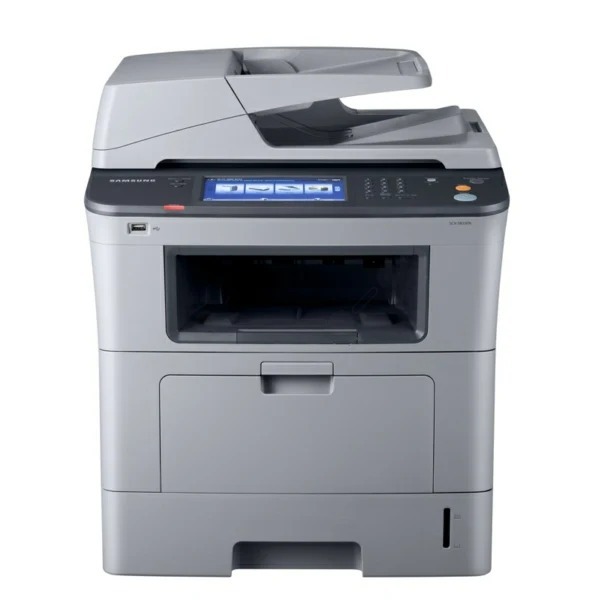
The Samsung SCX-5935FN is a workgroup monochrome multifunction with fax and networking, aimed at busy offices that need one shared machine to do everything. It prints in black only, from a single cartridge family with two capacity tiers: the standard MLT-D206S and the high-yield MLT-D206L. Both tiers are stocked below, as single cartridges and in multi-packs.
In a workgroup, the supply question around this machine is rarely urgent, but it is constant — somebody is always printing, copying or receiving a fax. The practical divide is how often the office wants to think about toner at all: standard cartridges in ready multi-packs for steady, predictable use, or the high-yield line for offices that would rather swap less often and reorder on a slower rhythm.
Toner Cartridges for SCX-5935FN
| Cartridge | Color | Page Yield |
|---|---|---|
| MLT-D206S — standard-capacity single cartridge | Black | See product page |
| MLT-D206S — standard-capacity 2 Pack | Black | See product page |
| MLT-D206S — standard-capacity 3 Pack | Black | See product page |
| MLT-D206S — standard-capacity 5 Pack | Black | See product page |
| MLT-D206S — standard-capacity 10 Pack | Black | See product page |
| MLT-D206L — high-yield single cartridge | Black | See product page |
| MLT-D206L — high-yield 2 Pack | Black | See product page |
| MLT-D206L — high-yield 4 Pack | Black | See product page |
| MLT-D206L — Premium Quality high-yield 5 Pack | Black | See product page |
| SCX-5935FN High Yield — single cartridge listed under the printer's name | Black | See product page |
| SCX-5935FN High Yield — 5 Pack listed under the printer's name | Black | See product page |
Which cartridge should you buy?
Choose by rhythm. The MLT-D206S standard cartridge suits offices with moderate, steady volume — especially in its multi-packs, which keep a small stock on hand without tying up much budget at once. The MLT-D206L high-yield cartridge is the better default when the SCX-5935FN runs all day: longer stretches between swaps and fewer interruptions for the whole workgroup. The two listings named for the printer itself carry the same high-yield supply under the model's own name, as a single and a 5 Pack, which suits purchasing systems that search by model. Whichever line you pick, the compatibles here carry a 1-year warranty with 1-year returns.
Chip, toner and everyday use
Swapping toner on the SCX-5935FN takes about a minute: open the front, pull the old cartridge straight out, and slide the replacement in until the printer registers its chip. A spare kept on the shelf should stay sealed, level and out of direct light — light is harder on a cartridge's photosensitive parts than time is on the toner itself. If a cartridge comes out half-used, bag it, keep it level, and plan to have it back in the printer within a few weeks.
Frequently Asked Questions
Can I trust a listing that says 'fits SCX-5935FN' without a cartridge code?
Treat the code as the deciding detail, not the model claim. This printer takes exactly two cartridges: MLT-D206S at standard capacity and MLT-D206L at high yield. A listing that names one of those codes — or that is named for the printer itself, like the high-yield listings above — can be verified. A bare 'fits' claim cannot.
The display says toner is out — can I still print a few critical pages?
Almost always. The message is an estimate based on coverage, and plain text with light coverage can continue for dozens, sometimes a few hundred, of pages after it appears. Dense pages run out first. Treat it as a reprieve rather than a strategy: a spare MLT-D206S or MLT-D206L on the shelf is what turns the message into a non-event.
How long can I safely keep a spare cartridge on the shelf?
Sealed in its packaging and stored level in a cool, dark spot, a spare keeps well for an extended period. The real risks are light, heat and being stored on end — not the calendar alone. If you pull a partially used cartridge out of the machine, reseal it in its original packaging or a dark bag and return it to service within a few weeks.
Is there a color cartridge option for the SCX-5935FN?
No. The machine prints in black and white only, so black toner is the entire supply list. If a listing tries to sell you cyan, magenta or yellow for this model, it is the wrong listing.
More printers that use the same cartridges
These Samsung models run on the same MLT-D206 cartridges: SCX-5935, SCX-5935NX, Samsung-MLTD206.