




TASKalfa 3550ci
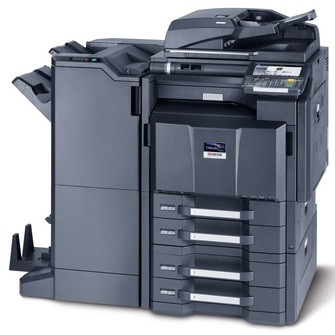
A rung above the 3050 models, the TASKalfa 3550ci is a color multifunction aimed at departments whose color workload keeps growing and whose deadlines keep tightening — and it stays on the same TK8309 toner platform, so nothing about restocking changes when the machine steps up. The black TK8309K is rated for approximately 25,000 pages; TK8309C cyan, TK8309M magenta and TK8309Y yellow each run to roughly 15,000 pages.
The point of this model is headroom: the higher number in the TASKalfa ladder marks it for heavier color work than the TASKalfa 3050ci below it, yet the supply chain stays identical. A floor running both machines side by side stocks one toner family, one shelf, one reorder habit. For a growing office that means the printer upgrade does not trigger a supplies overhaul — the cartridges in the cabinet today are the cartridges the 3550ci burns tomorrow, at the same rated yields.
Toner Cartridges for TASKalfa 3550ci
- TK8309K black cartridge — the single black unit, rated around 25,000 pages
- TK8309C cyan cartridge — the single cyan unit, rated around 15,000 pages
- TK8309M magenta cartridge — the single magenta unit, rated around 15,000 pages
- TK8309Y yellow cartridge — the single yellow unit, rated around 15,000 pages
- TK8309 4 Color Set — all four cartridges in one box for a full refresh
- TK8309K 2 Black — two black cartridges for steady document volume
- TK8309K 3 Black — three black cartridges for heavier months
- TK8309K 5 Black — five black cartridges for the busiest floors
- TK8309 4 Color Set (alternate listing) — the same four-cartridge set under a second listing
- TK8309K Black (alternate listing) — the black single under a second listing
- TK8309K Black 2 Pack — a two-pack of the black cartridge
- TK8309K Black 5 Pack — a five-pack of the black cartridge
- TK8309C Cyan (alternate listing) — the cyan single under a second listing
- TK8309M Magenta (alternate listing) — the magenta single under a second listing
- TK8309Y Yellow (alternate listing) — the yellow single under a second listing
Which cartridge should you buy?
Departments buy time as much as toner. Black does most of the work in mixed color offices and its rated life is the longest of the four, so the practical rhythm is black multipacks for the month-to-month load and single colors only when a specific one empties. A two- or three-black pack suits a steady department; the five-black pack is for floors where a stockout would stall real deadlines. Keep one complete four-color set in reserve as the buffer: when two colors fade in the same week — the classic month-end pattern — the set turns a scramble into a five-minute swap.
Chip, toner and everyday use
Before installing a cartridge, check that the chip contacts are clean and the packaging seals are fully removed; a partially peeled seal is the most common cause of a cartridge the machine refuses to recognize. After the swap the printer runs a short calibration — let it finish before judging print quality, then run one test page. Rated yields are measured at about 5 percent coverage, and presentation decks with full-color backgrounds consume toner several times faster than memos, so plan color stock around your worst week, not your average one. Keep unopened cartridges in their bags until the day they are needed.
Frequently Asked Questions
Does the TASKalfa 3550ci use the same toner as the 3050ci?
Yes — the identical TK8309 set, with the same rated yields of about 25,000 pages for black and 15,000 pages per color. A mixed fleet of the two models needs only one toner stock.
Is there a higher-yield cartridge option for this machine?
The TK8309 family is already the high-capacity platform for this line; there is no separate standard-yield tier to step up from. For higher volume, the multipacks of black are the economical way to buy the same rated yield in fewer orders.
What happens when one color runs out in the middle of a deadline?
The machine pauses for the empty color rather than printing incomplete pages. Because each cartridge swaps on its own, replacing just that one unit gets the queue moving again — another reason to keep at least the fast-moving black on hand at all times.
What warranty comes with these compatible cartridges?
They carry a 1-year warranty and 1-year returns. If a cartridge underperforms or fails within that window, it is replaced or refunded.
More printers that use the same cartridges
One toner stock covers the whole family — these models all take the same TK8309 cartridges: TASKalfa 3050ci, TASKalfa 3051ci, TASKalfa 3551ci, TASKalfa 4550ci, TASKalfa 4551ci, TASKalfa 5550ci, TASKalfa 5551ci.