







 See Compatible Printers
 Read more about our ink!
Kyocera-mita
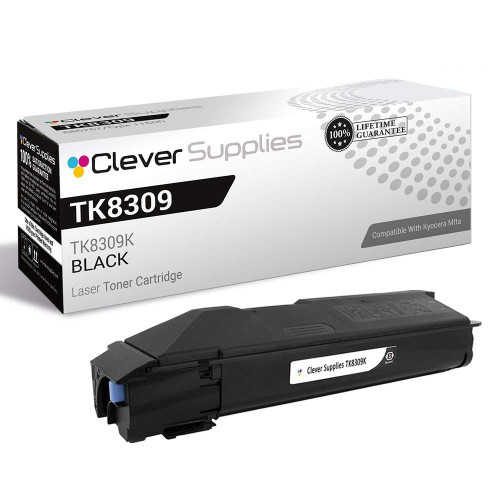
Compatible Kyocera-Mita TK8309 (TK8309K) Toner Cartridge Black

Amazon Price:

- Page Yield:
- Black: 15000
- Availability:
- In Stock
- Shipping:
- Free Shipping
- Compatible Printers
- Specifications
- SKU:
- CS-Kyocera-Mita-TK8309-Black-N1
- Printer Brand:
- Kyocera-Mita
- OEM Number:
- TK8309K
- Ink Color:
- Black
- Page Yield:
- Black: 15000
- Printer Type:
- Laser Cartridge
- Condition:
- New Compatible
- Description
- Reviews



Kyocera Mita TK8309, TK8309K, TK8309C, TK8309M, TK8309Y, these cartridges are designed for use with the TASKalfa 3050ci, TASKalfa 3051ci, TASKalfa 3550ci, and TASKalfa 3551ci printers, ensuring superior print quality and reliability in professional environments. The TK8309K black toner cartridge is engineered to produce sharp and clear text documents, making it ideal for business reports, contracts, and everyday printing tasks. With its high yield and efficiency, this cartridge offers cost-effective printing solutions for offices with high-volume printing needs. For color printing requirements, the TK8309C cyan, TK8309M magenta, and TK8309Y yellow toner cartridges provide accurate color reproduction and vibrant hues. Whether it's colorful presentations, marketing materials, or graphics, these cartridges produce professional-quality prints that captivate the audience. In addition to toner cartridges, toner cartridges play a crucial role in maintaining print quality. The Kyocera Mita TK8309 toner cartridge is designed to complement the printer's performance, delivering vibrant colors and sharp images. Whether it's photographs, illustrations, or creative designs, the TK8309 toner cartridge ensures exceptional print quality, enhancing overall output. Kyocera Mita printers, including the TASKalfa 3050ci and TASKalfa 3550ci models, are renowned for their durability and efficiency in demanding office environments. With features like high-speed printing and advanced color management, these printers streamline document workflows, boosting productivity and reducing operational costs.
Frequently Asked Questions
We inherited this printer and I have never ordered its toner — where do I start?
Start with the cartridge that is in the machine. Open the front cover, slide the unit partway out and read the label, or check the supply page on the panel: the black cartridge for this TASKalfa range is the TK8309K. Once you have that code, ordering is straightforward — no need to know the machine's history or age.
What am I actually getting for $78.63?
One compatible TK8309K black toner cartridge rated at 15,000 pages, ready to install out of the box. That rating is based on standard coverage, so a typical office workload of letters, forms and reports should see a long service life from a single unit.
Our machine is a TASKalfa 3550ci — is it covered by this listing?
Yes. This cartridge is the shared black for the TASKalfa 3050ci, TASKalfa 3051ci, TASKalfa 3550ci and TASKalfa 3551ci. All four take the same TK8309K, so whichever of them sits in your office, this is its black cartridge.
I have never changed one of these — how hard is it?
It is designed to be a user task. Pull the old cartridge straight out, rock the new one gently side to side before fitting it, slide it in until it locks, and close the cover. Print a test page afterwards. Most first-timers are done in about two minutes, with no tools involved.
Who do I contact if I get stuck or the output looks wrong?
Our support team is available Monday through Friday, 9 AM to 5 PM CST and can walk you through a change or help judge whether a print problem is the cartridge or the machine. Every cartridge is also backed by a 1-year warranty and free returns for a year, so a genuinely faulty unit is never your loss.
How will my order reach me, and how do returns work?
We dispatch from the warehouse in IL, PA, GA or CA closest to your address. Transit expectations and the return process are explained on our shipping and returns page.
How long will this one cartridge actually last me?
Work it out from your monthly volume: 15,000 pages divided by the pages you print each month. At 1,000 pages a month, a single TK8309K runs for about fifteen months; at 3,000 a month, about five. If you have no idea what your volume is, write the fitting date on the box and check the machine's page count when the low warning first shows — one cartridge teaches you your real rate, and the next order becomes simple arithmetic instead of a guess.
When should I place my next order — when the warning appears, or when the printer stops?
When the warning appears. The low warning is the machine telling you the cartridge is near the end of its 15,000 pages, not that it has stopped — you still have a short runway of printing left, and that is the window to order. Orders ship from the warehouse nearest you, but transit still takes time, and ordering at the warning means the replacement is in the room before the printer actually stops mid-job.
Should I keep the empty cartridge after I fit the new one?
For a few days, yes. Print normally and check that the new TK8309K is producing clean, full-density pages; once it has proven itself over a day or two of ordinary work, the old unit can go. Keeping it briefly also covers you if the new cartridge misbehaves — every cartridge carries a one-year warranty with free returns for a year, and a faulty unit is handled on its own, so you lose nothing by holding the empty until you are sure the replacement is sound.
What if my office adds a second printer later — will this same cartridge still fit?
As long as the second machine is one of the four in this range — the TASKalfa 3050ci, 3051ci, 3550ci or 3551ci — yes. All four take the identical TK8309K, so a second machine does not mean a second cartridge type to stock or a second code to remember. One spare on the shelf covers either printer, and one part number covers the whole small fleet, which keeps ordering simple as the office grows.
About This Cartridge
One compatible Kyocera-Mita TK8309K black toner cartridge for the TASKalfa 3050ci, 3051ci, 3550ci and 3551ci — an easy first order if the machine is new to you, since a single part number covers all four models. It is rated at 15,000 pages, costs $78.63, and comes with a 1-year warranty and 1-year free returns.
Related Items

Kyocera-mita
Compatible Kyocera-Mita TK8309 (TK8309K) Toner Cartridge Black

Kyocera-mita
Compatible Kyocera-Mita TK8309 Toner Cartridge Black (TK8309K)
/>
Kyocera-mita
Compatible Kyocera-Mita TK8309 Toner Cartridge 3 Black (TK8309K)
/>

Kyocera-mita
Compatible Kyocera-Mita TK8309 Toner Cartridge 2 Black (TK8309K)
/>