




M2635dw
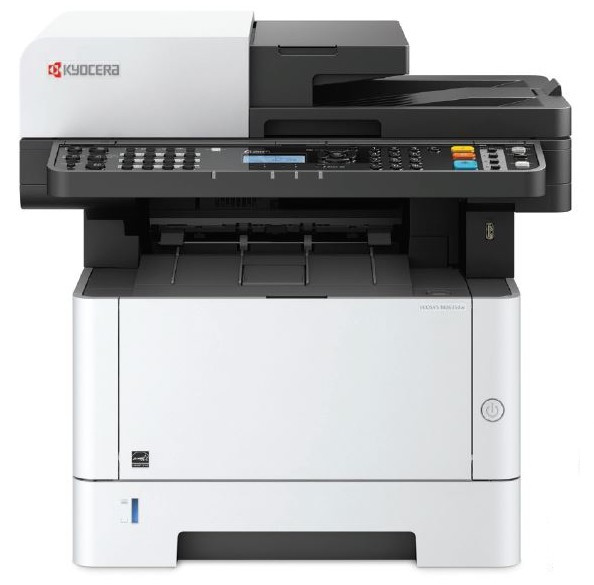
The M2635dw is Kyocera's M-series multifunction for the modern small office: print, copy, scan and fax in one compact desktop footprint, with wireless networking built in and duplex printing as standard. It feeds on the TK1152 black toner cartridge, a compact unit rated for 3,000 pages and sized honestly for lighter daily volumes. The dw suffix is the pitch in two letters — it joins the Wi-Fi network in minutes, with no cable runs and no fixed desk.
Flexible workspaces are where this model earns its place. A small team can set it on a credenza today, move it to a different room next quarter, and share it over wireless the whole time. USB and Ethernet ports are there when you want them, but nothing about the daily routine depends on them. For an office that prints steadily rather than heavily, the M2635dw covers every everyday task from a single box that never dominates the room.
Toner Cartridges for M2635dw
| Cartridge | Color | Page Yield |
|---|---|---|
| TK1152 | Black | 3,000 pages |
| TK1152 | Black — 2 Pack | 3,000 pages per cartridge |
| TK1152 | Black — 4 Pack | 3,000 pages per cartridge |
Which cartridge should you buy?
One cartridge fits this printer, so decide how your office likes to stock it. A single TK1152 at 3,000 pages suits a home office or a two-person team printing a few dozen pages a day. The 2 pack is the practical favorite for a shared MFP: scanning and copying keep working only while toner lasts, and a spare in the drawer means a low-toner morning never turns into a courier run. Small offices that have standardized on this model — or that simply dislike reordering — can step up to the 4 pack and bring the per-cartridge cost down.
Chip, toner and everyday use
The compatible TK1152 includes the recognition chip the M2635dw expects, so toner levels show correctly on the panel and over the wireless connection. Fitting a new cartridge takes a minute: open the front cover, slide the old unit out, and push the replacement in until it locks. If output fades near the end of a cartridge, a gentle side-to-side shake levels the remaining toner for a few more jobs. Keep your spare sealed in its bag in a drawer — away from heat and humidity — and it will be ready whenever the panel asks.
Frequently Asked Questions
Which toner does the M2635dw use?
The TK1152 black toner cartridge, rated for approximately 3,000 pages per ISO/IEC 19752.
Is M2635dw toner the same as M2040dn toner?
No. The M2040dn takes the TK-1172 cartridge; the M2635dw uses the TK1152 only, so the two models cannot share a supply drawer.
Does this printer really work wirelessly?
Yes. Built-in wireless sits alongside USB and Ethernet, and automatic duplex printing is standard, per the model's specification.
How many pages will one TK1152 print?
Approximately 3,000 pages at about 5% coverage. Text-heavy printing lands near the rating; dense graphics and full-page coverage will finish a cartridge sooner.