




ECOSYS P2035D
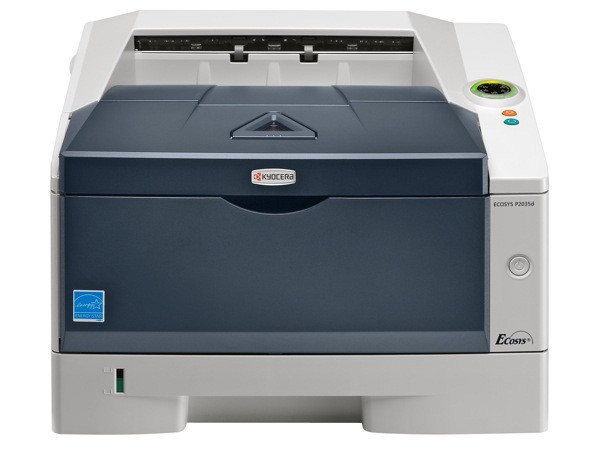
As part of the ECOSYS printer family, the ECOSYS P2035d is a USB-connected desktop monochrome printer for the cost-conscious office. It pairs Kyocera part 1T02LY0US0 — the TK-162 black toner, rated for 2,500 pages — with Kyocera's long-life drum, which is the ECOSYS formula for a genuinely low cost per page. The d suffix marks built-in duplexing, so two-sided jobs come out double-sided automatically, with no driver workarounds. European lists call the same cartridge the TK-160.
Desktop printers earn their keep by disappearing into the workday, and the P2035d is built to that brief: it sits beside one user, handles that person's letters, labels and reports, and asks for a modest cartridge a few times a year. The automatic duplexing quietly halves paper use on long documents — the feature owners tend to appreciate most once the paper bill arrives — while the long-life drum removes the second consumable most desktop lasers demand.
Toner Cartridges for ECOSYS P2035D
| Cartridge | Color | Page Yield |
|---|---|---|
| 1T02LY0US0 (TK-162) Black | Black | 2,500 pages |
| 1T02LY0US0 (TK-162) Black 3 Pack | Black | 2,500 pages per cartridge |
| 1T02LY0US0 (TK-162) Black 5 Pack | Black | 2,500 pages per cartridge |
| 1T02LY0US0 (TK-162) Premium Quality Black 5 Pack | Black | 2,500 pages per cartridge |
Which cartridge should you buy?
The TK-162 is a right-sized cartridge: 2,500 pages suits light to moderate desktop printing, and there is no larger yield tier to graduate to — the pack sizes are how you scale. A single cartridge plus the discipline to reorder at the low-toner warning works for one user. A home office that cannot afford a printing pause should hold the 3 Pack, and anyone running several small ECOSYS or FS desktops from the family below will find the 5 Pack or Premium Quality 5 Pack the economical standard. Cost per page stays low either way, thanks to the long-life drum that never appears on your supply order.
Chip, toner and everyday use
Toner is the only routine consumable on the P2035d: its long-life drum is designed to last the life of the machine under normal use, so there is no drum unit to budget for or replace. The TK-162 clicks in under the top cover and is recognized through its chip with no reset steps. Store the spare in a desk drawer, sealed and flat — a desktop printer's cartridge often sits in reserve for months, and cool, dark storage keeps it ready. The 2,500-page rating follows ISO/IEC 19752 at about 5% coverage; duplexing saves paper, not toner, so two-sided printing does not stretch the cartridge itself.
Frequently Asked Questions
Which toner does the ECOSYS P2035d use?
The Kyocera TK-162 black cartridge, factory part 1T02LY0US0 — the US version of the TK-160 — rated for about 2,500 pages.
Does the P2035d need a separate drum unit?
No. It uses Kyocera's long-life drum technology, which lasts the life of the machine under normal use. Toner is the only routine consumable you will buy for it.
What does the d in P2035d stand for?
Duplex. The printer has two-sided printing built in, so long documents can be printed on both sides automatically — cutting paper use on every two-sided job without any driver tricks.
Which other printers use the TK-162?
The networked /kyocera-mita/ecosys-series/ecosys-p2035dn/ and the /kyocera-mita/fs-series/fs-1120d/ take the identical cartridge, so spares bought for the P2035d also cover those machines.
More printers that use the same cartridges
The TK-162 is shared with these two models: ECOSYS P2035DN, FS-1120D.