




Xpress M2885FW
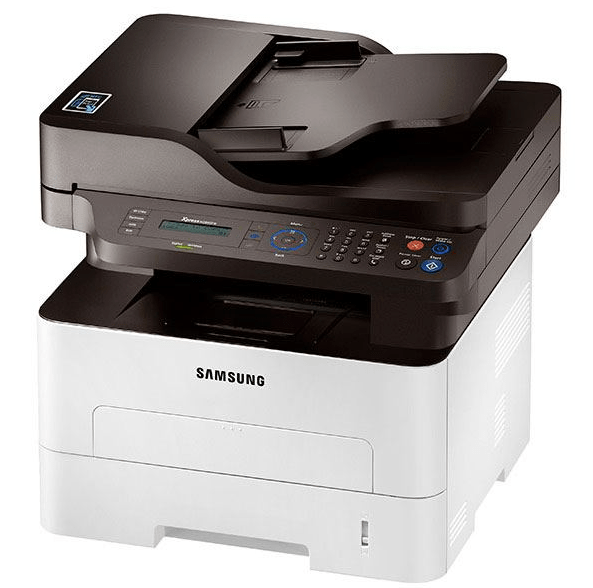
Topping the wireless range, the Xpress M2885FW pairs the family's fastest mono engine with fax and full wireless connectivity — the variant offices buy when they refuse compromises. The consumable to match that ambition is the high-yield MLT-D116L, stocked on this page. The long-life MLT-R116 drum unit supports the imaging side for roughly 9,000 pages, keeping even this flagship's running costs modest.
A flagship MFP collects the office's hardest jobs: the longest reports, the end-of-day fax backlog, the copy queue everyone else stands behind. Volume concentrates on the fastest machine in the building, so the cost per page it delivers — a figure set almost entirely by cartridge choice — matters more here than on any other printer you own.
Toner Cartridges for Xpress M2885FW
| Cartridge | Color | Page Yield |
|---|---|---|
| MLT-D116L High Yield | Black | See product page |
| MLT-D116L High Yield — 3 Pack | Black | See product page |
| MLT-D116L Premium High Yield — 5 Pack | Black | See product page |
| Xpress M2885FW High Yield | Black | See product page |
| Xpress M2885FW High Yield — 5 Pack | Black | See product page |
Imaging drum (replaced separately):
- MLT-R116 drum unit — Black — approximately 9,000 pages. Its long service life matches the flagship role: fewer interventions, longer runs.
Which cartridge should you buy?
Pair the flagship with the flagship fill. The MLT-D116L is the cartridge this page stocks for the Xpress M2885FW because the machine's speed, fax and wireless reach concentrate pages on it; the family's standard MLT-D116S fits, but choosing it for the range-topper trades a small saving for frequent interruptions. Teams that run the M2885FW hard should price the 3-pack and 5-pack listings — cost per page drops and a spare is always in the building. The MLT-R116 drum, at roughly 9,000 pages, needs replacing far less often and should be ordered when the printer prompts, not bundled into every toner purchase.
Chip, toner and everyday use
Each compatible cartridge's chip registers with the Xpress M2885FW on installation, so toner levels report normally and the machine accepts the MLT-D116L without complaint. Most care for this model is about the drum: when the MLT-R116's turn comes, keep the new unit shielded from light until it goes in, handle it by the ends, and never touch the photosensitive surface — fingerprints there print forever. Page yields assume 5% coverage; the dense reports this machine attracts will run through toner faster than the rating suggests. Store spare cartridges sealed and flat, and let a gently rocked cartridge finish its life before opening a new one.
Frequently Asked Questions
How should I handle the MLT-R116 drum when replacing it?
Keep it in its light-proof packaging until the moment of installation, hold it by the ends or handle, and do not touch the drum surface. Install it promptly, close the machine up, and run a test page to confirm clean output.
Why choose the high-yield cartridge for the fastest model?
Because pages concentrate here. The fastest engine, a fax line and an open wireless connection all feed one machine, so the MLT-D116L's longer life and lower cost per page have an outsized effect compared with the same choice on a quieter printer.
Will a standard-yield cartridge work in the Xpress M2885FW?
Yes — the MLT-D116S from the same family fits the same slot. It simply runs out sooner, which on this model usually means it is being changed at the worst possible moment: mid-queue, mid-fax, mid-report.
When should the drum be replaced if prints still look acceptable?
Let the printer and the page count guide you. The MLT-R116 is rated for roughly 9,000 pages; if output is still clean as you approach that figure, keep the spare ready and change the drum when the machine prompts or quality starts to slip.