




BizHub C353P
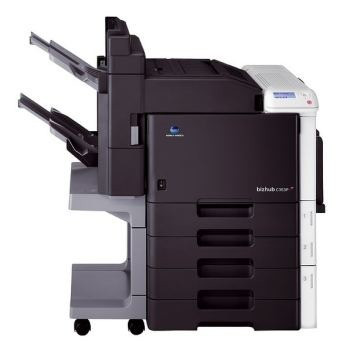
The P in BizHub C353P stands for print. This is the C353's engine released from multifunction duty, producing the same TN-314 color output without the copier hardware wrapped around it — and the cartridge set came across unchanged: black TN-314K under factory code A0D7131, cyan A0D7431 (TN-314C), magenta A0D7331 (TN-314M) and yellow A0D7231 (TN-314Y). A C353P standing beside a BizHub C353 draws from exactly the same spares shelf.
Mixed deployments are where this model quietly shines. An office that keeps the MFP for walk-up work and parks a C353P on the network for volume printing stocks one toner family for both, one order line, one shelf. The C353P itself asks for print-focused care: levels checked from the driver, swaps done slot by slot, and the small maintenance checks that share a toner change's open-door moment not postponed until they announce themselves.
Toner Cartridges for BizHub C353P
| Cartridge | Color | Page Yield |
|---|---|---|
| Black, Cyan, Magenta, Yellow — TN-314 4 Color Set (A0D7131/A0D7431/A0D7331/A0D7231) | Black, Cyan, Magenta, Yellow | See product page |
| Black, Cyan, Magenta, Yellow — TN-314 Premium 4 Color Set (A0D7131/A0D7431/A0D7331/A0D7231) | Black, Cyan, Magenta, Yellow | See product page |
| Black — TN-314K (A0D7131) | Black | See product page |
| Cyan — TN-314C (A0D7431) | Cyan | See product page |
| Magenta — TN-314M (A0D7331) | Magenta | See product page |
| Yellow — TN-314Y (A0D7231) | Yellow | See product page |
Which cartridge should you buy?
Think in replacement rhythm rather than in sets. The C353P burns its four cartridges at four different rates set by your workload — black usually quickest, yellow often slowest — so the economical habit is a single cartridge ordered against the slot the machine reports low. The 4-color sets on this page suit a different job: a first full stocking, or a deliberate shelf reset when several slots are aging together, with a premium-quality set listed alongside the standard one for offices whose color goes to clients. What does not pay is the precautionary full swap, which throws away the usable toner standing in three slots to solve a problem located in one.
Chip, toner and everyday use
Use the toner change as a maintenance moment. While the machine is open, check the waste toner box level — a box that fills unnoticed is one of this platform's classic surprises — and once the new cartridge's chip has registered, run the color calibration so the fresh cartridge blends with the three veterans beside it. Keep the paper path clean and the spare cartridges sealed until their turn; a C353P that gets this small routine at every swap rarely gives its owner a print-quality mystery to solve. These compatible cartridges are covered by a 1-year warranty and 1-year returns.
Frequently Asked Questions
Does the BizHub C353P share its TN-314 toner with the C353?
Yes, completely. The C353 and C353P take the same TN-314 CMYK cartridges, so one spare set covers both models wherever the two are deployed together.
Can I run the C353P with compatible TN-314 cartridges?
Compatible TN-314 cartridges are made to fit and print in this machine. For the steadiest color on client-facing work, compare a test print against the cartridge you are replacing before switching the whole office over.
What maintenance pairs well with a TN-314 change on the C353P?
Calibration after the swap, a glance at the waste toner box, and a quick check that the paper path is clear. Toner changes are the natural moment for all three, and the waste box in particular fills up quietly if nobody looks.
More printers that use the same cartridges
The multifunction BizHub C353 runs on this same TN-314 set.