




BizHub C353
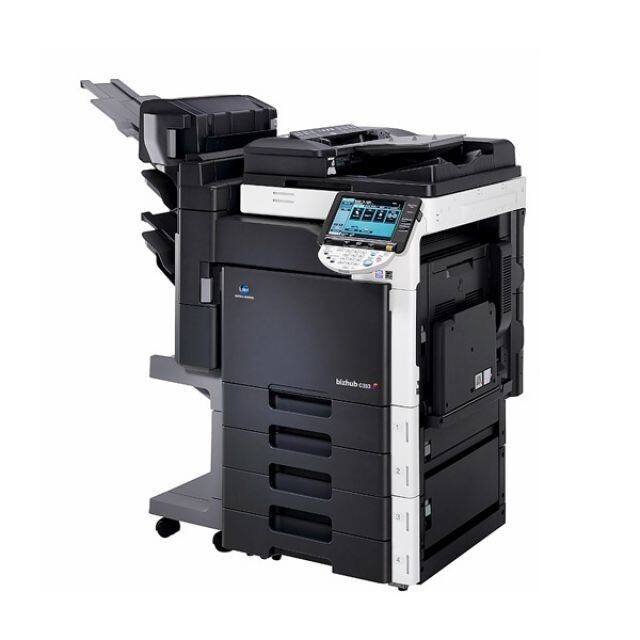
The BizHub C353 runs on the TN-314 toner family, and saying so plainly matters, because the number sits close to TN-213 and the two families are not interchangeable. Every slot in this color MFP also answers to a factory A-code: the black TN-314K carries code A0D7131, cyan is the A0D7431 (TN-314C), magenta the A0D7331 (TN-314M) and yellow the A0D7231 (TN-314Y). Order by the TN name or by the A-code and you arrive at the same four cartridges.
This is a departmental color MFP in the classic sense: one machine producing the shared documents a whole team signs off on. Work like that punishes inconsistency more than it punishes cost — a proposal whose charts drift in color from one printing to the next looks careless. The C353 rewards owners who treat toner as part of that consistency: genuine-fit cartridges, replaced one slot at a time, with calibration allowed to do its work after each change.
Toner Cartridges for BizHub C353
| Cartridge | Color | Page Yield |
|---|---|---|
| TN-314 4 Color Set (A0D7131/A0D7431/A0D7331/A0D7231) | Black, Cyan, Magenta, Yellow | See product page |
| TN-314 Premium 4 Color Set (A0D7131/A0D7431/A0D7331/A0D7231) | Black, Cyan, Magenta, Yellow | See product page |
| TN-314K (A0D7131) | Black | See product page |
| TN-314C (A0D7431) | Cyan | See product page |
| TN-314M (A0D7331) | Magenta | See product page |
| TN-314Y (A0D7231) | Yellow | See product page |
Which cartridge should you buy?
Start from the slot, not the set. Day to day, the C353 wants single cartridges: the machine names the color that is low, and replacing just that one keeps three healthy cartridges earning their keep. The complete sets listed above earn their place at two moments — when a machine is first stocked, and when several colors genuinely run low together and a single order should reset the whole shelf. Between the two set options, the page lists a standard 4-color set and a premium-quality 4-color set at the same specification; choose the premium line if the machine's output goes straight to clients, and the standard set for internal volume. Black, as usual in document offices, cycles on its own faster schedule and is the one cartridge worth holding as a standing spare.
Chip, toner and everyday use
The C353 confirms each new cartridge through its chip, and output from a freshly fitted cartridge settles once the machine has calibrated — judge a swap by the second or third page, not the first. Store spares upright in their boxes, away from heat, and resist stocking deep: a cartridge bought for a warning that is still months away ties up cash without printing a page. When the low message appears it arrives with working time in hand, so ordering at the warning, fitting on arrival and keeping one black in reserve covers this model's entire routine. Compatible cartridges here carry a 1-year warranty and 1-year returns.
Frequently Asked Questions
Can I use a cartridge from an older BizHub C-series model in the C353?
No. The TN-314 family was engineered for the C353 and BizHub C353P generation and does not interchange with other TN families. Match the TN number printed for your exact model before ordering.
Should I replace all four TN-314 cartridges when the C353 says one is low?
No — replace only the low one and leave the others to finish the toner they hold. The warning is deliberately early, so the single replacement can be ordered and fitted without any rush.
Why do solid blacks from the C353 print with a bluish tint?
A blue cast in black areas points to the color balance being off, often a cyan-heavy mix compensating for a weakening black cartridge. Run calibration first; if the tint persists, the black cartridge itself is the next suspect.
More printers that use the same cartridges
The TN-314 family also serves the printer-only BizHub C353P.