






 See Compatible Printers
 Read more about our ink!
Dell
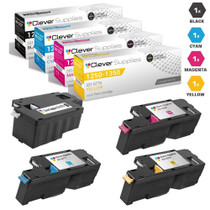
Compatible Dell 5120cdn Toner Cartridge High Yield 4 Color Set
- Page Yield:
- Black 18,000, Color 12,000 each
- Availability:
- In Stock
- Shipping:
- Free Shipping

Amazon Price:

- Page Yield:
- Black 18,000, Color 12,000 each
- Availability:
- In Stock
- Shipping:
- Free Shipping
- Compatible Printers
- Specifications
- SKU:
- Dell-5120cdn-4Set
- Printer Brand:
- Dell
- OEM Number:
- 330-5846, 330-5850, 330-5843, 330-5852
- Ink Color:
- Black, Cyan, Magenta, Yellow
- Page Yield:
- Black 18,000, Color 12,000 each
- Printer Type:
- Laser Cartridge Set
- Condition:
- New Compatible
- Description
- Yields up to Black 18000 Colors 12000 Each
- Compatible Dell 5120cdn Toner Cartridge High Yield 4 Color Set consistently produces high-resolution printouts with enhanced graphics and sharp text
- Unlike bargain brand toners Dell 5120cdn Toner Compatible Cartridge High Yield 4 Color Set is specifically engineered to work in Dell printers for optimum quality and performance
- Compatible with: Dell 5120 5130 5130cdn 5140 5140cdn laser printers
- Replaces the Following Manufacturer Numbers: 330-5846 N848N P942P CT201348 330-5851 330-5848 P614N G450R CT201349 330-5850 A3343942 330-5843 R272N P946P CT201350 330-5839 F916R T222N CT201351 330-5852
- Reviews

/> 

Compatible Dell 5120cdn Toner Cartridge High Yield 4 Color Set delivers consistent quality with high-resolution printouts sharper images and text
Dell 4 color set toner cartridge consistently produce high-resolution printouts with enhanced graphics and sharp text. High yield Cartridge is compatible with Dell 5120 5130 5130cdn 5140 5140cdn laser printers and yields up to Black 18000 Colors 12000 Each.
Features:
Frequently Asked Questions
Why do our colors look inconsistent even though no cartridge is empty?
Usually because the cartridges are different ages. A fresh cyan printing beside a magenta and yellow that are months older lays down color unevenly, and the drift shows up in logos, charts and skin tones long before any cartridge actually runs dry. It is the most common reason color output from a 5120cdn starts to look "off" while every level still reads acceptable.
How does a matched set help with that?
Start the 330-5846 black, 330-5850 cyan, 330-5843 magenta and 330-5852 yellow on the same day and they wear together, so the balance the machine was calibrated around holds for most of the set's life. One planned swap also replaces four separate interruptions — worth having on a printer a whole team depends on.
Which code is which color in the 5120cdn?
330-5846 is the black, rated at 18,000 pages. 330-5850 is cyan, 330-5843 is magenta and 330-5852 is yellow, each rated at 12,000 pages. Ratings assume the standard 5% coverage, so a graphics-heavy workload will land lower than the headline figures.
How much sooner will the colors need attention than the black?
Noticeably. At 12,000 pages against the black's 18,000, the colors exhaust their rating in about two-thirds of the black's span. When the 330-5850, 330-5843 and 330-5852 are done, expect roughly 6,000 rated pages still sitting in the 330-5846 — plan the reorder around the colors and let the black follow its own clock.
What does the set cost per cartridge?
$140.48 across four cartridges averages $35.12 each. On that even split, black pages cost about 0.20 cents each in toner and color pages about 0.29 cents — the set price, not any single cartridge, is the number to compare when you are costing the 5120cdn's output.
What cover comes with these cartridges?
They are compatible cartridges, backed by a 1-year warranty and 1-year free returns as set out on our shipping and returns page. Help is available Monday to Friday, 9 AM to 5 PM CST.
Where should a spare set for a shared 5120cdn live?
In one labeled spot near the machine, with the box marked for the 5120cdn and the four codes — 330-5846, 330-5850, 330-5843, 330-5852 — visible on the outside. On a shared printer, the person who discovers an empty cartridge is rarely the person who ordered the stock. A set that anyone can find, identify and fit without hunting through a general supplies shelf is what turns a toner-outage into a two-minute interruption.
Who on a team should do the swap when a color runs out?
Whoever is there — if the routine is written down. A short note kept with the spare set, covering which code goes in which position and the test page to print afterward, means the change does not wait for one particular colleague. Because each cartridge in this machine is replaced independently, a single-color swap is a small job; the written routine is what keeps it small for everyone.
Our 5120cdn duplexes most of its work — how should we read the ratings?
As sides, not sheets. The 330-5846's 18,000 pages and the colors' 12,000 pages count every printed side, so a heavily duplexed workload consumes the ratings at roughly two pages per sheet of paper. When you reconcile toner use against paper purchases, that two-to-one relationship explains why the cartridges seem to finish 'early' against a sheet count while having delivered exactly their rated output.
Is it worth keeping a test page from when the set was fitted?
Yes. File one good page with solid color blocks from the day the 330-5850, 330-5843 and 330-5852 went in, dated and kept with the printer's records. Months later, when output starts to look questionable, that baseline page settles arguments: lay a fresh test page beside it and you can see which color has drifted and by how much, instead of guessing from memory how the machine used to print.
About This Dell 5120cdn Toner Set
The matched four-cartridge set for the Dell Color Laser 5120cdn: 330-5846 black rated at 18,000 pages with 330-5850 cyan, 330-5843 magenta and 330-5852 yellow at 12,000 pages each, $140.48 the set. It leaves from our warehouses in Illinois, Pennsylvania, Georgia or California and is covered by a 1-year warranty with 1-year free returns. The rest of the compatible range is on our Dell toner page.
Related Items

Dell
Compatible Dell 5120CDN Premium Quality Toner Cartridge High Yield 4 Color Set
/>

Dell
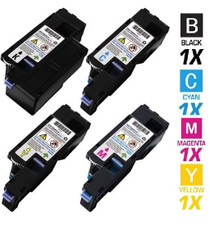
Compatible Dell C1760 High Yield Toner Cartridges 4 Color Set
/>
Dell
Compatible Dell 1755NF Toner Cartridges High Yield 4 Color Set
/>

Dell
Compatible Dell 1250 High Yield Toner Cartridges 4 Color Set
/>